anyviz/cloudadapter
Cloud Adapter for connecting OPC-UA, Modbus, Siemens, Beckhoff, EtherNet/IP, BACnet and M-Bus items
50K+
anyviz/cloudadapter repository overview
What is AnyViz
The AnyViz cloud solution allows you to remotely monitor, control and analyse industrial PLCs, sensors and meters.
What are the features of anyviz/cloudadapter
The cloud adapter is able to connect local devices via OPC-UA, Modbus, Siemens, Beckhoff ADS, EtherNet/IP, M-Bus and BACnet. The data is collected locally and transmitted to the AnyViz portal via an encrypted connection. If the internet connection is interrupted, the data is buffered locally. In addition, the Cloud Adapter can pass through local websites and VNC servers so that they can be embedded in the Cloud HMI.
Running AnyViz cloud adapter
docker run -d -p 80:8888 -p 9999:9999 anyviz/cloudadapter
Open your browser (port 80) and start configuring via web interface.
Running AnyViz cloud adapter including full AnyViz VPN support
docker run -d --net=host --cap-add=NET_ADMIN --device /dev/net/tun:/dev/net/tun anyviz/cloudadapter
The AnyViz Cloud Adapter requires some privileges to enable VPN connections.
Running AnyViz cloud adapter via docker-compose
Create a directory (e.g. ./anyvizcloudadapter) and create a file named docker-compose.yml with following content.
version: "2"
services:
  cloudadapter:
    image: anyviz/cloudadapter
    restart: always
    container_name: anyviz
    ports:
      - "8888:8888"
      - "9999:9999"
    volumes:
      - anyviz_config:/etc/anyviz
    # required if AnyViz VPN is needed
    network_mode: "host"
    cap_add:
      - NET_ADMIN
    devices:
      - /dev/net/tun
volumes:
  anyviz_config:
Start AnyViz cloud adapter by typing docker-compose up -d.
Web UI is listening on port 8888 in this case
Complete setup
- Join the AnViz portal or create a new project
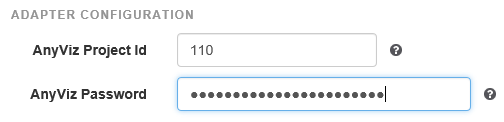
- Enter the project ID given by AnyViz portal and enter a unique password for your cloud adapter
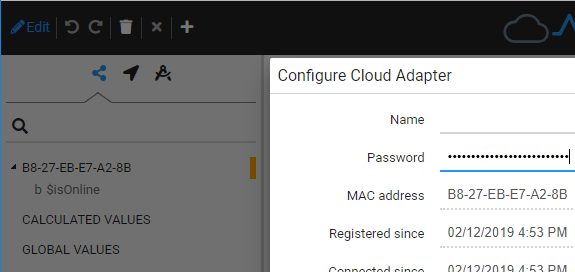
- The cloud adapter should now appear in the AnyViz portal. In the configuration dialog of the Cloud Adapter the password from step 2 has to be confirmed.
Additional links and documentation
Tag summary
Content type
Image
Digest
sha256:396609ba8…
Size
5.4 MB
Last updated
about 1 month ago
docker pull anyviz/cloudadapter