dekobon/visual-consul
UI that shows Consul services being added and removed real-time.
654
dekobon/visual-consul repository overview
Consul Visualizer
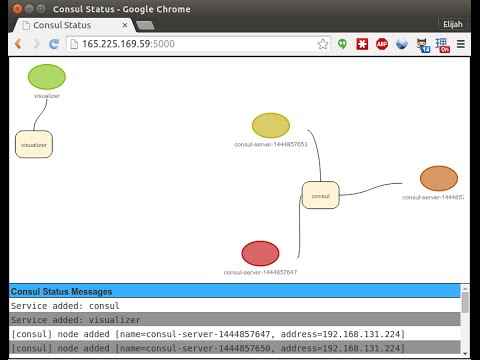
This project is a Node.js application that connects to a running Consul instance and provides a running log and visualization of the services and nodes that have been added to Consul.
Demo
Setting up Consul
If you want to get a Consul instance up and running quickly, you can use this Docker image or you can use this setup script for Joyent.
Docker
To get started quickly, you can run this application in Docker (omit the DNS values unless you have setup Consul to act as DNS) as follows:
# Replace 192.168.131.224, 192.168.131.225 and 192.168.131.224 with the addresses
# of the three Consul servers that make up your cluster.
docker run --dns="192.168.131.224" --dns="192.168.131.225" --dns="192.168.131.226" \
           -p 5000:5000 \
           -e CONSUL_SERVERS="192.168.131.224:8500 192.168.131.225:8500 192.168.131.226:8500" \
           -e SERVICE_NAME="visualizer" \
           -e APP_PORT=5000 \
           -d --name visualizer dekobon/visual-consul
Then just visit the newly instantiated Docker instance on port 5000.
Developing
To get started, you will need to:
npm install -g gulp bower
Then go to the ui/ directory and do a:
npm install .
and a:
bower install .
Then to run the node server and browser-sync together, issue the command
(replacing the CONSUL_SERVERS value with a list the ips of all of the
Consul servers delineated with spaces):
CONSUL_SERVERS="x.x.x.x y.y.y.y" gulp browser-sync
Tag summary
Content type
Image
Digest
sha256:1c3c5fa71…
Size
46.1 MB
Last updated
almost 11 years ago
docker pull dekobon/visual-consul