dzhuang/latex2image
Dockerized Service converting LaTex code to image
1.4K
dzhuang/latex2image repository overview
LaTeX2image


Dockerized Service converting LaTex code to image
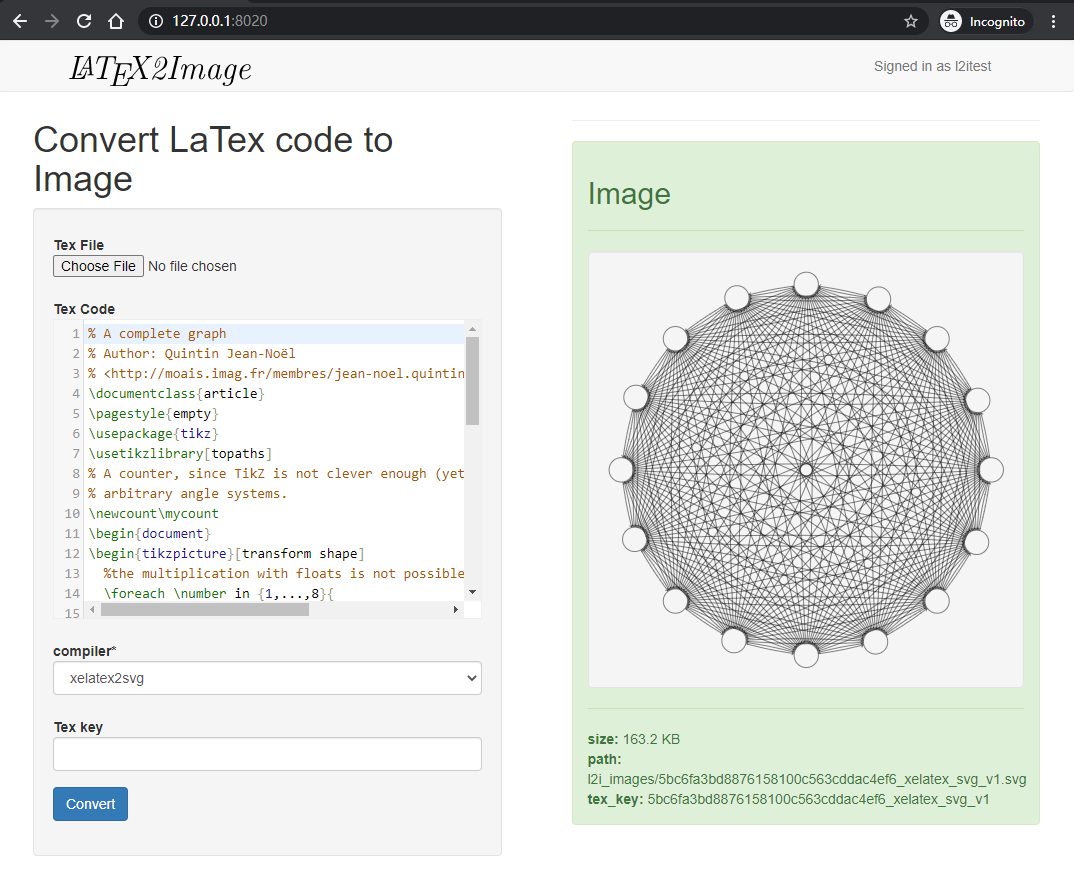
Often, when we want to convert a LaTex scripts to images, it is hard to configure the LaTex compile engine, along with other dependencies like ImageMagick. This project provide a Dockerized service with a minimal disk space usage (1 GB).
Install
docker pull dzhuang/latex2image:latest

git clone https://github.com/dzhuang/latex2image.git
cd latex2image

cp docker-compose-example.yml docker-compose.yml
vi docker-compose.yml # Change your configurations

docker-compose up -d
Usage
Setup a MongoDB in you computer with default port (27017) opened. In your browser, navigate to http://127.0.0.1:8020/, and login with the superuser name you configured in the
docker-compose.yml (see below).
Notice:
tex_keys are auto generated if not provided whencreate. It can be thought of as the query key, when thetex_keyexists in the database, it will return the saved item (as well as compile error raised) instead of doing the convert.- No LaTex source code will be saved in the database.
- Make sure your tex code will compile to only one pdf page, or it will raise errors.
Configurations
The following short-handed settings items can be configured in your docker-compose.yml file.
| Django Settings/Environment Variable | Detail |
|---|---|
| L2I_SECRET_KEY | The SECRET_KEY of your server. You need to configure this to keep you data safe. |
| L2I_ALLOWED_HOST_* | A host which is to be appended to settings.ALLOWED_HOSTS |
| L2I_MONGODB_HOST | The host name of the mongodb used |
| L2I_MONGODB_USERNAME | The username of mongodb used |
| L2I_MONGODB_PASSWORD | The passwd of mongodb used |
| L2I_CORS_ORIGIN_WHITELIST_* | The allowed hosts which will not be checked by CSRF requests especially for API requests. (Notice, need to add http:\\ or https:\\ as prefix.) |
| L2I_LANGUAGE_CODE | Language code used for web server. |
| L2I_TZ | Timezone used. |
| L2I_DEBUG | For settings.DEBUG. Allowed values [off, on], default to off. |
| L2I_API_IMAGE_RETURNS_RELATIVE_PATH | By default, when the return result of API request, the image field will return the relative path of the image file in the storage. If you want it to return the absolute url of the image, set it to False, which also need a proper configuration of the MEDIA_URL in your local_settings. |
| L2I_CACHE_MAX_BYTES | The maximum size above which the attribute won't be cached. |
| L2I_KEY_VERSION | A string appended to the auto generated tex_key, which is used as the identifier of the Tex source code. Default to 1. |
| DJANGO_SUPERUSER_USERNAME | Superuser name created for the first run. String, no quote. |
| DJANGO_SUPERUSER_PASSWORD | Superuser password created for the first run. String, no quote. |
Advanced Configurations
You can map the folder latex2image/local_settings to your local machine in the volumes block, and write a file named local_settings.py in it
to override all setting items (including those set in the docker-compose.yml file). Another assumption which makes you need to use the local_settings.py
configurations is, the docker service assume there is a running MongoDB service with 27017 port opened. You can override that by using SQLite3 backends,
but make sure you have correct volume map of that sqlite3 file, or you data will get lost when the container stops.
APIs available
The APIs are realized by Django REST framework. The Token authorization were used to authorize requests, when token available for each user
in their \profile page. When requesting via APIs, you need to add a header Authorization with value Token <your/given/token>.
| URL | Allowed method |
|---|---|
| api/create | POST |
| api/detail/<tex_key> | GET/PUT/PATCH/DELETE |
| api/list | GET/POST |
-
POSTdata:tex_source: string, required.image_format: string, required. Allowed format includepngandsvg, whenpngwill return a png image with resolution 96.compiler: string, required. Allowed compiler includelatex,pdflatex,xelatexandlualatex. Notice that whencompilerislatexwhile the source code containstikzpictures, it will returnsvgimages disregarding theimage_formatparam.tex_key: Optional, a unique identifier, if not provide, it will be generated automatically. Notice that, the image generated will use that key as the base_name.fields: Optional, a string with fields name concatenated by,. See below.
-
For
POSTrequests, with afields(e.g., {fields:image,creator}) in the post data, you'll get a result which don't display all the fields. When only on field is specified, the result will be cached. -
For
GETrequests, result fields filtering is achieved by adding a querystring (?fields=image,creator).
Cache
By default, when requesting a single field, via ?fields=<field_name> in GET or a field name in post data via {"fields": field_name}, the result will be cached.
For example, if you have a record with:
    {tex_key: "abcd_xelatex_svg_v1",
     image: "l2i_images/abcd_xelatex_svg_v1.svg",
     creator: 1,
     creation_time: 2020-06-25:16:56,
     compile_error: None
     }
When GET that result with api/detail/abcd_xelatex_svg_v1?fields="image", the result will be cached, i.e., querying using a single field, the result will be cached, else the results are returned from db queries.
Noticing that, if the compile_error is not null, it will be returned in the data, with response code 400.
For POST request, if you want a field to be cached and returned, you need to add fields in the post data (it is also the same for PUT).
Extra packages
If you need to install more Python packages, you can map the folder latex2image/local_settings to a local folder, and
put a requirements.txt in it.
Contribute to the project
Contributions to the project are welcome.
git clone https://github.com/dzhuang/latex2image.git
cd latex2image
# Create virtualenv
python -m virtualenv .env
source .env/bin/activate

cd latex2image
pip install -r requirements.txt

# Do your development...

# Install test dependancies
pip install factory_boy
pip install coverage
coverage run manage.py test tests && coverage html
Customized build
If you want to add other fonts to the image, you need to provide a downloadable url of a tar.gz file, and set it in Travis-CI options with name MY_EXTRA_FONTS_GZ.
ALERT
To include fonts in your own builds, You must respect the intellectual property rights (LICENSE) of those fonts, and take the correspond legal responsibility.
Tag summary
Content type
Image
Digest
sha256:5e60f8c53…
Size
372.6 MB
Last updated
about 4 years ago
docker pull dzhuang/latex2image