enmotech/netshoot
a Docker Networking Trouble-shooting Swiss-Army Container
8.7K
enmotech/netshoot repository overview
netshoot: a Docker + Kubernetes network trouble-shooting swiss-army container
                    dP            dP                           dP
                    88            88                           88
88d888b. .d8888b. d8888P .d8888b. 88d888b. .d8888b. .d8888b. d8888P
88'  `88 88ooood8   88   Y8ooooo. 88'  `88 88'  `88 88'  `88   88
88    88 88.  ...   88         88 88    88 88.  .88 88.  .88   88
dP    dP `88888P'   dP   `88888P' dP    dP `88888P' `88888P'   dP
fork自nicolaka/netshoot,我们增加了for ARM64的容器镜像。
Purpose: Docker and Kubernetes network troubleshooting can become complex. With proper understanding of how Docker and Kubernetes networking works and the right set of tools, you can troubleshoot and resolve these networking issues. The netshoot container has a set of powerful networking tshooting tools that can be used to troubleshoot Docker networking issues. Along with these tools come a set of use-cases that show how this container can be used in real-world scenarios.
Network Namespaces: Before starting to use this tool, it's important to go over one key topic: Network Namespaces. Network namespaces provide isolation of the system resources associated with networking. Docker uses network and other type of namespaces (pid,mount,user..etc) to create an isolated environment for each container. Everything from interfaces, routes, and IPs is completely isolated within the network namespace of the container.
Kubernetes also uses network namespaces. Kubelets creates a network namespace per pod where all containers in that pod share that same network namespace (eths,IP, tcp sockets...etc). This is a key difference between Docker containers and Kubernetes pods.
Cool thing about namespaces is that you can switch between them. You can enter a different container's network namespace, perform some troubleshooting on its network's stack with tools that aren't even installed on that container. Additionally, netshoot can be used to troubleshoot the host itself by using the host's network namespace. This allows you to perform any troubleshooting without installing any new packages directly on the host or your application's package.
Network Problems
Many network issues could result in application performance degradation. Some of those issues could be related to the underlying networking infrastructure(underlay). Others could be related to misconfiguration at the host or Docker level. Let's take a look at common networking issues:
- latency
- routing
- DNS resolution
- firewall
- incomplete ARPs
To troubleshoot these issues, netshoot includes a set of powerful tools as recommended by this diagram.
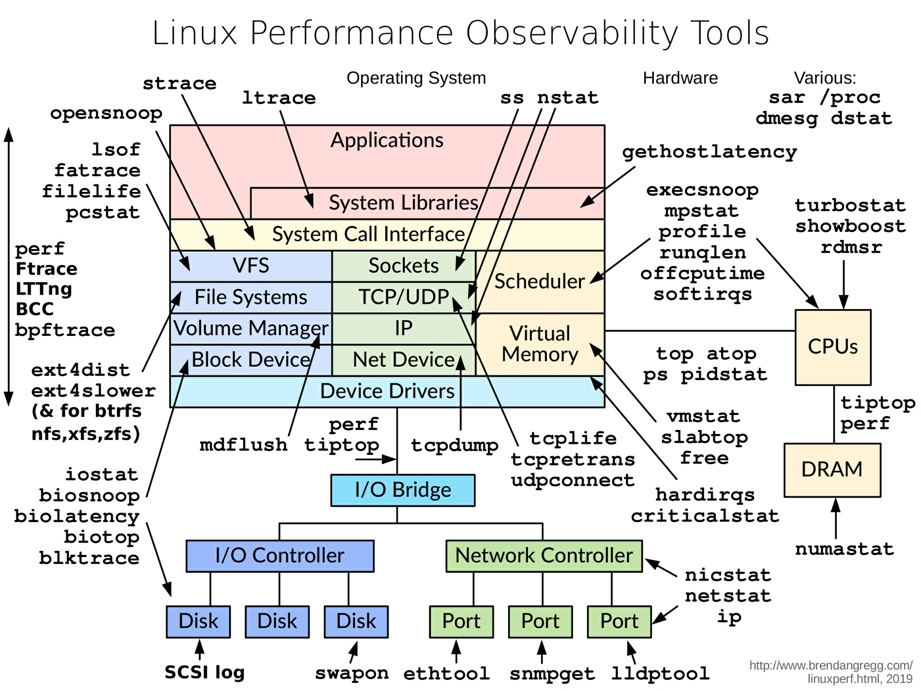
Included Packages: The following packages are included in netshoot. We'll go over some with some sample use-cases.
apache2-utils
bash
bind-tools
bird
bridge-utils
busybox-extras
calicoctl
conntrack-tools
ctop
curl
dhcping
drill
ethtool
file
fping
httpie
iftop
iperf
iproute2
ipset
iptables
iptraf-ng
iputils
ipvsadm
jq
libc6-compat
liboping
mtr
net-snmp-tools
netcat-openbsd
netgen
nftables
ngrep
nmap
nmap-nping
openssl
py-crypto
py2-virtualenv
python2
scapy
socat
strace
tcpdump
tcptraceroute
termshark
tshark
util-linux
vim
详细使用方法参看:README
Tag summary
Content type
Image
Digest
Size
120.5 MB
Last updated
about 6 years ago
docker pull enmotech/netshoot