geertmeersman/ueberboese-web
Lightweight web controller designed to orchestrate Bose SoundTouch hardware networks.
979
geertmeersman/ueberboese-web repository overview
Überböse Web 🔈🎶
A lightweight, high-performance web controller designed to orchestrate Bose SoundTouch hardware networks. By communicating directly with local speaker endpoints, this service offers real-time telemetry streaming, advanced developer utilities, and direct preset injection.















⚠️ Prerequisite: This frontend web application requires ueberboese-api running as its backend management server.
The codebase and logic for this web interface are partly based on and inspired by the ecosystem structures found in ueberboese-api and the mobile client application ueberboese-app.
Key Features
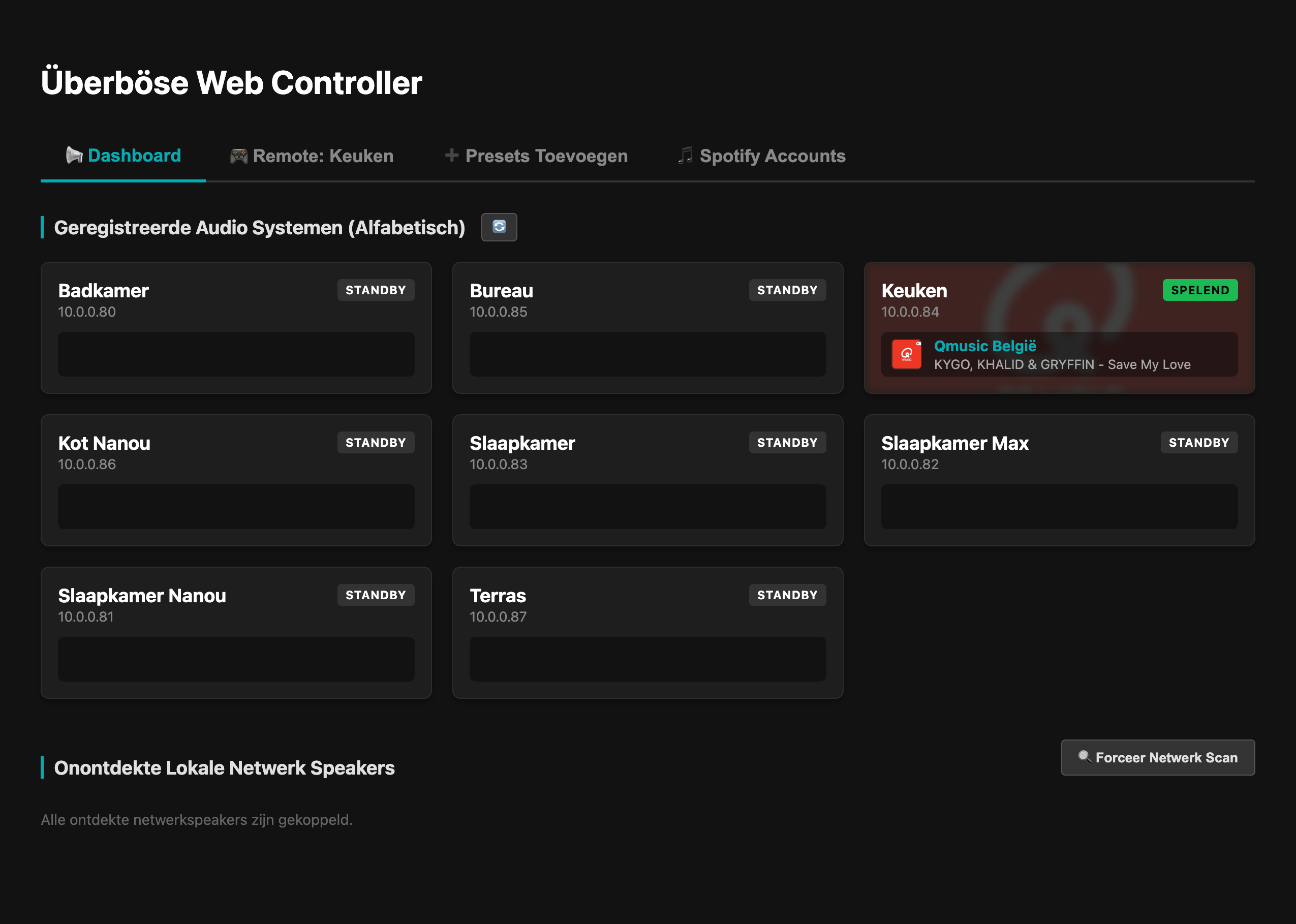
- 📺 Real-time Dashboard: Alphabetical overview of all audio nodes with reactive Server-Sent Events (SSE) telemetry.
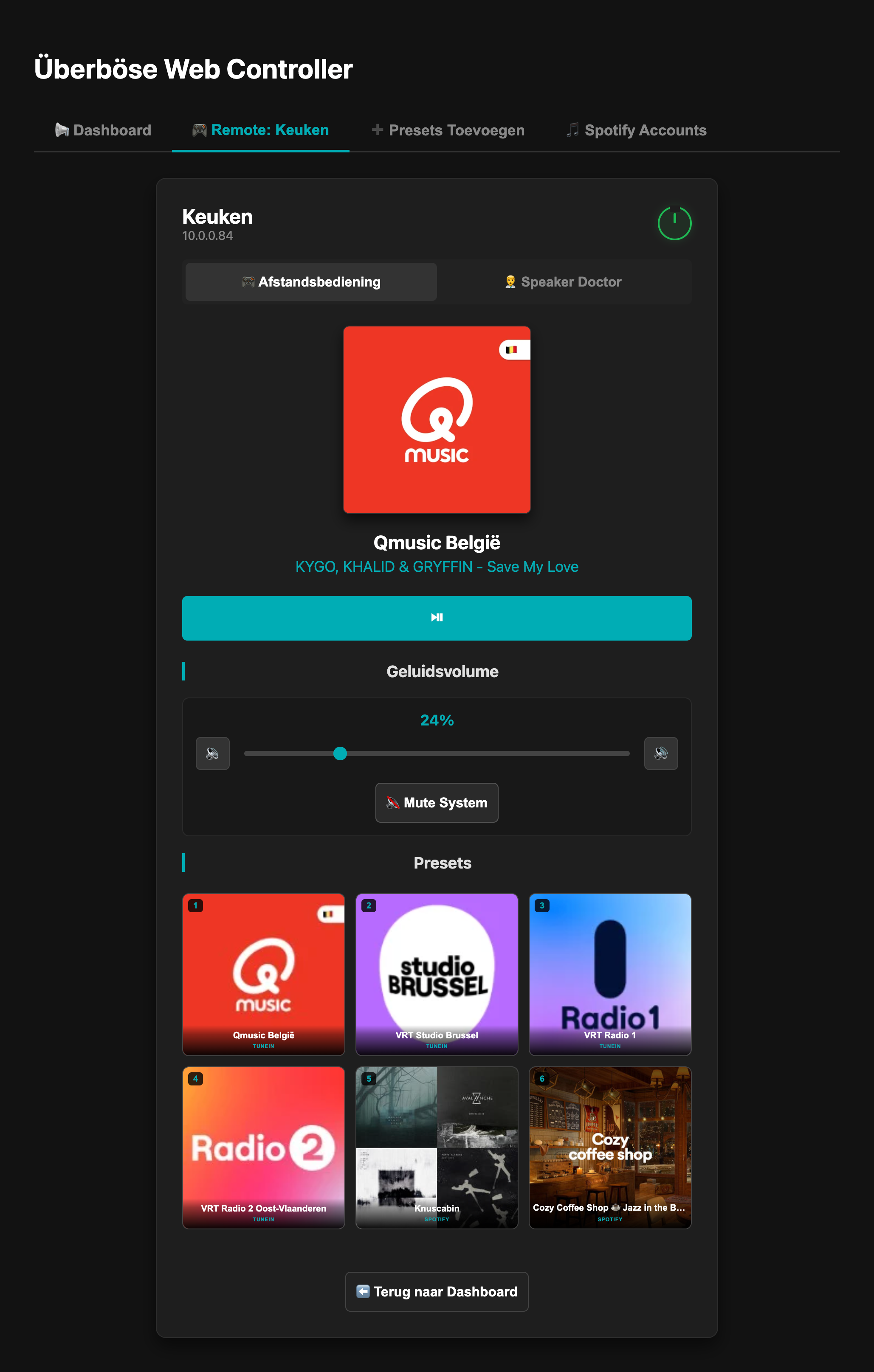
- ➕ Hardware Preset Injector: Live lookup engine to bind TuneIn stations and Spotify containers directly to physical button slots (1-6).
- 👨⚕️ Speaker Doctor: Low-level TCP socket bridge via port 17000 to read hardware configuration registers and trigger remote hard reboots.
- 🛡️ Browser & Mobile Optimized: Built with pure CSS components ensuring full UI rendering across mobile browsers.
- 🌐 Multi-Language Support: Fully localized in English (EN) and Dutch (NL) using Flask-Babel.
📸 Screenshots
Here is a glimpse of the web interface in action:
Network Overview Dashboard
Speaker Control & Diagnostics
🛠️ Environment Variables
The application utilizes environment variables for configuration. Create a .env file in the root directory based on the following keys:
# Example .env configuration
FLASK_SECRET_KEY=your_super_secret_session_key_here
SPOTIFY_CLIENT_ID=your_spotify_client_id_here
SPOTIFY_CLIENT_SECRET=your_spotify_client_secret_here
UEBERBOESE_API_URL=http://10.0.0.5:8000
UEBERBOESE_WEB_PORT=7082
| Variable | Default Value | Description |
|---|---|---|
FLASK_SECRET_KEY | Required | A unique, secure key used by Flask to sign session cookies (required to persist user language preferences). |
SPOTIFY_CLIENT_ID | Optional | The Client ID from your Spotify Developer Dashboard. |
SPOTIFY_CLIENT_SECRET | Optional | The Client Secret from your Spotify Developer Dashboard. |
UEBERBOESE_API_URL | http://10.0.0.5:8000 | The endpoint URL where your back-end Überböse API management engine is running. |
UEBERBOESE_WEB_PORT | 7082 | The custom networking port the Flask web server will bind to inside the container. |
🚀 Running the Application
Method A: With Docker Compose (Recommended)
The fastest way to deploy the controller is by using Docker Compose. Create a docker-compose.yml file in your directory and paste the configuration below. It pulls the official pre-built image directly from Docker Hub.
services:
  ueberboese-web:
    image: geertmeersman/ueberboese-web:latest
    container_name: ueberboese-web
    network_mode: host
    restart: unless-stopped
    environment:
      - TZ=${TZ}
      - FLASK_SECRET_KEY=${FLASK_SECRET_KEY}
      - SPOTIFY_CLIENT_ID=${SPOTIFY_CLIENT_ID}
      - SPOTIFY_CLIENT_SECRET=${SPOTIFY_CLIENT_SECRET}
      - UEBERBOESE_API_URL=${UEBERBOESE_API_URL}
      - UEBERBOESE_WEB_PORT=${UEBERBOESE_WEB_PORT}
Before running, make sure your .env file is present in the same directory, then launch the stack:
docker-compose up -d
Method B: Standalone Docker CLI
If you prefer running a single container without Compose, pull and execute the image using the following command:
docker run -d \
  --name ueberboese-web \
  --network host \
  --env-file .env \
  --restart unless-stopped \
  geertmeersman/ueberboese-web:latest
🛠️ Development & Building from Source
If you want to modify the source code or build the Docker image locally:
# Build the application image locally
docker build -t geertmeersman/ueberboese-web:latest .
Tag summary
Content type
Image
Digest
sha256:cad169f6b…
Size
50 MB
Last updated
4 months ago
docker pull geertmeersman/ueberboese-web