hteppl/gcore-dns-monitor
Lightweight Gcore DNS healthcheck monitor with Telegram alerts
1.4K
hteppl/gcore-dns-monitor repository overview

gcore-dns-monitor




A lightweight monitoring service that tracks Gcore DNS healthcheck metrics and sends Telegram notifications when IP address health status changes.
Features
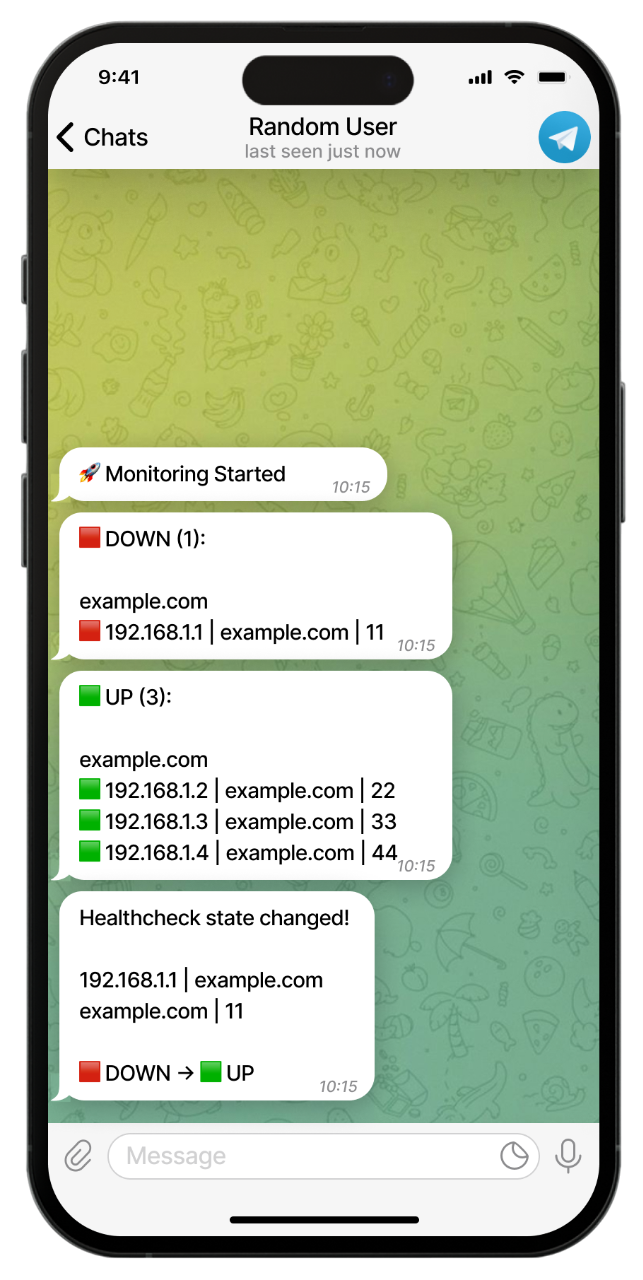
- Real-time Monitoring - Continuously monitors Gcore DNS healthcheck states (UP/DOWN)
- Instant Notifications - Sends Telegram alerts when node status changes
- Periodic Reminders - Configurable reminders for DOWN healthchecks
- Domain Filtering - Monitor specific domains or all domains at once
- Lightweight - Single Python file with minimal dependencies
- Docker Ready - Easy deployment with Docker and Docker Compose
Prerequisites
Before you begin, ensure you have the following:
- Gcore Account with DNS zones configured and healthchecks enabled
- Gcore API Token - Generate from Gcore Portal under API Tokens
- Telegram Bot - Create via @BotFather and get the bot token
- Telegram Chat ID - Get your chat ID via @username_to_id_bot
Configuration
Copy .env.example to .env and fill in your values:
# Gcore API token (format: <account_id>$<token>)
API_TOKEN=

# Telegram bot token
TG_BOT_TOKEN=

# Telegram chat ID for notifications
TG_CHAT_ID=

# Telegram topic ID (optional, for forum groups)
TG_TOPIC_ID=

# Polling interval in seconds (default: 30)
CHECK_INTERVAL=30

# Reminder interval in minutes (default: 30, -1 to disable)
REMINDER_INTERVAL=30

# Filter by domain (optional, leave empty to monitor all domains)
FILTER_DOMAIN=
Configuration Reference
| Variable | Description | Default | Required |
|---|---|---|---|
API_TOKEN | Gcore API token in format account_id$token | - | Yes |
TG_BOT_TOKEN | Telegram bot token from BotFather | - | Yes |
TG_CHAT_ID | Telegram chat ID for notifications | - | Yes |
TG_TOPIC_ID | Telegram topic ID for forum groups | - | No |
CHECK_INTERVAL | Polling interval in seconds | 30 | No |
REMINDER_INTERVAL | DOWN reminder interval in minutes (-1 to disable) | 30 | No |
FILTER_DOMAIN | Filter by domain (empty = all domains) | - | No |
Installation
Docker (recommended)
- Create the docker-compose.yml:
services:
  gcore-monitor:
    image: hteppl/gcore-dns-monitor:latest
    container_name: gcore-dns-monitor
    restart: unless-stopped
    env_file:
      - .env
    logging:
      driver: json-file
      options:
        max-size: "10m"
        max-file: "3"
- Create and configure your environment file:
nano .env # or use your preferred editor
- Start the container:
docker compose up -d && docker compose logs -f
Manual Installation
- Clone the repository:
git clone https://github.com/hteppl/gcore-dns-monitor.git
cd gcore-dns-monitor
- Create a virtual environment (recommended):
python -m venv .venv
source .venv/bin/activate  # Linux/macOS
# or
.venv\Scripts\activate     # Windows
- Install dependencies:
pip install -r requirements.txt
- Create and configure your environment file:
cp .env.example .env
- Run the application:
python main.py
How It Works
-
Initial State - On startup, the service fetches all healthcheck metrics from Gcore DNS API and sends an initial status report to Telegram
-
Continuous Monitoring - The service polls the Gcore API at the configured interval (
CHECK_INTERVAL) -
Change Detection - When a healthcheck state changes (UP to DOWN or vice versa), an immediate notification is sent
-
Reminders - If configured, periodic reminders are sent for all DOWN healthchecks at the specified interval (
REMINDER_INTERVAL)
Logs
Monitor logs to diagnose issues:
# Docker
docker compose logs -f

# Manual
# Logs are output to stdout with timestamps
License
This project is licensed under the GNU General Public License v3.0.
Tag summary
Content type
Image
Digest
sha256:550ebeda6…
Size
54.9 MB
Last updated
10 months ago
docker pull hteppl/gcore-dns-monitor