iblocker/encryptor
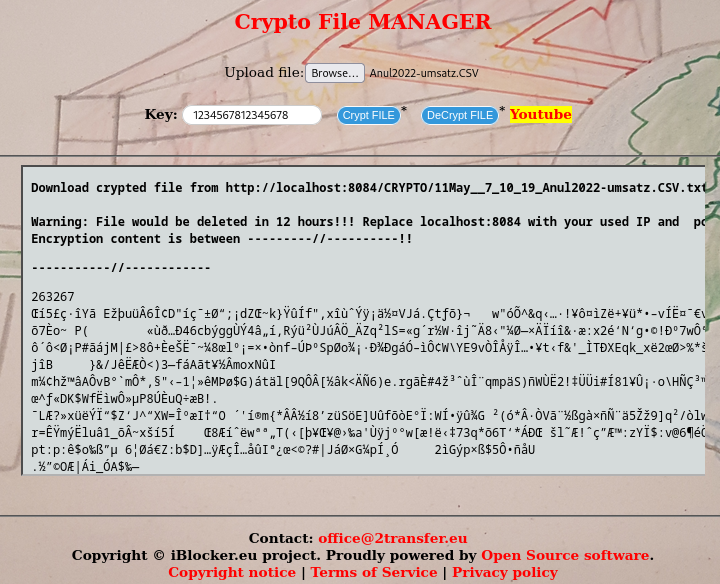
Files encryptor (128-bit symmetric block cipher)
3.3K
iblocker/encryptor repository overview
Files encryptor (128-bit symmetric block cipher)
File is encrypted and a download link is generated. Encrypted file or the link could be send via email or messenger, and the receiver could decrypt the file.
Docker Installation
Add below lines in docker-compose.yml
  encrypt:
    image: iblocker/encryptor:v2.0.5
    ports:
    - "8084:443"
    container_name: encrypt
    restart: always
    uts: host
    logging:
      options:
        max-size: "100m"
Open in browser https://localhost:8084
Encryption used - Twofish
Twofish is a 128-bit symmetric block cipher- with a variable length (128, 192, or 256-bit) key, developed by Counterpane Labs. It is un-patented and free for all users, as described at URL:http://www.counterpane.com/twofish.html.
This module implements Twofish encryption. It supports the Crypt::CBC interface. It also provides an interface that is call-compatible with Crypt::Twofish 1.0, but its use in new code is strongly discouraged.
Note: v2.0.5 is for arm architecture
K8 Installation
kubectl run  encryptor --image iblocker/encryptor:v1.0.5

 kubectl get pods
 kubectl get pod encryptor -o wide
 kubectl describe pod encryptor


  kubectl expose pod encryptor \
  --name=encryptor-service \
  --type=NodePort \
  --port=8084 \
  --target-port=443

  kubectl port-forward svc/encryptor-service 8084:8084
Tag summary
Content type
Image
Digest
sha256:bf68ed066…
Size
114.5 MB
Last updated
7 days ago
docker pull iblocker/encryptor:v1.0.5