jasonacox/pypowerwall
Authentication Proxy Server for Tesla Energy Powerwall
100K+
jasonacox/pypowerwall repository overview
pyPowerwall Proxy Server
This pyPowerwall Caching Proxy handles authentication to the Powerwall Gateway and will proxy API calls to /api/meters/aggregates (power metrics), /api/system_status/soe (battery level), and many others (see HELP for full list). With the instructions below, you can containerize this proxy and run it as an endpoint for tools like telegraf to pull metrics without needing to authenticate.
Because pyPowerwall is designed to cache the auth and high frequency API calls, while also utilising HTTP persistent connections, this will reduce the load on the Gateway and prevent crash/restart issues that can happen if too many session are created on the Gateway.
Docker: docker pull jasonacox/pypowerwall
Quick Start
-
Run the Docker Container to listen on port 8675. Update the
-evalues for your Powerwall.docker run \ -d \ -p 8675:8675 \ -e PW_PORT='8675' \ -e PW_PASSWORD='password' \ -e PW_EMAIL='[email protected]' \ -e PW_HOST='IP_of_Powerwall_Gateway' \ -e PW_TIMEZONE='America/Los_Angeles' \ -e PW_CACHE_EXPIRE='5' \ -e PW_DEBUG='no' \ -e PW_HTTPS='no' \ --name pypowerwall \ --restart unless-stopped \ jasonacox/pypowerwall -
Test the Proxy
# Get Powerwall Data
curl -i http://localhost:8675/soe
curl -i http://localhost:8675/aggregates
curl -i http://localhost:8675/vitals
curl -i http://localhost:8675/strings

# Get Proxy Stats
curl -i http://localhost:8675/stats

# Clear Proxy Stats
curl -i http://localhost:8675/stats/clear
Example Usage
- Powerwall Dashboard - https://github.com/jasonacox/Powerwall-Dashboard
- Powerwall Solar Display - https://github.com/jasonacox/Powerwall-Display
Power Flow Animation - Passthrough
The Proxy will pass authenticated calls through to the Powerwall Web Interface allowing the display of the Power Flow Animation:
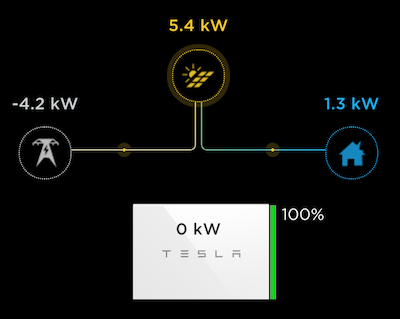
This is available by directly accessing the proxy endpoint, https://localhost:8675 (replace localhost with the address of host running pyPowerwall Proxy). You can embed this animation within an iFrame. See web/example.html.
HTTPS Support (Experimental)
The Proxy now supports https protocol using the optional environmental variable PW_HTTPS. This is useful for placing data in secured iFrame, including the power flow animation available via the Powerwall portal (https://localhost:8675/).
There are three settings for PW_HTTPS:
- PW_HTTPS='no' - This is default - run in HTTP mode only.
- PW_HTTPS='http' - Run in HTTP mode but simulate HTTPS when behind https proxy.
- PW_HTTPS='yes' - Run in HTTPS mode using self-signed certificate.
Troubleshooting Help
Turn on debug mode in docker run:
-e PW_DEBUG='yes'
Check the logs:
# See the logs
docker logs pypowerwall
If you see python errors, make sure you entered your credentials correctly in docker run.
Content does not render in iFrame or prompts you for a login:
- Browser may be set to never accept third party cookies. The web app requires cookies and in an iFrame it will look like a third party, see here).
- iFrame doesn't render. Make sure the browser is not running in incognito mode. Try other browsers.
Tag summary
Content type
Image
Digest
sha256:7d3e59dde…
Size
187 MB
Last updated
8 days ago
docker pull jasonacox/pypowerwall