jbzoo/ci-report-converter
Tool converts different error reports for integration with popular CI systems (TeamCity, Actions)
10K+
jbzoo/ci-report-converter repository overview
JBZoo / CI-Report-Converter











- Why?
- Installing
- Using as GitHub Action
- Available Directions
- Help description in terminal
- Examples
- Contributing
- License
- See Also
Why?
I believe you are familiar with the huge zoo of various utilities for testing, checking code standards, linters etc.
It's really often the output of utilities is not supported in popular CI systems (TeamCity, GitHub, etc...).
I guess you are lucky if the utility saves the error report in the junit.xml format, because it works pretty fine with almost all modern dev software.
But... My experience tells me it's the exception rather than the rule. For example, I really like the good old phpmd utility (perhaps you have another right opinion about the benefits. At least, it's just an example). It doesn't integrate well with TeamCity/PhpStorm/GitHub. Everytime I spend a lot of time looking for results in the logs. Though I really want to see instant and well-printed error report.
Therefore, I developed a converter that changes the report format for deep integration with CI systems and JetBrain IDEs.
Well... It may seem to you it's a useless thing, and your favorite super tool works fine in TeamCity/PhpStorm. Just take a look at the examples below.
Installing
composer require jbzoo/ci-report-converter
php ./vendor/bin/ci-report-converter --help

# OR use phar file
wget https://github.com/JBZoo/CI-Report-Converter/releases/latest/download/ci-report-converter.phar
chmod +x ./ci-report-converter.phar
./ci-report-converter.phar --help

# OR just pull the Docker Image
docker run --rm jbzoo/ci-report-converter --help
Using as GitHub Action
Action allows you to convert error reports to the GitHub Annotations format
- See demo of error output
- To learn more see different examples
- uses: jbzoo/ci-report-converter@master # or see the specific version on releases page
  with:
    # File path with the original report format. If not set or empty, then the STDIN is used.
    # Required: true
    input-file: ./build/checkstyle.xml

    # Source format. Available options: checkstyle, junit, phpmd-json, phpmnd, pmd-cpd, psalm-json
    # Default value: checkstyle
    # Required: true
    input-format: checkstyle

    # Will exit with the code=1, if any violations are found.
    # Default value: no
    non-zero-code: yes

    # File path with the result report format. If not set or empty, then the STDOUT is used.
    output-file: ./build/junit.xml

    # Target format. Available options: gitlab-json, github-cli, junit, tc-inspections, tc-tests
    # Default value: github-cli
    # Required: true
    output-format: junit

    # Set custom name of root group/suite (if it's possible).
    # Required: true
    suite-name: My Tests
Example GitHub Action workflow
name: Linters

on:
  pull_request:
    branches:
      - "*"

jobs:
  linters:
    name: PHPcs
    runs-on: ubuntu-latest
    steps:
      - name: Checkout Code
        uses: actions/checkout@v2

      - name: PHP Code Sniffer
        run: ./vendor/bin/phpcs --report=checkstyle --standard=PSR12 -q ./src > ./build/phpcs-checkstyle.xml

      - name: Converting checkstyle.xml to Github Annotations
        uses: jbzoo/ci-report-converter@master
        with:
          input-file: build/phpcs-checkstyle.xml
Available Directions
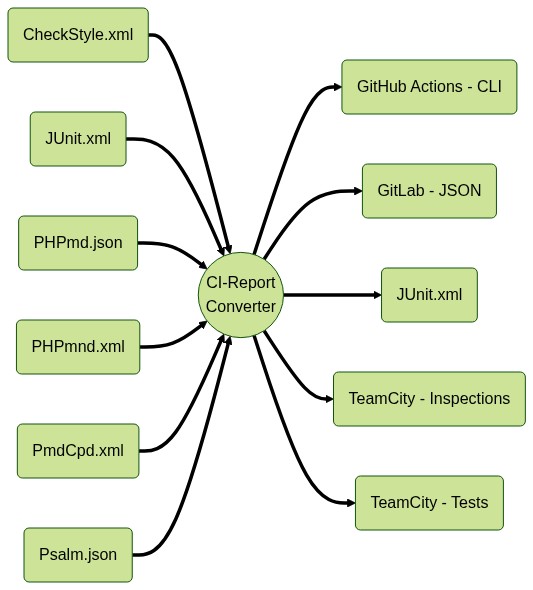
At the moment, converting of reports works with
- Input Formats:
- checkstyle - the most popular sort of error report. It works for Phan, PHPcs and others.
- junit - also it's really popular sort of error report. Usually, the format is used to display unit test results.
- phpmd-json - the most detailed report of PHPMD.
- phpmnd - I know only PHP Magic Numbers Detector.
- psalm-json - the most detailed report of Psalm.
- pmd-cpd - it's PMD-CPD XML format. An example of tool is Copy/Paste Detector.
- Output Formats:
- gitlab-json - GitLab Custom Report.
- junit - The most popular sort of reporting.
- tc-tests - Reporting Tests in TeamCity/PhpStorm/JetBrains.
- tc-inspections - Reporting Inspections in TeamCity.
Also, you can follow metrics around your code in TeamCity via teamcity:stats
- JUnit.xml => Example in TeamCity
- PHPUnitClover.xml => Example in TeamCity
- PHPDepend.xml => Example in TeamCity
- PHPloc.json => Example in TeamCity
- PHPMetrics.xml => Example in TeamCity
Help description in terminal
Converting
$ php ./vendor/bin/ci-report-converter convert --help
Description:
  Convert one report format to another one

Usage:
  convert [options]

Options:
  -S, --input-format=INPUT-FORMAT      Source format. Available options: checkstyle, junit, phpmd-json, phpmnd, pmd-cpd, psalm-json [default: "checkstyle"]
  -I, --input-file[=INPUT-FILE]        File path with the original report format. If not set or empty, then the STDIN is used.
  -T, --output-format=OUTPUT-FORMAT    Target format. Available options: gitlab-json, github-cli, junit, tc-inspections, tc-tests [default: "tc-tests"]
  -O, --output-file[=OUTPUT-FILE]      File path with the result report format. If not set or empty, then the STDOUT is used.
  -R, --root-path[=ROOT-PATH]          If option is set, all absolute file paths will be converted to relative once. [default: "."]
  -N, --suite-name=SUITE-NAME          Set custom name of root group/suite (if it's possible).
  -F, --tc-flow-id[=TC-FLOW-ID]        Custom flowId in TeamCity output. Default value is PID of the tool.
  -Q, --non-zero-code[=NON-ZERO-CODE]  Will exit with the code=1, if any violations are found. [default: "no"]
  -h, --help                           Display this help message
  -q, --quiet                          Do not output any message
  -V, --version                        Display this application version
      --ansi                           Force ANSI output
      --no-ansi                        Disable ANSI output
  -n, --no-interaction                 Do not ask any interactive question
  -v|vv|vvv, --verbose                 Increase the verbosity of messages: 1 for normal output, 2 for more verbose output and 3 for debug
Custom Metrics in TeamCity
To clarify the use of the method, take a look at the examples and screenshots below, please.
$ php ./vendor/bin/ci-report-converter teamcity:stats --help
Description:
  Push code metrics to TeamCity Stats

Usage:
  teamcity:stats [options]

Options:
  -S, --input-format=INPUT-FORMAT  Source format. Available options: junit-xml, pdepend-xml, phploc-json, phpmetrics-xml, phpunit-clover-xml
  -I, --input-file[=INPUT-FILE]    File path with the original report format. If not set or empty, then the STDIN is used.
  -O, --output-file[=OUTPUT-FILE]  File path with the result report format. If not set or empty, then the STDOUT is used.
  -R, --root-path[=ROOT-PATH]      If option is set, all absolute file paths will be converted to relative once. [default: "."]
  -F, --tc-flow-id[=TC-FLOW-ID]    Custom flowId in TeamCity output. Default value is PID of the tool.
  -h, --help                       Display this help message
  -q, --quiet                      Do not output any message
  -V, --version                    Display this application version
      --ansi                       Force ANSI output
      --no-ansi                    Disable ANSI output
  -n, --no-interaction             Do not ask any interactive question
  -v|vv|vvv, --verbose             Increase the verbosity of messages: 1 for normal output, 2 for more verbose output and 3 for debug
Examples
JetBrains IDE (IntelliJ IDEA, PhpStorm, WebStorm, etc)
One of the unique features of the tool is converting reports to a unit test format compatible with JetBrains IDE and TeamCity. The following examples show how to use JetBrains IDE UI to display any kind of style issues. Yeah, I know that the integration is not the cleanest, and it's not super beautiful. However, this code/screenshots demonstrate the usability of the approach.

NOTE: I believe that coding style issues have the same level of severity as any other sort of errors. Therefore, I prefer to use the same workflow to check the quality of the code as I do with regular PHPUnit tests. It's like "just one click!" Also, you will have the awesome bonus - navigating the project and gives the most detailed information about errors.
The general idea is pretty simple:
- We take almost any utility for testing.
- It saves report in the file or outputs error to StdOut as xml/json.
- CI-Report-Converter changes the report format. It saves result somewhere or just outputs it in StdOut.
- ???
- Profit.
In the next example we will see how to integrate JetBrains IDE UI with Code Sniffer deeply. I use PHPcs just as example. This is the most popular linter in PHP. However, the approach is independent of the programming language or unit testing framework.
<?php declare(strict_types=1);

use PHPUnit\Framework\Assert;
use PHPUnit\Framework\TestCase;

/**
 * Here's an example based on PHPUnit and PhpStorm, but you are not limited to PHP language.
 * This is just an example to show the idea.
 * So you can use any sort language to integrate style tests with JetBrains IDE.
 */
class CheckStyleExamplesTest extends TestCase
{
    /**
     * The short example which uses pipe as way to pass error report.
     */
    public function testPipelineWay(): void
    {
        echo shell_exec(                       # Execute command via shell and return the complete output as a string.
            'php ./vendor/bin/phpcs' .         # Path to bin of third-party tool (PHP Code Sniffer is just example).
            ' --report=checkstyle' .           # Output format of PHPcs. ci-report-converter expects it by default as `--input-format` option.
            ' --standard=PSR12 -q ./src' .     # The custom tool options. For phpcs `-q` is important!
            ' | ' .                            # The pipe operator, it passes the output of one command as input to another. See https://en.wikipedia.org/wiki/Pipeline_(Unix)
            ' ./ci-report-converter.phar'      # The converter does all the magic. Look at help description ( --help) to lean more about options and default values.
        );

        # Usually PHPUnit expects at least one assert in a test.
        # Otherwise, it may show useless warning messages. It depends on PHPUnit version and your configurations.
        # So, just in case, we make a fake assertion.
        Assert::assertTrue(true);
    }

    /**
     * The super detailed example which uses files as way to pass error report.
     */
    public function testXmlFileWay(): void
    {
        shell_exec(                                     # Execute command via shell and return the complete output as a string.
            'php ./vendor/bin/phpcs' .                  # Path to bin of third-party tool (PHP Code Sniffer is just example).
            ' --report=checkstyle' .                    # Output format of PHPcs. CI-Report-Converter expects it by default as `--input-format` option.
            ' --report-file=./build/phpcs-report.xml' . # Save result of phpcs work in XML file in "checkstyle" format.
            ' --standard=PSR12 -q ./src' .              # The custom tool options. For phpcs `-q` is important!
            ' || true > /dev/null'                      # We don't expect any output of phpcs and ignore error exit codes.
                                                        # Lol, we are very self-confident. Actually, we need only XML file, that's it.
        );

        // I've shown all the options explicitly just to add transparency.
        // In fact, this example does the same thing as the code above in `testPipelineWay()`.
        echo shell_exec(
            './ci-report-converter.phar' .              # The path to bin file of CI-Report-Converter. It depends of your installation way. See above.
            ' --input-format=checkstyle' .              # Source reporting format. Default value is "checkstyle".
            ' --input-file=./build/phpcs-report.xml' .  # Using prepared file on previous step as source.
            ' --output-format=tc-tests' .               # Target reporting format. Default value is "tc-tests".
            ' --suite-name=PHPcs' .                     # Define the name of group. See screenshot below.
            ' --root-path=`pwd`'                        # Specify the project path for pretty printing paths in UI. Default value is `.` (current dir).
        );

        # The same reason like in `testPipelineWay()`.
        Assert::assertTrue(true);
    }
}
What happens under the hood. Also, see source file as ready-to-use examples.
cd  ~/your/project/root/directory
php ./vendor/bin/phpunit ./tests/examples/CheckStyleExamples.php --teamcity

# or
php ./vendor/bin/phpcs --report=checkstyle --standard=PSR12 -q ./src | ./ci-report-converter.phar
Mess Detector (phpmd-json)
Screenshot

php ./vendor/bin/phpmd ./src json cleancode | ./ci-report-converter.phar -Sphpmd-json
Magic Number Detector (phpmnd)
Screenshot

php ./vendor/bin/phpmnd ./src --hint --quiet --xml-output=./build/phpmnd-report.xml
./ci-report-converter.phar --root-path=./src --input-file=./build/phpmnd-report.xml --input-format=phpmnd
Copy/Paste Detector (pmd-cpd)
Screenshot

php ./vendor/bin/phpcpd ./src --log-pmd=./build/phpcpd-report.xml
./ci-report-converter.phar --input-file=./build/phpcpd-report.xml --input-format=pmd-cpd
PHPStan (checkstyle)
Screenshot

php ./vendor/bin/phpstan analyse --error-format=checkstyle --no-progress ./src | ./ci-report-converter.phar
Psalm (psalm-json)
Screenshot

php ./vendor/bin/psalm --output-format=json | ./ci-report-converter.phar --input-format="psalm-json"
Phan (checkstyle)
Screenshot

php ./vendor/bin/phan.phar --directory=./src --output-mode=checkstyle | ./ci-report-converter.phar
TeamCity - Style Issue As Failed Unit test
Use the option --output-format=tc-tests to convert any style report to unit test format in TeamCity

TeamCity - Style Issue As Code Inspections
Use the option --output-format=tc-inspections to convert any style report to unit test format in TeamCity

TeamCity - Reported Statistic Values
PHPDepend.xml => Example in TeamCity
./vendor/bin/pdepend.phar --summary-xml="./build/pdepend-summary.xml" --quiet ./src
./ci-report-converter.phar teamcity:stats --input-format="pdepend-xml" --input-file="./build/pdepend-summary.xml"
PHPloc.json => Example in TeamCity
./vendor/bin/phploc ./src --log-json="./build/phploc.json" --quiet
./ci-report-converter.phar teamcity:stats --input-format="phploc-json" --input-file="./build/phploc.json"
PHPUnitClover.xml => Example in TeamCity
./vendor/bin/phpunit --coverage-clover ./build/phpunit-report.xml
./ci-report-converter.phar teamcity:stats --input-format="phpunit-clover-xml" --input-file="./build/phpunit-report.xml"
JUnit.xml => Example in TeamCity
./vendor/bin/phpunit --coverage-xml ./build/phpunit-junit.xml
./ci-report-converter.phar teamcity:stats --input-format="junit-xml" --input-file="./build/phpunit-junit.xml"
PHPMetrics.xml => Example in TeamCity
./vendor/bin/phpmetrics  ./src --report-violations="./build/phpmetrics-report.xml"
./ci-report-converter.phar teamcity:stats --input-format="phpmetrics-xml" --input-file="./build/phpmetrics-report.xml"

GitHub Actions
You can find a lot of life examples here and see real examples in YML file


GitLab CI
Use the option --output-format=gitlab-json to convert the report to Gitlab JSON fo
Tag summary
Content type
Image
Digest
sha256:865d563e1…
Size
42.7 MB
Last updated
about 3 years ago
docker pull jbzoo/ci-report-converter