jfvilasoutlook/kwirth
The simplest ever log management for Kubernetes: logging, alarms, multi-cluster... IN 1 ONLY POD!!
10K+
jfvilasoutlook/kwirth repository overview
Kwirth
Kwirth is the final implementation of the idea of having a simple way to manage logging, metrics, and other observability information inside a Kubernetes cluster. Maybe you feel comfortable with your DataDog or your Grafana and the Loki and the Promtrail, or the Prometheus stack, or a full ELK stack. But maybe these (and other tools) are too complex for you, or maybe you just need a simple realtime observability tool.
If this is the case, Kwirth is the answer to your needs. Just one pod to access all the observability you need from your main Kubernetes cluster, or even consolidate observability information from different clusters. When we say 'observability' we mean 'logging', 'metrics', 'alerts', 'signals', etc.
You can access the source code HERE.
Get started
You can deploy Kwirth to your Kubernetes cluster by using Helm or vanilla Kubernetes manifests.
Helm
-
Add Kwirth repository to oyour local Helm:
helm repo add kwirth https://github.com/jfvilas/kwirth/tree/master/deploy/helm -
Install Kwirth:
helm install kwirth kwirth/kwirth -n kwirth --create-namespace
You can get some help on taioring your values HERE.
Manifests
Yes, one only command, just a simple 'kubectl' is enough for deploying Kwirth to your cluster.
kubectl apply -f https://raw.githubusercontent.com/jfvilas/kwirth/master/test/kwirth.yaml
If everything is ok, in no more than 8 to 10 seconds Kwirth should be up and running. So next step is to access the front application of your fresh new Kubernetes observability system. Several options exist here...
Accessing
-
You can access just using command line port forwarding:
kubectl port-forward svc/kwirth-svc 3883 -
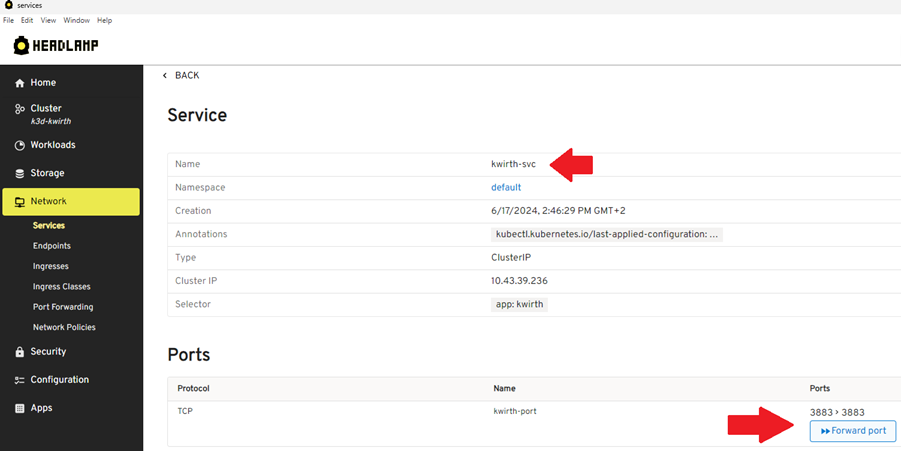
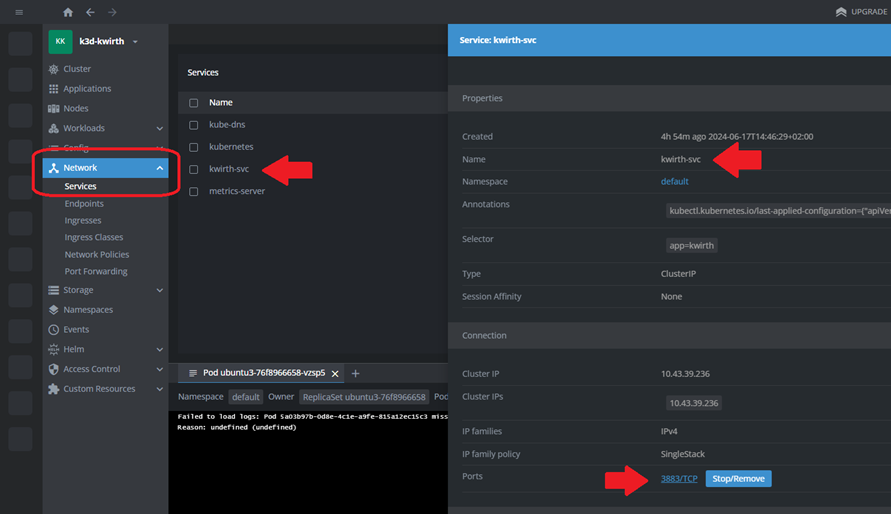
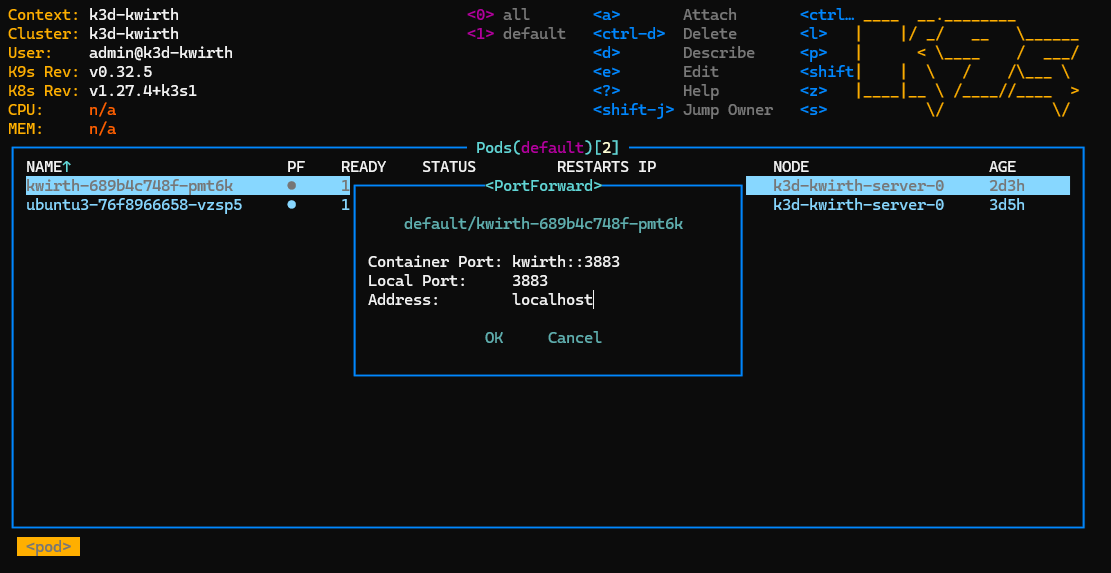
Using the port forwarding option of your favourite Kubernetes management tool, like Lens, Headlamp, K9S, etc... (etc was not a Kubernetes tool when I wrote this article ;) ).
-
With Headlamp...
-
With Lens...
-
With K9S. Just select the Kwirth pod and press Caps+F, then just accept (or change) the port sugegstions from K9s and navigate...
-
-
Using an Ingress. It is the best option if you plan to access your Kwirth from Internet and if you also plan to share Kwirth with the development team in your corporate private network. For publishing Kwirth to be accesible from outside the cluster, you must create an Ingress (be sure, you need to deploy an ingress controller before, you have info on how to perform a simple ingress installation HERE).
NOTE: If you use Helm you can install the Ingress just by configuring the values.
```yaml
apiVersion: networking.k8s.io/v1
kind: Ingress
metadata:
    name: ingress-kwirth
    namespace: default
spec:
    ingressClassName: nginx
    # if you want to publish Kwirth securely you would need to add something like this:
    # tls:
    # - hosts:
    #   - www.kwirth-dns.com
    #     secretName: www.kwirth-dns.com.tls
    rules:
    - host: localhost
    http:
        paths:
        - path: /kwirth
            pathType: Prefix
            backend:
            service:
                name: kwirth-svc
                port:
                number: 3883
```
NOTE: You can change the path where to publish Kwirth, it is explained in installation section.
Tag summary
Content type
Image
Digest
sha256:317061edd…
Size
100.6 MB
Last updated
6 months ago
docker pull jfvilasoutlook/kwirth