jsoprych/elko-market-mcp
Financial data MCP server for AI agents — stocks, SEC, Treasury, BLS, FDIC & World Bank.
3.6K
jsoprych/elko-market-mcp repository overview
elko-market-mcp
🚀 FREE to test, run locally, or deploy wherever containers run. Your AI assistant gets live market data in under 60 seconds. Just pull and go.
docker pull jsoprych/elko-market-mcp:latest
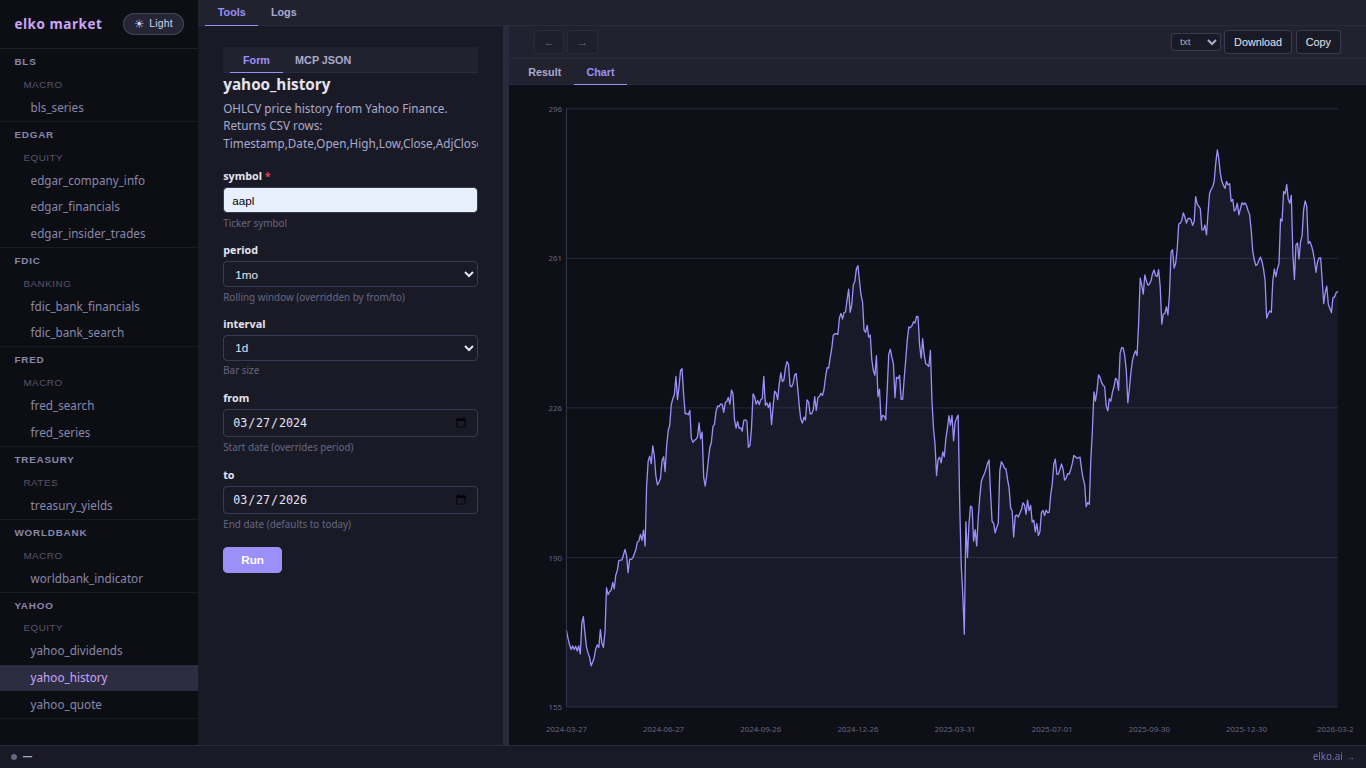
A self-hosted financial data server that exposes free market data via MCP (Model Context Protocol), REST API, and a web dashboard.
Connect your AI assistant (Claude, Cursor, etc.) and ask: "What's the current price of AAPL?" or "Show me the 10-year Treasury yield."
Data sources: Yahoo Finance, EDGAR (SEC), Treasury, BLS, FDIC, World Bank, FRED.
📖 Full documentation & examples → github.com/jsoprych/elko-docs
🐳 Docker Hub → hub.docker.com/r/jsoprych/elko-market-mcp
docker pull jsoprych/elko-market-mcp:latest
Quick Start
Assuming Docker is installed — cut and paste into your terminal:
docker run -d \
  --name elko-market \
  -p 8082:8082 \
  -v elko-market-data:/data \
  jsoprych/elko-market-mcp:latest
Once running, open the dashboard: http://localhost:8082
API keys (FRED required for FRED tools): You can set them from the dashboard — click the 🔑 Keys button in the status bar — no restart needed. Keys are persisted to the volume automatically. Alternatively, pass them at startup:
docker run -d \
  --name elko-market \
  -p 8082:8082 \
  -v elko-market-data:/data \
  -e FRED_API_KEY=your_fred_key \
  -e SEC_USER_AGENT="YourName [email protected]" \
  -e BLS_API_KEY=your_bls_key \
  jsoprych/elko-market-mcp:latest
To stop, restart, or remove the container:
docker stop elko-market                          # stop
docker start elko-market                         # restart
docker rm elko-market                            # remove container (data volume kept)
docker rm elko-market && docker volume rm elko-market-data  # full removal (container + data)
Connect to Claude Code, Cursor, or ChatGPT:
curl -s localhost:8082/mcp.json > .mcp.json
Docker Compose
services:
  elko-market:
    image: ghcr.io/jsoprych/elko-market-mcp:latest
    ports:
      - "8082:8082"
    volumes:
      - elko-market-data:/data
    restart: unless-stopped
    # Optional — keys can also be set from the dashboard after first run
    environment:
      - FRED_API_KEY=your_key

volumes:
  elko-market-data:
Environment Variables
| Variable | Default | Description |
|---|---|---|
ELKO_EASY_KEY | bundled key | Rate-limit token (91-day demo; override with your own) |
ELKO_KEY_SECRET | — | Enable pro-key HMAC validation (optional) |
ELKO_REVOCATION_URL | — | Pro-key revocation list URL (requires ELKO_KEY_SECRET) |
FRED_API_KEY | — | Required for FRED tools — free at fred.stlouisfed.org |
SEC_USER_AGENT | — | Recommended for EDGAR: "Company Name [email protected]" |
BLS_API_KEY | — | Optional — lifts BLS daily cap from 25 to 500 requests |
Tip: FRED, BLS, and SEC keys can be set or updated directly from the dashboard 🔑 Keys panel without restarting the container. Keys are saved to the data volume.
The bundled easy key expires ~91 days after each release. Override or disable:
# Override
docker run -e ELKO_EASY_KEY=your_key ...

# Disable rate limiting entirely
docker run -e ELKO_EASY_KEY="" ...
MCP Setup
HTTP transport (recommended):
curl -s localhost:8082/mcp.json > .mcp.json
Claude Desktop / Cursor stdio transport:
{
  "mcpServers": {
    "elko-market": {
      "command": "docker",
      "args": ["run", "--rm", "-i",
               "-v", "elko-market-data:/data",
               "jsoprych/elko-market-mcp:latest",
               "mcp"]

    }
  }
}
Python / LangChain / any HTTP client (JSON-RPC 2.0):
import requests

r = requests.post("http://localhost:8082/mcp", json={
    "jsonrpc": "2.0",
    "id": 1,
    "method": "tools/call",
    "params": {
        "name": "yahoo_quote",
        "arguments": {"symbol": "AAPL"}
    }
})
print(r.json())
# curl equivalent
curl -s -X POST http://localhost:8082/mcp \
  -H "Content-Type: application/json" \
  -d '{"jsonrpc":"2.0","id":1,"method":"tools/call","params":{"name":"yahoo_quote","arguments":{"symbol":"AAPL"}}}'
The /mcp endpoint is a standard MCP JSON-RPC 2.0 HTTP endpoint — compatible with
any client that supports the MCP spec, including LangChain (langchain-mcp-adapters),
custom Python scripts, or direct HTTP calls.
MCP Tools
| Tool | Source | Description |
|---|---|---|
yahoo_quote | Yahoo Finance | Real-time quote for any ticker |
yahoo_history | Yahoo Finance | Historical OHLCV price data |
yahoo_dividends | Yahoo Finance | Dividend history |
treasury_yields | Treasury.gov | Current yield curve |
edgar_company_info | SEC EDGAR | Company filings and info |
edgar_financials | SEC EDGAR | Income statement, balance sheet |
edgar_insider_trades | SEC EDGAR | Form 4 insider transactions |
bls_series | BLS | CPI, unemployment, PPI series |
fdic_bank_search | FDIC | Bank search and lookup |
fdic_bank_financials | FDIC | Bank financial data |
worldbank_indicator | World Bank | Global economic indicators |
fred_series | FRED | Federal Reserve economic data time series |
fred_search | FRED | Search FRED series by keyword |
SQL Procedures — saved queries that register as additional MCP tools automatically.
Three starter procedures are included (top_tools, recent_calls, yield_curve_snapshot).
Create your own via POST /v1/procedures.
REST API
| Method | Path | Auth | Description |
|---|---|---|---|
GET | /health | public | Status + tool count |
GET | /v1/key-status | public | Current key mode and rate-limit info |
GET | /v1/catalogue | public | List all available tools |
GET | /v1/keys | public | API key status (env/config/unset per key) |
GET | /mcp.json | public | Ready-to-use .mcp.json for this server |
GET | /openapi.json | public | OpenAPI 3.0 spec for ChatGPT Custom GPT |
POST | /mcp | public | MCP JSON-RPC 2.0 HTTP endpoint |
POST | /v1/call/{tool} | key | Invoke a tool directly |
GET | /v1/logs | key | Recent tool call log (requires --db) |
PUT | /v1/api-keys/{env} | key | Save an API key — persisted to volume |
DELETE | /v1/api-keys/{env} | key | Clear a saved API key |
GET | /v1/procedures | key | List SQL procedures |
POST | /v1/procedures | key | Create or update a SQL procedure |
GET | /v1/procedures/{name} | key | Get a single procedure |
DELETE | /v1/procedures/{name} | key | Delete a procedure |
SQL Procedures
Define named SQL queries that auto-register as live MCP tools:
# Create a procedure
curl -s -X POST http://localhost:8082/v1/procedures \
  -H "Content-Type: application/json" \
  -d '{
    "name": "my_query",
    "description": "Recent call log for a tool",
    "sql": "SELECT datetime(ts, '\''unixepoch'\'') as time, duration_ms FROM call_log WHERE tool = '\''{{tool}}'\'' ORDER BY ts DESC LIMIT {{limit}}",
    "parameters": [
      {"name": "tool",  "type": "string",  "description": "Tool name", "required": true},
      {"name": "limit", "type": "integer", "description": "Max rows",  "required": false, "default": 10}
    ]
  }'
The procedure is immediately callable as an MCP tool and via POST /v1/call/my_query.
Queries must be SELECT or WITH statements. Template substitution via {{param}}.
Persistent Data
Named volume at /data inside the container:
# Named volume (recommended)
docker run -v elko-market-data:/data ...

# Host path
docker run -v /path/on/host:/data ...
The SQLite database stores:
| Table | Contents |
|---|---|
cache | HTTP response cache (TTL-based, avoids redundant API calls) |
call_log | Tool call audit trail — powering the Logs tab |
_config | Persisted API keys set from the dashboard |
procedures | Saved SQL procedures registered as MCP tools |
price_history | Structured OHLCV data (Yahoo Finance) |
financials | EDGAR XBRL financial statement rows |
yield_curve | Treasury yield curve daily snapshots |
macro_series | BLS / World Bank / FRED time series |
bank_financials | FDIC bank financials |
Ports
| Port | Description |
|---|---|
8082 | REST API + MCP HTTP + web dashboard |
Port conflicts: The elko server family uses staggered defaults —
elko-news-mcpon 8081,elko-market-mcpon 8082 — so both can run simultaneously. If another service occupies a port, override it:docker run -p 9082:8082 ... jsoprych/elko-market-mcp:latest
Source & Support
- GitHub: jsoprych/elko-market-mcp
- Docker Hub: jsoprych/elko-market-mcp
- Web: Elko.AI & DARKFABRIK.AI
- Feedback: [email protected]

Tag summary
Content type
Image
Digest
sha256:d94ca6bc6…
Size
5 MB
Last updated
4 months ago
docker pull jsoprych/elko-market-mcp