jsoprych/elko-news-mcp
Self-hosted AI news agent — MCP tools for Claude, ChatGPT & Cursor. Ask your AI anything.
3.9K
jsoprych/elko-news-mcp repository overview
elko-news-mcp
🚀 FREE to test, run locally, or deploy wherever containers run. Your AI assistant gets live news in under 60 seconds. Just pull and go.
docker pull jsoprych/elko-news-mcp:latest
A self-hosted news daemon that polls RSS/Atom feeds and serves articles via MCP (Model Context Protocol), REST API, and a web dashboard.
Connect your AI assistant (Claude, Cursor, etc.) and ask: "What's in the news today?" or "Summarize tech news from the last 2 hours."
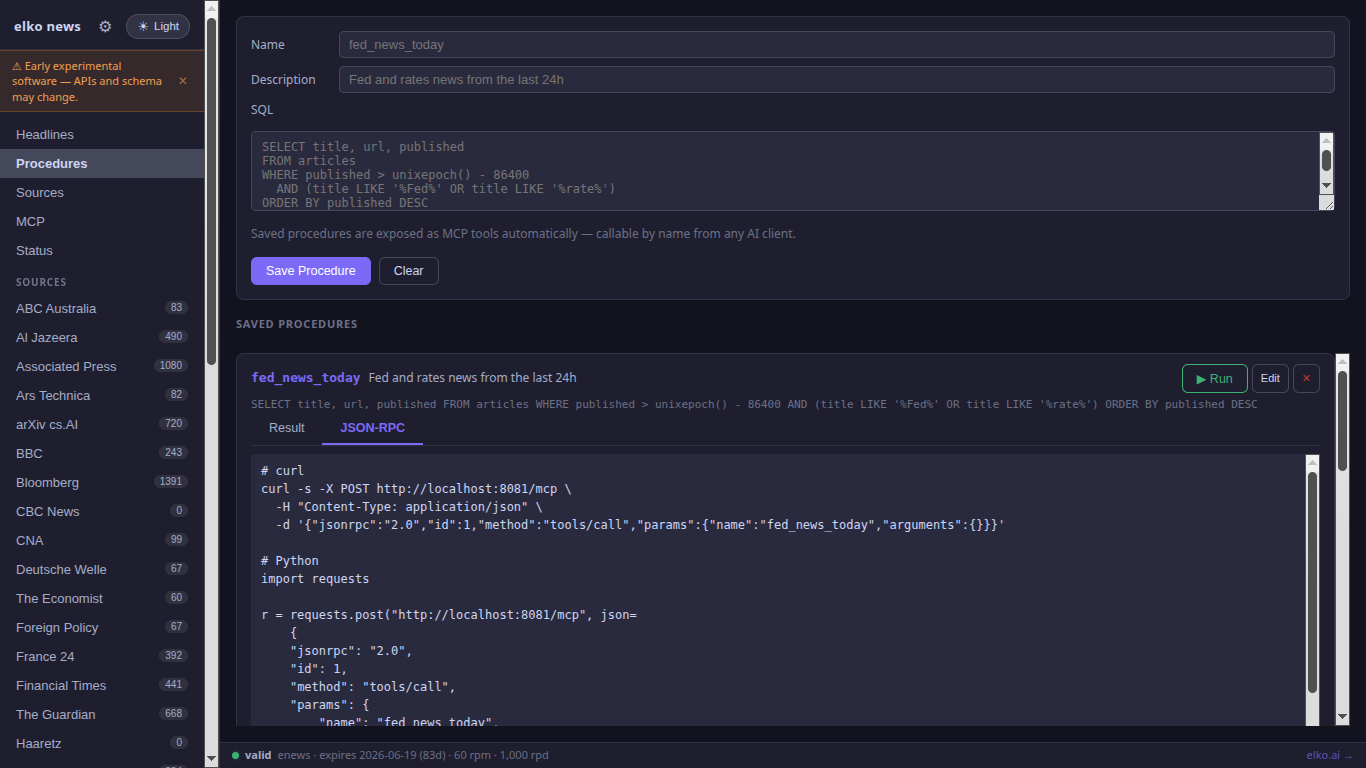
📖 Full documentation & examples → github.com/jsoprych/elko-docs
🐳 Docker Hub → hub.docker.com/r/jsoprych/elko-news-mcp
docker pull jsoprych/elko-news-mcp:latest
What's new in v0.5.0
- Feed health monitoring — every feed's status (
ok / fail / dead) is now tracked persistently. The/healthendpoint reportsstatus: degradedwhen feeds are broken and showsfeeds_ok / feeds_fail / feeds_deadcounts. NewGET /v1/feed-healthendpoint returns the full per-feed status table. - Optional call logging — add
--log-max-output 2000to start recording every MCP tool call and REST query to SQLite. Browse recent calls atGET /v1/logs. Disabled by default (zero overhead). - 10 feed repairs — 8 broken RSS URLs fixed (The Verge AI, VentureBeat AI, Jerusalem Post, CBC, Xinhua, Haaretz, Moscow Times, Deutsche Welle Business). Papers with Code (shut down by Meta, 2025) and Phys.org AI (sub-feed removed) replaced with Tech Xplore ML/AI and Hugging Face Blog.
What's new in v0.4
- Five-pane dashboard — Headlines, Procedures, Sources, MCP playground, and Status panes in a single UI.
- Source intelligence — editorial metadata for every source (owner, lean, country, ticker). Enrich any source with live Wikidata data from the Sources pane.
- API key management from the dashboard — click 🔑 Keys in the status bar to set keys without restarting the container.
- Full-text search — FTS5-powered search across all article titles and summaries.
- Bulk export — download your entire article archive as JSON, CSV, or Markdown.
Quick Start
Assuming Docker is installed — cut and paste into your terminal:
docker run -d \
  --name elko-news \
  -p 8081:8081 \
  -v elko-news-data:/data \
  jsoprych/elko-news-mcp:latest
Once running, open the dashboard: http://localhost:8081
To stop, restart, or remove the container:
docker stop elko-news                          # stop
docker start elko-news                         # restart
docker rm elko-news                            # remove container (data volume kept)
docker rm elko-news && docker volume rm elko-news-data  # full removal (container + data)
Connect to Claude Code, Cursor, or ChatGPT:
curl -s localhost:8081/mcp.json > .mcp.json
Docker Compose
services:
  elko-news:
    image: jsoprych/elko-news-mcp:latest
    ports:
      - "8081:8081"
    volumes:
      - elko-news-data:/data
    restart: unless-stopped

volumes:
  elko-news-data:
Environment Variables
| Variable | Default | Description |
|---|---|---|
ELKO_EASY_KEY | bundled key | Rate-limit token (91-day demo; override with your own) |
ELKO_KEY_SECRET | — | Enable pro-key HMAC validation (optional) |
ELKO_REVOCATION_URL | — | Pro-key revocation list URL (requires ELKO_KEY_SECRET) |
The bundled easy key expires ~91 days after each release. To run indefinitely
without rotation, generate your own key at elko.ai or pass
ELKO_EASY_KEY="" to disable rate limiting entirely.
# Override the bundled key
docker run -p 8081:8081 -v elko-news-data:/data \
  -e ELKO_EASY_KEY=your_key \
  jsoprych/elko-news-mcp:latest

# Open mode (no rate limiting)
docker run -p 8081:8081 -v elko-news-data:/data \
  -e ELKO_EASY_KEY="" \
  jsoprych/elko-news-mcp:latest
MCP Setup
HTTP transport (recommended — connect to a running container):
curl -s localhost:8081/mcp.json > .mcp.json
Claude Desktop / Cursor stdio transport:
{
  "mcpServers": {
    "elko-news": {
      "command": "docker",
      "args": ["run", "--rm", "-i",
               "-v", "elko-news-data:/data",
               "jsoprych/elko-news-mcp:latest",
               "mcp", "--db", "/data/elko-news.db"]
    }
  }
}
Python / LangChain / any HTTP client (JSON-RPC 2.0):
import requests

r = requests.post("http://localhost:8081/mcp", json={
    "jsonrpc": "2.0",
    "id": 1,
    "method": "tools/call",
    "params": {
        "name": "news_headlines",
        "arguments": {"hours": 24, "limit": 10}
    }
})
print(r.json())
# curl equivalent
curl -s -X POST http://localhost:8081/mcp \
  -H "Content-Type: application/json" \
  -d '{"jsonrpc":"2.0","id":1,"method":"tools/call","params":{"name":"news_headlines","arguments":{"hours":24,"limit":10}}}'
The /mcp endpoint is a standard MCP JSON-RPC 2.0 HTTP endpoint — compatible with
any client that supports the MCP spec, including LangChain (langchain-mcp-adapters),
custom Python scripts, or direct HTTP calls.
MCP Tools
| Tool | Description |
|---|---|
news_headlines | Latest articles, filter by source / category / hours |
news_search | Full-text search across title and summary |
news_sources | List active sources and article counts |
| saved procedures | Any stored SQL procedure becomes an MCP tool automatically |
REST API
| Method | Path | Description |
|---|---|---|
GET | /health | Status + article count |
GET | /v1/key-status | Current key mode and rate-limit info |
GET | /v1/headlines | Recent articles (?source=, ?category=, ?hours=, ?limit=) |
GET | /v1/search | Full-text search (?q=, ?source=, ?limit=) |
GET | /v1/sources | Article counts per source |
GET | /v1/export | Bulk export (?format=json|csv|md) |
POST | /v1/query | Run an ad-hoc SELECT query |
GET | /v1/procedures | List saved SQL procedures |
POST | /v1/procedures | Create / update a saved procedure |
DELETE | /v1/procedures/{name} | Delete a saved procedure |
POST | /v1/procedures/{name}/run | Run a saved procedure |
GET | /mcp.json | Ready-to-use .mcp.json for this server |
POST | /mcp | MCP JSON-RPC 2.0 HTTP endpoint |
Saved Procedures
Saved procedures are named SQL queries stored in the database. Each one is automatically exposed as an MCP tool — your AI assistant can call them by name.
Create via dashboard: open http://localhost:8081, go to the Procedures tab, enter a name, description, and SELECT query, then click Save Procedure. Each saved procedure shows a JSON-RPC tab with ready-to-copy curl and Python snippets.
Three example procedures are seeded automatically on first run.
Create via REST API:
curl -s -X POST localhost:8081/v1/procedures \
  -H "Content-Type: application/json" \
  -d '{
    "name": "fed_news_today",
    "description": "Fed and rates news from the last 24h",
    "sql": "SELECT title, url, published FROM articles WHERE published > unixepoch() - 86400 AND (title LIKE '\''%Fed%'\'' OR title LIKE '\''%rate%'\'') ORDER BY published DESC"
  }'
Run a procedure:
curl -s -X POST localhost:8081/v1/procedures/fed_news_today/run
Pro: AI-assisted procedure creation — describe what you want in plain English and your AI assistant (Claude, GPT, or any MCP-compatible client) generates and saves the SQL for you automatically.
Persistent Data
All articles are stored in SQLite at /data/elko-news.db inside the container.
Mount a named volume or host path to persist across restarts:
# Named volume (recommended)
docker run -v elko-news-data:/data ...

# Host path
docker run -v /path/on/host:/data ...
Ports
| Port | Protocol | Description |
|---|---|---|
8081 | TCP | REST API + MCP HTTP + web dashboard |
Port conflicts: The elko server family uses staggered defaults —
elko-news-mcpon 8081,elko-market-mcpon 8082 — so both can run simultaneously. If another service occupies a port, override it:docker run -p 9081:8081 ... jsoprych/elko-news-mcp:latest
Source & Support
- GitHub: jsoprych/elko-news-mcp
- Docker Hub: jsoprych/elko-news-mcp
- Web: Elko.AI & DARKFABRIK.AI
- Feedback: [email protected]

Tag summary
Content type
Image
Digest
sha256:02b0388e7…
Size
5.1 MB
Last updated
4 months ago
docker pull jsoprych/elko-news-mcp