k44sh/rutorrent
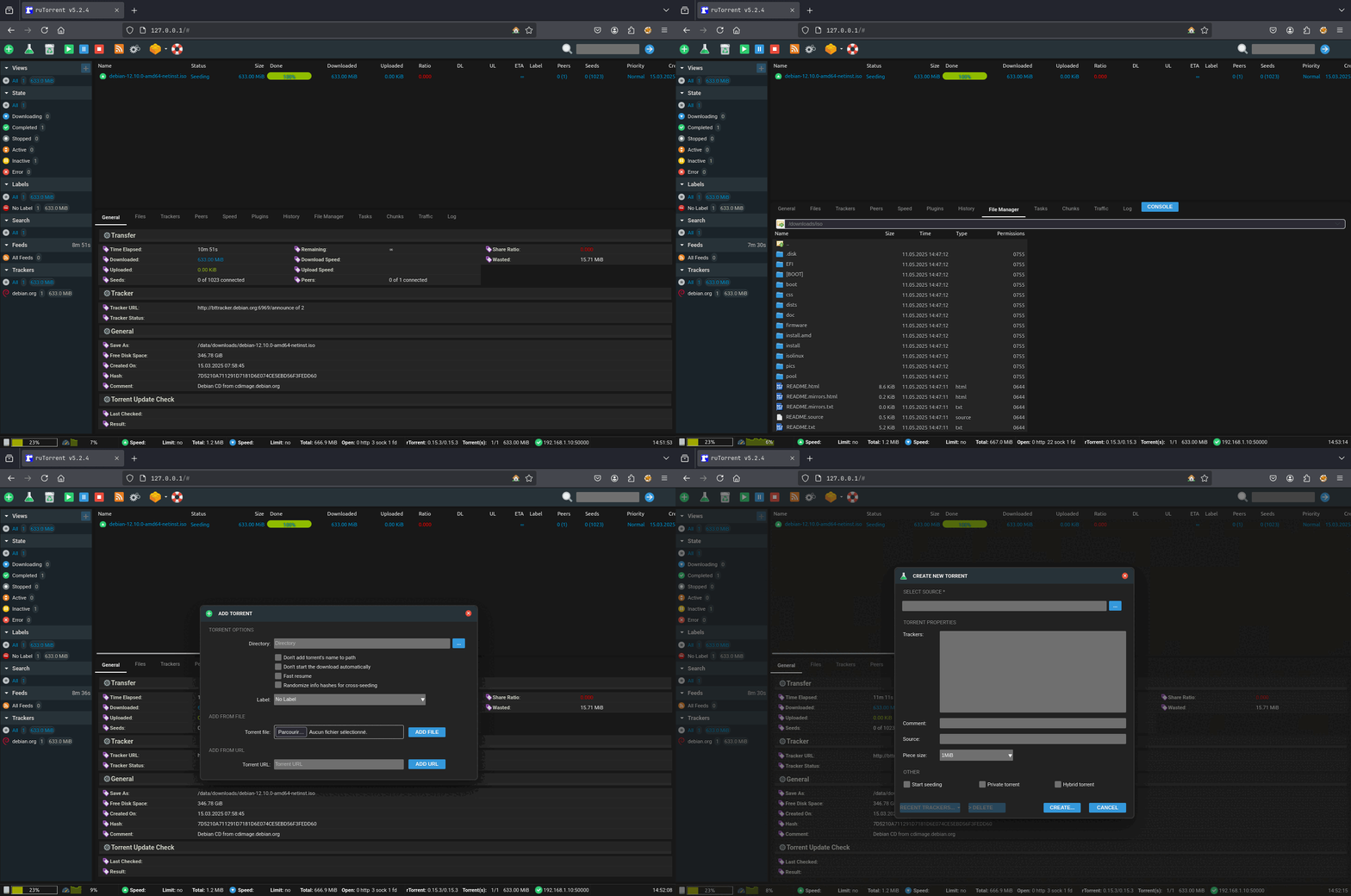
🐳 ruTorrent Docker compatible with Radarr/Sonarr 🍿
100K+
k44sh/rutorrent repository overview



&logo=gitlab)
&logo=gitlab)


About
rTorrent and ruTorrent Docker image based on Alpine Linux.
Features
- Run as non-root user
- Multi-platform image
- NGINX with PHP 8.4
- GeoIP2 database by MaxMind (Update with your own key)
- geoipupdate to update MaxMind's GeoIP2 databases
- Cloudflare trusted addresses for NGINX Real IP (not enable by default)
- libTorrent (
0.15.3) / rTorrent (0.15.3) compiled from source - ruTorrent release (
v5.2.4) - c-ares and UDNS for asynchronous DNS requests
- mktorrent installed for ruTorrent create plugin
- Radarr / Sonarr hardlinks compliance
- ruTorrent GeoIP2 plugin
- ruTorrent Filemanager plugin
- ruTorrent Ratiocolors plugin
- ruTorrent QuickBox theme
WAN IPaddress automatically resolved for reporting to the trackerXMLRPCthrough nginx over SCGI socket (basic auth optional)WebDAVon completed downloads (basic auth optional)- Ability to add a custom ruTorrent
plugin/theme - Allow specific configuration for
datafolder - Allow specific configuration for
configfolder
Volume Overview
| Volume | Description |
|---|---|
/config | Stores rTorrent, ruTorrent, and other configurations |
/data | Main storage for downloaded torrent files |
/passwd | Holds .htpasswd files for HTTP authentication |
:information_source: Note: Volumes should be owned by the user/group matching the specified
PUIDandPGID.
Radarr / Sonarr Users
It is recommended to use the same data volume for ruTorrent and Radarr/Sonarr, in order to have a structure similar to this :
data
├── downloads
└── media
   ├── movies
   ├── music
   └── tv
:information_source: More informations here : TRaSH Guide
Multi Platform Images
- linux/amd64
- linux/arm64
- linux/arm/v7
Usage
Docker Compose
Docker compose is the recommended way to run this image. Edit the compose file with your preferences and run the following command:
mkdir $(pwd)/{config,data,passwd}
chown ${PUID}:${PGID} $(pwd)/{config,data,passwd}
docker compose up -d
docker compose logs -f
Upgrade
To upgrade, pull the newer image and launch the container:
docker compose pull
docker compose up -d
Cleanup
docker compose down -v
rm -rf $(pwd)/{config,data,passwd}
Command line
You can also use the following minimal command:
mkdir $(pwd)/{config,data,passwd}
chown ${PUID}:${PGID} $(pwd)/{config,data,passwd}
docker run -d --name rutorrent \
  --ulimit nproc=65535 \
  --ulimit nofile=32000:40000 \
  -p 6881:6881/udp \
  -p 8000:8000 \
  -p 8080:8080 \
  -p 9000:9000 \
  -p 50000:50000 \
  -v $(pwd)/config:/config \
  -v $(pwd)/data:/data \
  -v $(pwd)/passwd:/passwd \
  k44sh/rutorrent:latest && \
  docker logs -f rutorrent
Environment variables
General
| Variable | Description | Default |
|---|---|---|
TZ | The timezone assigned to the container | UTC |
PUID | rTorrent user ID | 1000 |
PGID | rTorrent group ID | 1000 |
CONFIG_PATH | ruTorrent configuration path | /config |
TOPDIR_PATH | ruTorrent top directory | /data |
DOWNLOAD_PATH | Path for downloaded files | /data/downloads |
MM_ACCOUNT | Your MaxMind account ID | (required for auto update) |
MM_LICENSE | Your MaxMind license key | (required auto update) |
WAN_IP | Public IP address reported to the tracker | Auto resolved |
MEMORY_LIMIT | PHP memory limit | 512M |
UPLOAD_MAX_SIZE | Max upload size | 16M |
CLEAR_ENV | Clear environment in PHP-FPM workers | yes |
OPCACHE_MEM_SIZE | PHP OpCache memory size | 256 |
MAX_FILE_UPLOADS | Max number of files allowed to be uploaded simultaneously | 50 |
AUTH_DELAY | Delay before HTTP Basic Auth is enforced | 0s |
REAL_IP_FROM | Trusted CIDR ranges that can set real client IPs | false |
REAL_IP_CF | Trusted Cloudflare IP ranges that can set real client IPs | false |
REAL_IP_HEADER | Header containing the real client IP | X-Forwarded-For |
LOG_IP_VAR | Variable used in Nginx logs for remote IP | remote_addr |
XMLRPC_AUTHBASIC_STRING | Message shown for XMLRPC Basic Auth | rTorrent XMLRPC restricted access |
XMLRPC_PORT | XMLRPC port through Nginx (over SCGI socket) | 8000 |
XMLRPC_SIZE_LIMIT | Max body size of XMLRPC calls | 2M |
RUTORRENT_AUTHBASIC_STRING | Message shown for ruTorrent Basic Auth | ruTorrent restricted access |
RUTORRENT_PORT | HTTP port used by ruTorrent | 8080 |
WEBDAV_AUTHBASIC_STRING | Message shown for WebDAV Basic Auth | WebDAV restricted access |
WEBDAV_PORT | WebDAV port for accessing completed downloads | 9000 |
rTorrent
| Variable | Description | Default |
|---|---|---|
RT_LOG_LEVEL | rTorrent log level | info |
RT_LOG_EXECUTE | Log executed commands to /config/rtorrent/log/execute.log | false |
RT_LOG_XMLRPC | Log XMLRPC queries to /config/rtorrent/log/xmlrpc.log | false |
RT_SESSION_SAVE_SECONDS | Interval (in seconds) between saving session data to disk | 3600 |
RT_TRACKER_DELAY_SCRAPE | Delay tracker announces at startup | true |
RT_RECEIVE_BUFFER_SIZE | TCP receive buffer size (network.receive_buffer.size.set) | 16M |
RT_SEND_BUFFER_SIZE | TCP send buffer size (network.send_buffer.size.set) | 16M |
RT_PREALLOCATE_TYPE | Disk space preallocation type | 0 |
RT_DHT_PORT | DHT UDP port (dht.port.set) | 6881 |
RT_INC_PORT | Incoming port range (network.port_range.set) | 50000 |
ruTorrent
| Variable | Description | Default |
|---|---|---|
RU_REMOVE_CORE_PLUGINS | Remove ruTorrent core plugins; comma-separated | false |
RU_HTTP_USER_AGENT | ruTorrent HTTP user agent | Mozilla Firefox |
RU_HTTP_TIME_OUT | ruTorrent HTTP timeout in seconds | 30 |
RU_HTTP_USE_GZIP | Use HTTP Gzip compression | true |
RU_RPC_TIME_OUT | ruTorrent RPC timeout in seconds | 5 |
RU_LOG_RPC_CALLS | Log ruTorrent RPC calls | false |
RU_LOG_RPC_FAULTS | Log ruTorrent RPC faults | true |
RU_PHP_USE_GZIP | Use PHP Gzip compression | false |
RU_PHP_GZIP_LEVEL | PHP Gzip compression level | 2 |
RU_SCHEDULE_RAND | Random delay (0 to X seconds) for scheduler start | 10 |
RU_LOG_FILE | ruTorrent log file path for error messages | /config/rutorrent/rutorrent.log |
RU_DO_DIAGNOSTIC | ruTorrent diagnostics (e.g., permission checks) | true |
RU_CACHED_PLUGIN_LOADING | Enable rapid cached loading of ruTorrent plugins | false |
RU_SAVE_UPLOADED_TORRENTS | Save uploaded torrent files to /config/rutorrent/share/torrents | true |
RU_OVERWRITE_UPLOADED_TORRENTS | Overwrite existing .torrent files | false |
RU_FORBID_USER_SETTINGS | Enforce global settings, even with HTTP auth | false |
RU_LOCALE | Default locale for ruTorrent | UTF8 |
Ports
| Port | Variable | Description |
|---|---|---|
6881 | RT_DHT_PORT | DHT UDP port (dht.port.set) |
50000 | RT_INC_PORT | Incoming connections (network.port_range.set) |
8000 | XMLRPC_PORT | XMLRPC port through Nginx over SCGI socket |
8080 | RUTORRENT_PORT | ruTorrent HTTP port |
9000 | WEBDAV_PORT | WebDAV port for completed downloads |
Notes
WebDAV
WebDAV allows you to retrieve your completed torrent files in /data on port 9000. Like XMLRPC, these
requests can be secured with basic authentication through the /passwd/webdav.htpasswd file in which you will need to
add a username with his password. See below to populate this file with a user / password.
Populate .htpasswd files
For ruTorrent basic auth, XMLRPC through nginx and WebDAV on completed downloads, you can populate .htpasswd
files with the following command:
docker run --rm -it httpd:2.4-alpine htpasswd -Bbn <username> <password> >> $(pwd)/passwd/webdav.htpasswd
Htpasswd files used:
rpc.htpasswd: XMLRPC through nginxrutorrent.htpasswd: ruTorrent basic authwebdav.htpasswd: WebDAV on completed downloads
Override or add a ruTorrent plugin/theme
You can add a plugin for ruTorrent in /config/rutorrent/plugins/.
If you add a plugin that already exists in ruTorrent,
it will be removed from ruTorrent core plugins and yours will be used. And you can also add a theme in
/config/rutorrent/themes/. The same principle as for plugins will be used if you want to override one.
:information_source: Container has to be restarted to propagate changes
Edit a ruTorrent plugin configuration
As you probably know, plugin configuration is not outsourced in ruTorrent. Loading the configuration of a plugin is
done via a conf.php file placed at the root of the plugin folder. To solve this issue with Docker, a special folder
has been created in /config/rutorrent/plugins-conf to allow you to configure plugins. For example to configure the
diskspace plugin, you will need to create the /config/rutorrent/plugins-conf/diskspace.php file with your
configuration:
<?php
$diskUpdateInterval = 10;	// in seconds
$notifySpaceLimit = 512;	// in Mb
$partitionDirectory = null;	// if null, then we will check rtorrent download directory
:information_source: Container has to be restarted to propagate changes
Fork based on the version of CrazyMax
Tag summary
Content type
Image
Digest
sha256:33192fa09…
Size
158.7 MB
Last updated
over 1 year ago
docker pull k44sh/rutorrent