ksey/dht-spider repository overview
dht-spider
DHT is the name given to the Kademlia-based distributed hash table (DHT) used by BitTorrent clients to find peers via the BitTorrent protocol.
DHT spider implements the bittorrent DHT protocol in crawling mode. The standard mode follows the BEPs, and you can use it as a standard dht server. The crawling mode aims to crawl as more metadata info as possiple. It doesn't follow the standard BEPs protocol. With the crawling mode, you can build another BitTorrent DHT search engine.
More info:
GitHub:
ℹ Requrements:
Redis - in-memory data structure store used as a database for DHT spider.
Install docker with redis:
- create folder for database
mkdir -p /docker/redis && chmod -R 777 /docker/redis
- install redis docker (don't forget to set
<redis password>!)
docker run --name redis -d --restart=unless-stopped -p 6379:6379 -v /docker/redis:/data redislabs/redismod \
--requirepass <redis password> \
--dir /data \
--loadmodule /usr/lib/redis/modules/rejson.so \
--loadmodule /usr/lib/redis/modules/redisearch.so
ℹ Installing DHT spider
docker run --name dht-spider -d --restart=unless-stopped --net=host \
-e REDIS_PASSWORD=<redis password> \
-e ADD_MAGNET=true \
-e ADD_RETRACKERS=true \
ksey/dht-spider
| Parameters | Description |
|---|---|
-e REDIS_HOST=localhost | Redis database hostname |
-e REDIS_PORT=6379 | Redis database port (default: 6379) |
-e REDIS_PASSWORD=<redis password> | Password for redis |
-e REDIS_TTL=31536000 | Set the specified expire time for dht object, in seconds (default: 1 year. 0 - no expire) |
-e ADD_MAGNET=true | Generate and add magnet link to dht object in database |
-e ADD_RETRACKERS=true | Add list of retrackers to magnet link |
‼ You must use the “port forwarding” feature on router to passing through DHT port 6881/UDP to container. For example, if you have a router/switch/gateway/firewall, you will need to go into the configuration of this device and forward port 6881/UDP to the container that will be running DHT spider.
The container will try to forward port 6881/UDP using UPnP, but the result is not guaranteed.
ℹ DHT spider data usage:
- install redis-tools and jq
apt-get update && apt-get install --no-install-recommends -y redis-tools jq
- add alias for redis-tools
alias redis-cli='redis-cli -h <redis hostname> -p <redis port> -a <redis password> --no-auth-warning'
- get data
| Command | Description |
|---|---|
redis-cli keys '*' | List all dht hashes |
redis-cli JSON.GET 9d7b3a082d73f409d0c33731dbb90cb65de36e2f | jq | Get full torrent info (add jq to get human readable output) |
redis-cli JSON.GET 9d7b3a082d73f409d0c33731dbb90cb65de36e2f name | jq | Get torrent name |
redis-cli JSON.GET 9d7b3a082d73f409d0c33731dbb90cb65de36e2f magnet | jq -r | Get magnet link without quotes |
redis-cli FT.SEARCH namesIdx 'Electric Circuits' | Search 'Electric Circuits' words in torrent's names |
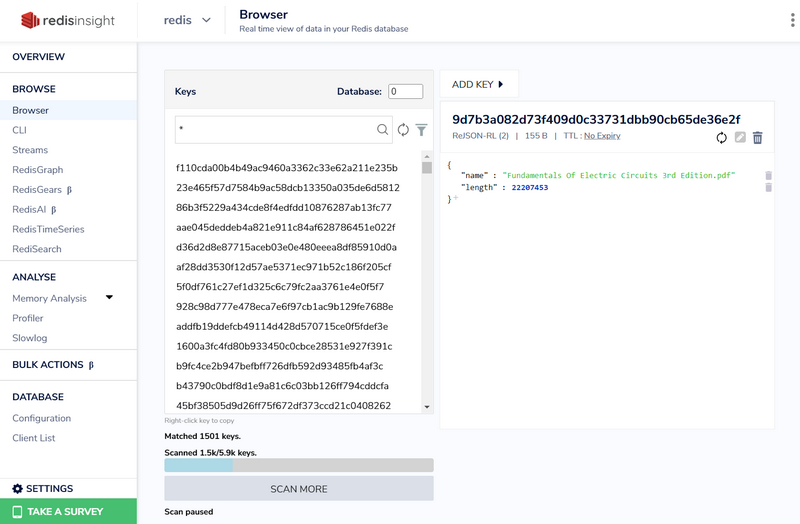
➡ Optional: Redis admin GUI - RedisInsight
- create folder for redisinsight
mkdir -p /docker/redisinsight && chmod -R 777 /docker/redisinsight
- install redisinsight docker
docker run --name redisinsight -d --restart=unless-stopped -v /docker/redisinsight:/db -p 8001:8001 redislabs/redisinsight:latest
- open Web UI:
http://<redisinsight_HOSTNAME>:8001
Tag summary
Content type
Image
Digest
Size
91.4 MB
Last updated
over 4 years ago
docker pull ksey/dht-spider