lizheming/drone-js
Drone extensions to support javascript configuration files
346
lizheming/drone-js repository overview
drone-js-config


Drone extensions to support javascript configuration files, just like the following content. We support both github, gitlab, bitbucket, gogs and gitea.
//.drone.js
module.exports = [
  Pipeline("node6", "node:6"),
  Pipeline("node8", "node:8")
];

function Pipeline(name, image) {
  return {
    kind: "pipeline",
    name,

    steps: [
      {
        name: "test",
        image,
        commands: [
          "npm install",
          "npm test"
        ]
      }
    ]
  };
}
HOW TO USE
-
Generate a shared secret key. This key is used to secure communication between the server and agents. The secret should be 32 bytes.
$ openssl rand -hex 16 558f3eacbfd5928157cbfe34823ab921 -
Generate a GitHub/Gitlab/Bitbucket/Gogs/Gitea access token. This token is used to fetch the jsonnet configuration file from the repository. This token must therefore have sufficient permission to do so. Here is an example where to generate access token:
-
Install the plugin by pulling and running the container.
docker run \ -p 3000:3000 \ -e PLUGIN_SECRET=558f3eacbfd5928157cbfe34823ab921 \ -e GITHUB_TOKEN=GITHUB8168c98304b \ lizheming/drone-js -
Once the extension is installed and running, you need to modify your Drone server configuration and provide the extension endpoint and shared secret.
-e DRONE_YAML_ENDPOINT=http://... -e DRONE_YAML_SECRET=558f3eacbfd5928157cbfe34823ab921 -
Rename
Configurationend with.jssuch as.drone.js.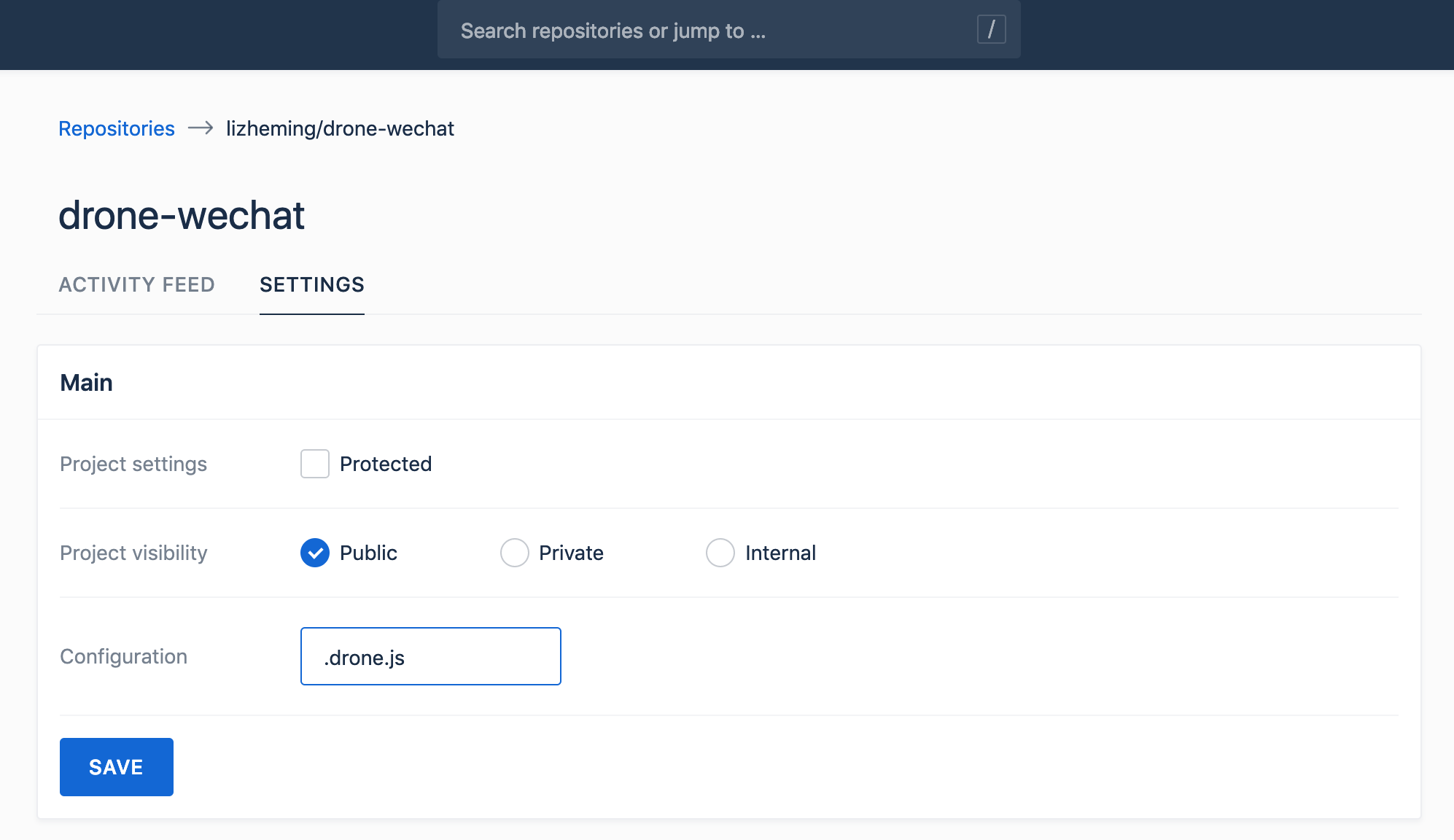
-
At last, you just add
.drone.jsfile to your repo. It should exports an array drone config object.module.exports = [ Pipeline("node6", "node:6"), Pipeline("node8", "node:8") ]; function Pipeline(name, image) { return { kind: "pipeline", name, steps: [ { name: "test", image, commands: [ "npm install", "npm test" ] } ] }; }
Settings
We take support for all VCS which drone supports, not only GitHub but also GitLab, Bitbucket, Gogs and Gitea. Let we have a look how config in different VCS.
Github
You should pass GITHUB_TOKEN to container, if you're using GitHub Enterprise, you should pass GITHUB_SERVER to custom server url.
docker run \
  -p 3000:3000 \
  -e PLUGIN_SECRET=558f3eacbfd5928157cbfe34823ab921 \
  -e GITHUB_SERVER=https://api.github.com
  -e GITHUB_TOKEN=GITHUB8168c98304b \
  lizheming/drone-js
Gitlab
You should pass GITLAB_TOKEN to container, if you're self hosting GitLab, you should also pass GITLAB_SERVER to custom server url.
docker run \
  -p 3000:3000 \
  -e PLUGIN_SECRET=558f3eacbfd5928157cbfe34823ab921 \
  -e GITLAB_SERVER=https://gitlab.com/api/v4
  -e GITLAB_TOKEN=GITLAB8168c98304b \
  lizheming/drone-js
Bitbucket
You should pass BITBUCKET_USERNAME and BITBUCKET_APP_PASSWORD to container, if you're using Bitbucket Server, you should also pass BITBUCKET_SERVER to set server url.
docker run \
  -p 3000:3000 \
  -e PLUGIN_SECRET=558f3eacbfd5928157cbfe34823ab921 \
  -e BITBUCKET_SERVER=https://api.bitbucket.org/2.0
  -e BITBUCKET_USERNAME=lizheming \
  -e BITBUCKET_APP_PASSWORD=BITBUCKET8168c98304b \
  lizheming/drone-js
BTW, if your bitbucket server support personal access token, you can pass it without bitbucket username.
docker run \
  -p 3000:3000 \
  -e PLUGIN_SECRET=558f3eacbfd5928157cbfe34823ab921 \
  -e BITBUCKET_SERVER=https://api.bitbucket.org/2.0
  -e BITBUCKET_TOKEN=BITBUCKET8168c98304b \
  lizheming/drone-js
You can also just pass BITBUCKET_USERNAME and BITBUCKET_PASSWORD, but it'll fail if your account open two step authencation.
docker run \
  -p 3000:3000 \
  -e PLUGIN_SECRET=558f3eacbfd5928157cbfe34823ab921 \
  -e BITBUCKET_SERVER=https://api.bitbucket.org/2.0
  -e BITBUCKET_USERNAME=lizheming \
  -e BITBUCKET_PASSWORD=xxxx \
  lizheming/drone-js
Gogs/Gitea
You should pass GOGS_TOKEN or GITEA_TOKEN to container, if you're self hosting Gogs/Gitea, you should also pass GOGS_SERVER or GITEA_SERVER to custom server url.
docker run \
  -p 3000:3000 \
  -e PLUGIN_SECRET=558f3eacbfd5928157cbfe34823ab921 \
  -e GOGS_SERVER=https://try.gogs.io/api/v1 \
  -e GOGS_TOKEN=GOGS8168c98304b \
  lizheming/drone-js
Configuration
PLUGIN_SECRET
The server and extension authenticate http requests using a shared secret. You must provide the shared secret to both the extenion and the server.
docker run \
  -p 3000:3000 \
  -e PLUGIN_SECRET=558f3eacbfd5928157cbfe34823ab921 \
  -e GITHUB_TOKEN=GITHUB8168c98304b \
  lizheming/drone-js
And it should be same with DRONE_YAML_SECRET.
Environment
PLUGIN_ADDRESSPLUGIN_SECRETGITHUB_SERVERGITHUB_TOKENGITLAB_SERVERGITLAB_TOKENBITBUCKET_SERVERBITBUCKET_USERNAMEBITBUCKET_PASSWORDBITBUCKET_APP_PASSWORDGOGS_SERVERGOGS_TOKENGITEA_SERVERGITEA_TOKEN
Tag summary
Content type
Image
Digest
Size
39.3 MB
Last updated
over 7 years ago
docker pull lizheming/drone-js