markusmcnugen/qbittorrentvpn
Headless qBittorrent client with WebUI and optional OpenVPN connection
10M+
markusmcnugen/qbittorrentvpn repository overview
qBittorrent with WebUI and OpenVPN
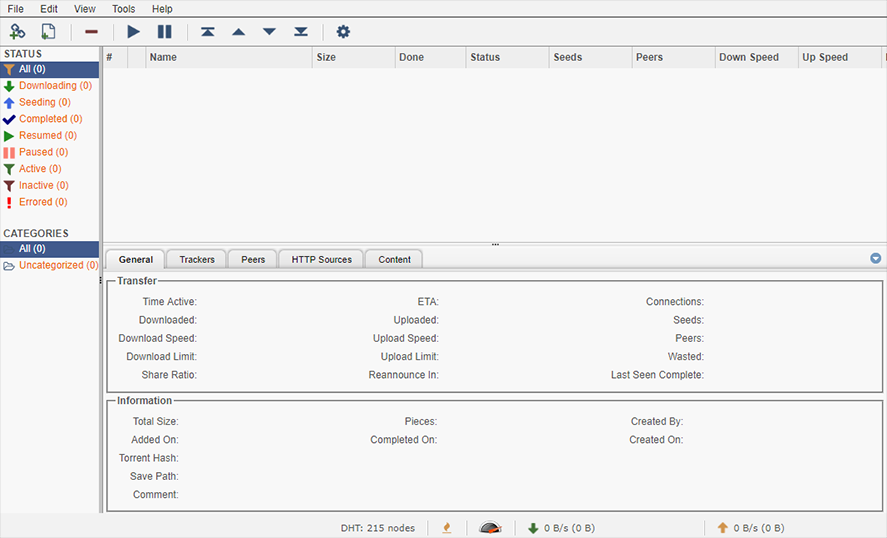
Docker container which runs the latest headless qBittorrent client with WebUI while connecting to OpenVPN with iptables killswitch to prevent IP leakage when the tunnel goes down.
Docker Features
- Base: Ubuntu 20.04
- Always builds latest qBittorrent client
- Size: 300MB
- Selectively enable or disable OpenVPN support
- IP tables kill switch to prevent IP leaking when VPN connection fails
- Specify name servers to add to container
- Configure UID, GID, and UMASK for config files and downloads by qBittorrent
- WebUI\CSRFProtection set to false by default for Unraid users
Run container from Docker registry
The container is available from the Docker registry and this is the simplest way to get it. To run the container use this command:
$ docker run --privileged  -d \
              -v /your/config/path/:/config \
              -v /your/downloads/path/:/downloads \
              -e "VPN_ENABLED=yes" \
              -e "LAN_NETWORK=192.168.1.0/24" \
              -e "NAME_SERVERS=8.8.8.8,8.8.4.4" \
              -p 8080:8080 \
              -p 8999:8999 \
              -p 8999:8999/udp \
              markusmcnugen/qbittorrentvpn
Variables, Volumes, and Ports
Environment Variables
| Variable | Required | Function | Example |
|---|---|---|---|
VPN_ENABLED | Yes | Enable VPN? (yes/no) Default:yes | VPN_ENABLED=yes |
VPN_USERNAME | No | If username and password provided, configures ovpn file automatically | VPN_USERNAME=ad8f64c02a2de |
VPN_PASSWORD | No | If username and password provided, configures ovpn file automatically | VPN_PASSWORD=ac98df79ed7fb |
LAN_NETWORK | Yes | Local Network with CIDR notation | LAN_NETWORK=192.168.1.0/24 |
NAME_SERVERS | No | Comma delimited name servers | NAME_SERVERS=8.8.8.8,8.8.4.4 |
PUID | No | UID applied to config files and downloads | PUID=99 |
PGID | No | GID applied to config files and downloads | PGID=100 |
UMASK | No | GID applied to config files and downloads | UMASK=002 |
WEBUI_PORT_ENV | No | Applies WebUI port to qBittorrents config at boot (Must change exposed ports to match) | WEBUI_PORT_ENV=8080 |
INCOMING_PORT_ENV | No | Applies Incoming port to qBittorrents config at boot (Must change exposed ports to match) | INCOMING_PORT_ENV=8999 |
Volumes
| Volume | Required | Function | Example |
|---|---|---|---|
config | Yes | qBittorrent and OpenVPN config files | /your/config/path/:/config |
downloads | No | Default download path for torrents | /your/downloads/path/:/downloads |
Ports
| Port | Proto | Required | Function | Example |
|---|---|---|---|---|
8080 | TCP | Yes | qBittorrent WebUI | 8080:8080 |
8999 | TCP | Yes | qBittorrent listening port | 8999:8999 |
8999 | UDP | Yes | qBittorrent listening port | 8999:8999/udp |
Access the WebUI
Access http://IPADDRESS:PORT from a browser on the same network.
Default Credentials
| Credential | Default Value |
|---|---|
WebUI Username | admin |
WebUI Password | adminadmin |
Origin header & Target origin mismatch
WebUI\CSRFProtection must be set to false in qBittorrent.conf if using an unconfigured reverse proxy or forward request within a browser. This is the default setting unless changed. This file can be found in the dockers config directory in /qBittorrent/config
WebUI: Invalid Host header, port mismatch
qBittorrent throws a WebUI: Invalid Host header, port mismatch error if you use port forwarding with bridge networking due to security features to prevent DNS rebinding attacks. If you need to run qBittorrent on different ports, instead edit the WEBUI_PORT_ENV and/or INCOMING_PORT_ENV variables AND the exposed ports to change the native ports qBittorrent uses.
How to use OpenVPN
The container will fail to boot if VPN_ENABLED is set to yes or empty and a .ovpn is not present in the /config/openvpn directory. Drop a .ovpn file from your VPN provider into /config/openvpn and start the container again. You may need to edit the ovpn configuration file to load your VPN credentials from a file by setting auth-user-pass.
Note: The script will use the first ovpn file it finds in the /config/openvpn directory. Adding multiple ovpn files will not start multiple VPN connections.
Example auth-user-pass option
auth-user-pass credentials.conf
Example credentials.conf
username
password
PUID/PGID
User ID (PUID) and Group ID (PGID) can be found by issuing the following command for the user you want to run the container as:
id <username>
Issues
If you are having issues with this container please submit an issue on GitHub. Please provide logs, docker version and other information that can simplify reproducing the issue. Using the latest stable verison of Docker is always recommended. Support for older version is on a best-effort basis.
Building the container yourself
To build this container, clone the repository and cd into it.
Build it:
$ cd /repo/location/qbittorrentvpn
$ docker build -t qbittorrentvpn .
Run it:
$ docker run --privileged  -d \
              -v /your/config/path/:/config \
              -v /your/downloads/path/:/downloads \
              -e "VPN_ENABLED=yes" \
              -e "LAN_NETWORK=192.168.1.0/24" \
              -e "NAME_SERVERS=8.8.8.8,8.8.4.4" \
              -p 8080:8080 \
              -p 8999:8999 \
              -p 8999:8999/udp \
              qbittorrentvpn
This will start a container as described in the "Run container from Docker registry" section.
Tag summary
Content type
Image
Digest
Size
102.5 MB
Last updated
almost 5 years ago
docker pull markusmcnugen/qbittorrentvpn