opendronemap/node-opendronemap
Automated build for node-OpenDroneMap (deprecated, please use opendronemap/nodeodm instead)
50K+
opendronemap/node-opendronemap repository overview
NodeODM

NodeODM is a Node.js App and REST API to access ODM. It exposes an API which is used by WebODM.
Getting Started
We recommend that you setup NodeODM using Docker.
- From the Docker Quickstart Terminal (Windows / OSX) or from the command line (Linux) type:
docker run -p 3000:3000 opendronemap/node-opendronemap
- If you're on Windows/OSX, find the IP of your Docker machine by running this command from your Docker Quickstart Terminal:
docker-machine ip
Linux users can connect to 127.0.0.1.
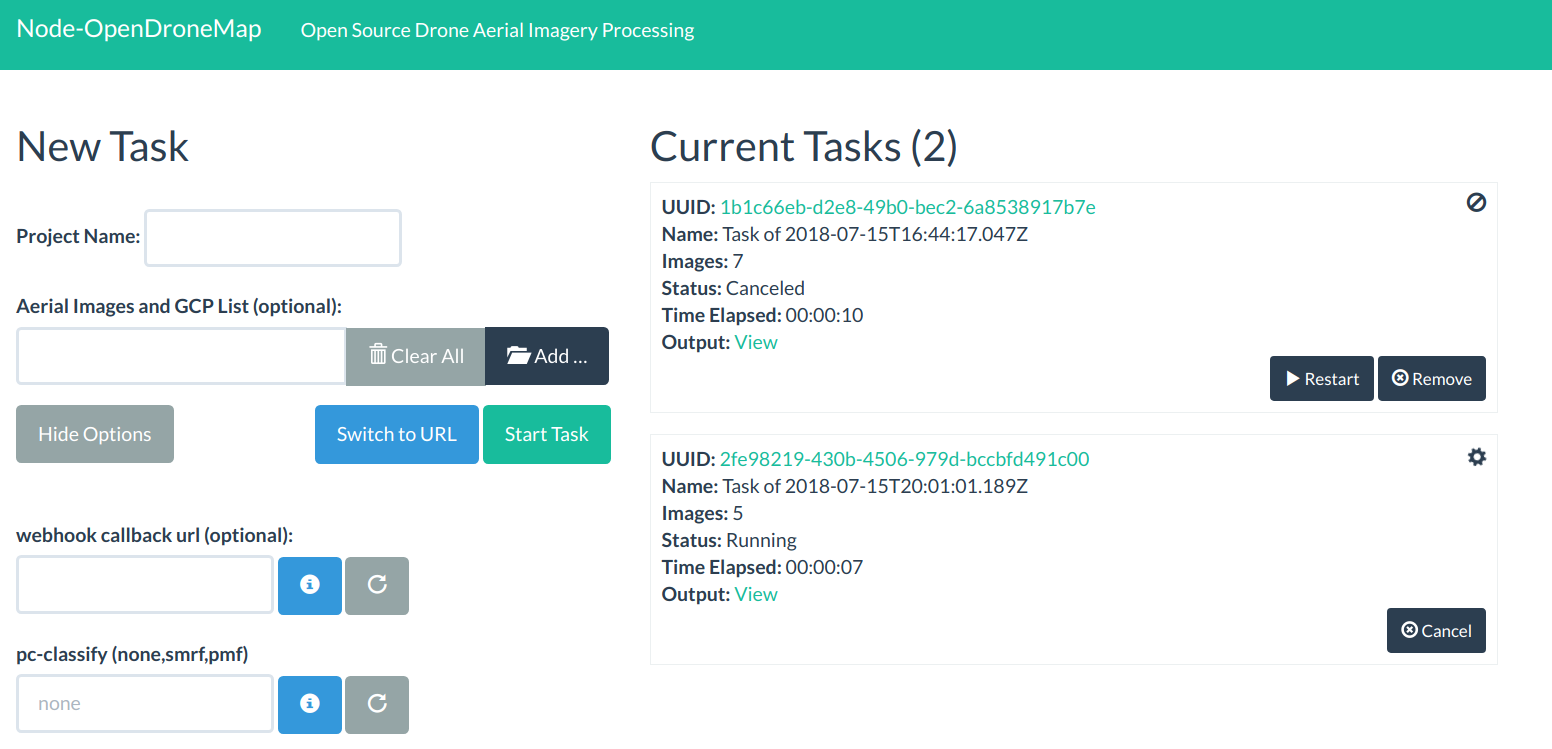
- Open a Web Browser to
http://<yourDockerMachineIp>:3000 - Load some images
- Press "Start Task"
- Go for a walk :)
If the computer running NodeODM is using an old or 32bit CPU, you need to compile OpenDroneMap from sources and setup NodeODM natively. You cannot use docker. Docker images work with CPUs with 64-bit extensions, MMX, SSE, SSE2, SSE3 and SSSE3 instruction set support or higher. Seeing a Illegal instruction error while processing images is an indication that your CPU is too old.
API Docs
See the API documentation page.
Using an External Hard Drive
If you want to store results on a separate drive, map the /var/www/data folder to the location of your drive:
docker run -p 3000:3000 -v /mnt/external_hd:/var/www/data opendronemap/node-opendronemap
This can be also used to access the computation results directly from the file system.
Run it Natively
If you are already running ODM on Ubuntu natively you can follow these steps:
- Install PotreeConverter and LASzip dependency
apt-get install -y libboost-dev libboost-program-options-dev

mkdir /staging
git clone https://github.com/pierotofy/LAStools /staging/LAStools
cd LAStools/LASzip
mkdir build
cd build
cmake -DCMAKE_BUILD_TYPE=Release ..
make

git clone https://github.com/pierotofy/PotreeConverter /staging/PotreeConverter
cd /staging/PotreeConverter
mkdir build
cd build
cmake -DCMAKE_BUILD_TYPE=Release -DLASZIP_INCLUDE_DIRS=/staging/LAStools/LASzip/dll -DLASZIP_LIBRARY=/staging/LAStools/LASzip/build/src/liblaszip.a ..
make && sudo make install
- Install gdal2tiles.py script, node.js and npm dependencies
sudo curl --silent --location https://deb.nodesource.com/setup_6.x | sudo bash -
sudo apt-get install -y nodejs python-gdal
git clone https://github.com/OpenDroneMap/NodeODM
cd NodeODM
npm install
- Start NodeODM
node index.js
You may need to specify your ODM project path to start the server:
node index.js --odm_path /home/username/OpenDroneMap
If you want to start node ODM on a different port you can do the following:
node index.js --port 8000 --odm_path /home/username/OpenDroneMap
For other command line options you can run:
node index.js --help
You can also specify configuration values via a JSON file:
node index.js --config config.default.json
Command line arguments always take precedence over the configuration file.
Run it using PM2
The app can also be run as a background process using the pm2 process manager, which can also assist you with system startup scripts and process monitoring.
To install pm2, run (using sudo if required):
npm install pm2 -g
The app can then be started using
pm2 start processes.json
To have pm2 started on OS startup run
pm2 save
pm2 startup
and then run the command as per the instructions that prints out. If that command errors then you may have to specify the system (note that systemd should be used on CentOS 7). Note that if the process is not running as root (recommended) you will need to change /etc/init.d/pm2-init.sh to set export PM2_HOME="/path/to/user/home/.pm2", as per these instructions
You can monitor the process using pm2 status.
Test Mode
If you want to make a contribution, but don't want to setup OpenDroneMap, or perhaps you are working on a Windows machine, or if you want to run automated tests, you can turn test mode on:
node index.js --test
While in test mode all calls to OpenDroneMap's code will be simulated (see the /tests directory for the mock data that is returned).
Test Images
You can find some test drone images here.
What if I need more functionality?
NodeODM is meant to be a lightweight API. If you are looking for a more comprehensive solution to drone mapping, check out WebODM, which uses NodeODM for processing.
Contributing
Make a pull request for small contributions. For big contributions, please open a discussion first. Please use ES6 syntax while writing new Javascript code so that we can keep the code base uniform.
Roadmap
- Command line options for OpenDroneMap
- GPC List support
- Video support when the SLAM module becomes available
- Continuous Integration Setup
- Documentation
- Unit Testing
Tag summary
Content type
Image
Digest
Size
1.2 GB
Last updated
almost 8 years ago
docker pull opendronemap/node-opendronemap