pfeiffermax/file-manager repository overview
File Manager




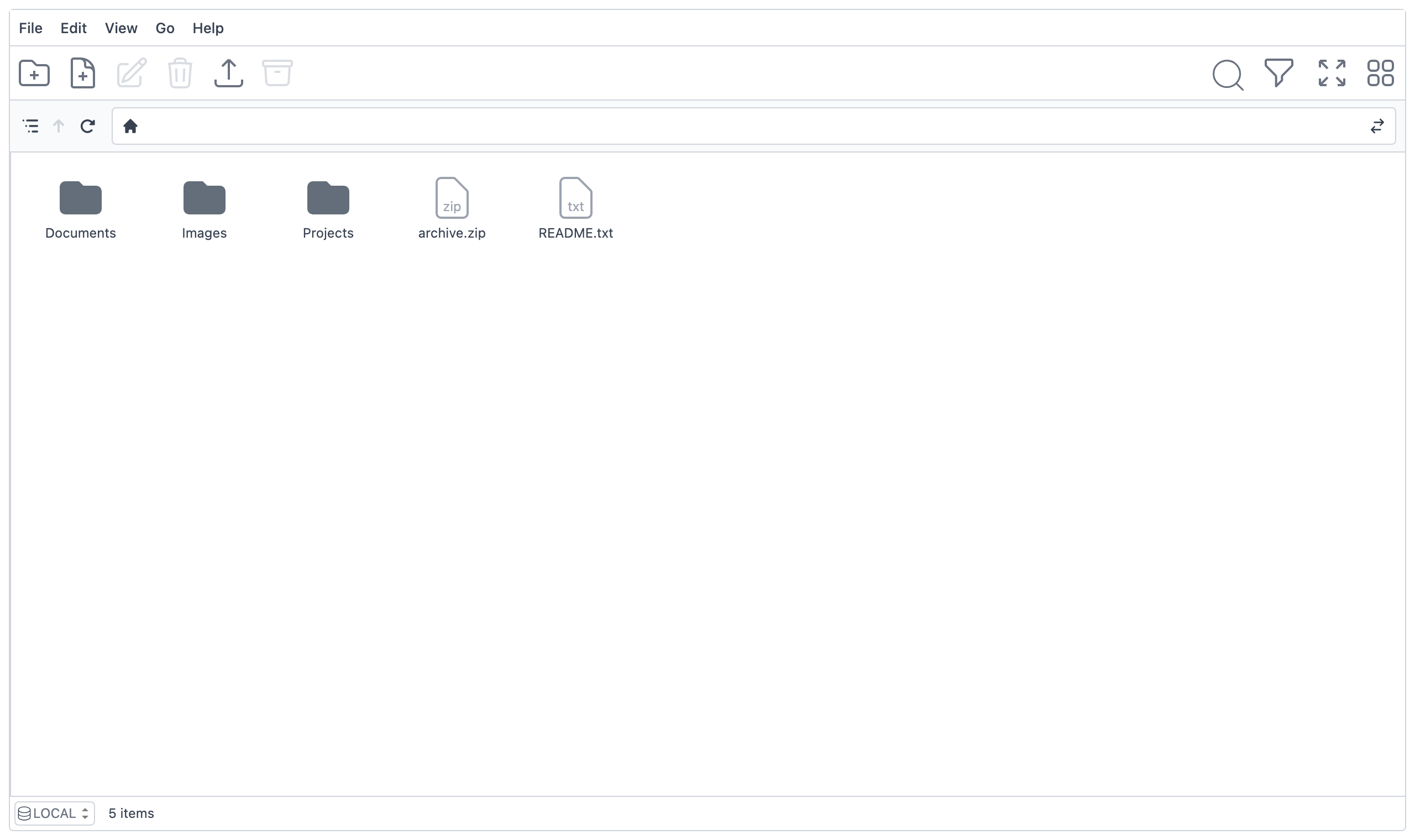
A self-hosted web frontend for managing files on disk. Browse, create, edit, upload, download, rename, move, delete, and work with zip archives — all from the browser. It runs as a single container and serves files from a directory you mount into it, making it a natural fit for Podman, Docker and Kubernetes with a persistent volume.
Features
- Full file management — view, create, rename, move, copy and delete files and folders.
- Edit text files in the browser with a built-in code editor.
- Upload and download files, including drag-and-drop upload.
- Zip archives — create archives from selected items and extract existing ones.
- Search within the current folder or recursively.
- Pluggable authentication — none, HTTP Basic Auth, or OAuth2/OIDC via Keycloak, selected at runtime.
- Path sandboxing — every request is resolved against the configured root
and rejected if it escapes it (
.., symlinks, absolute paths). - Single container — one process serves both the SPA and the file API;
multi-arch images for
linux/amd64andlinux/arm64.
Quick start
The image is published on Docker Hub as
pfeiffermax/file-manager.
Mount a host directory at /data and open http://localhost:8080:
podman run --rm -p 8080:8080 -v "$PWD/files:/data" pfeiffermax/file-manager
# or: docker run --rm -p 8080:8080 -v "$PWD/files:/data" pfeiffermax/file-manager
By default authentication is disabled (AUTH_METHOD=none) — anyone who can
reach the port can manage the files. Enable Basic Auth or Keycloak (see below)
before exposing it beyond localhost.
Configuration
All configuration is provided through environment variables and read by the
backend at startup. The frontend receives only what it needs (auth method and
public Keycloak settings) from GET /api/config. The backend validates the
configuration on startup and fails fast with a clear error if a variable
required by the active AUTH_METHOD is missing.
| Variable | Default | Description |
|---|---|---|
PORT | 8080 | HTTP listen port. |
HOST | 0.0.0.0 | HTTP listen address. |
FILES_ROOT | /data | Root directory of the managed files; all operations are sandboxed to this path. |
AUTH_METHOD | none | Active authentication method: basic, keycloak, or none. |
AUTH_USERNAME | — | Basic Auth username (required when AUTH_METHOD=basic). |
AUTH_PASSWORD | — | Basic Auth password (required when AUTH_METHOD=basic). |
KEYCLOAK_URL | — | Keycloak URL as reached by the browser; determines the token issuer (required when AUTH_METHOD=keycloak). |
KEYCLOAK_INTERNAL_URL | KEYCLOAK_URL | Keycloak URL the backend uses to fetch the realm JWKS. Set it when Keycloak is only reachable internally under a different hostname (compose network, in-cluster service). |
KEYCLOAK_REALM | — | Keycloak realm name (required when AUTH_METHOD=keycloak). |
KEYCLOAK_CLIENT_ID | — | Keycloak client ID (required when AUTH_METHOD=keycloak). |
See .env.example for a copy-paste starting point.
Authentication
The active method is chosen with AUTH_METHOD; the frontend learns it at
runtime from GET /api/config and adapts its login flow accordingly.
none(default) — no authentication. Suitable only for trusted networks or local use.basic— HTTP Basic Auth enforced on every/api/*route with a timing-safe comparison ofAUTH_USERNAME/AUTH_PASSWORD. The app shows its own login form (no browser-native prompt); credentials are kept in memory only and attached as anAuthorization: Basic …header.keycloak— OAuth2/OIDC using the Authorization Code flow with PKCE. Tokens are refreshed silently, and the backend validates Bearer tokens against the realm JWKS usingjose.
Kubernetes deployment
The application is designed to run 24/7 in a container on Kubernetes. No manifests are shipped in this repository, but the notes below cover everything you need.
Volume — mount a PersistentVolumeClaim at FILES_ROOT (default /data).
The container runs as the non-root node user, so the volume must be writable
by that user.
Health probes — the backend exposes an always-unauthenticated
GET /healthz (outside /api/*) returning 200 OK. Use it for both liveness
and readiness probes.
Credentials — never bake credentials into the image or a plain
Deployment. Inject AUTH_USERNAME / AUTH_PASSWORD (or the Keycloak
settings) from a Secret via envFrom or env.valueFrom.secretKeyRef.
# Illustrative Deployment snippet (not a complete manifest).
containers:
  - name: file-manager
    image: pfeiffermax/file-manager:latest
    ports:
      - containerPort: 8080
    env:
      - name: AUTH_METHOD
        value: basic
    envFrom:
      - secretRef:
          name: file-manager-credentials # AUTH_USERNAME / AUTH_PASSWORD
    volumeMounts:
      - name: files
        mountPath: /data
    livenessProbe:
      httpGet:
        path: /healthz
        port: 8080
    readinessProbe:
      httpGet:
        path: /healthz
        port: 8080
volumes:
  - name: files
    persistentVolumeClaim:
      claimName: file-manager-data
When using Keycloak, set KEYCLOAK_URL to the browser-facing issuer URL and, if
Keycloak is reachable in-cluster under a different service hostname, set
KEYCLOAK_INTERNAL_URL to that internal address for JWKS fetching.
Local development
Prerequisites: Node 24 (see .nvmrc) and pnpm (managed via
Corepack — the version is pinned in package.json).
corepack enable
pnpm install
pnpm dev
pnpm dev runs the full stack: the Fastify API on http://localhost:3000
(tsx watch) and the Vite dev server on http://localhost:5173, which proxies
/api and /healthz to the API. During development the managed files live in
.dev-data/ (override with FILES_ROOT).
Common commands
| Command | Description |
|---|---|
pnpm dev | Full dev stack (API + Vite). |
pnpm dev:web | Vite dev server only. |
pnpm dev:server | Backend only (tsx watch). |
pnpm build | Build the SPA (Vite) and backend (tsc) into dist/. |
pnpm start | Run the built server (production entrypoint). |
pnpm lint | ESLint with --fix. |
pnpm format | Prettier write. |
pnpm typecheck | vue-tsc (frontend) and tsc (backend), no emit. |
pnpm test:unit | Vitest unit tests. |
pnpm test:e2e | Playwright end-to-end tests. |
Testing
- Unit tests (Vitest) cover the Pinia stores and composables on the frontend and the route handlers, config parsing, auth logic and the security-critical path sandboxing on the backend.
- E2E tests (Playwright) cover the main file CRUD flows and the Basic Auth login flow; the auth layer is stubbed at the network edge, so no Keycloak is required.
Local manual testing with Keycloak
A Podman Compose stack brings up the app behind a preconfigured Keycloak:
podman compose up --build
- App: http://localhost:8080 (log in as
test/test) - Keycloak admin console: http://localhost:8081 (
admin/admin)
The realm file-manager and client file-manager are imported from
compose/keycloak/realm.json. The test user is
for local testing only.
Building the container image
The image uses a multi-stage Containerfile and is built with
Podman:
podman build -t file-manager -f Containerfile .
podman run --rm -p 8080:8080 -v "$PWD/files:/data" file-manager
Architecture
Single package — the Vue 3 SPA (src/) and the Fastify backend (server/)
share one package.json and one toolchain. In production a single process
serves the built SPA via @fastify/static and the file API under /api/*.
src/— Vue 3 frontend (SPA): VueFinder UI, Pinia stores, router.server/— Fastify backend: file API, auth, config, path sandboxing.e2e/— Playwright end-to-end tests.compose/— assets for local manual testing (Keycloak realm import)..github/workflows/— CI and release automation.
See CLAUDE.md for the full architecture and conventions
reference.
Releases & CI
- CI (
.github/workflows/ci.yaml) runs linting, format checks, type checking and unit tests on every pull request. - Releases are managed by
release-please: merging
Conventional Commit history to
mainopens a release PR, and merging it tags a semantic version. - Tagging a version builds and pushes the multi-arch container image to Docker
Hub, tagged with the version and
latest.
Contributing
mainis protected — never commit to it directly.- Branch names:
feature/<short-kebab-name>orbugfix/<short-kebab-name>. - Commit messages follow the Conventional Commits specification.
- Open a pull request against
main; CI must pass before merge.
License
See LICENSE.
Tag summary
Content type
Image
Digest
sha256:48df6b452…
Size
73.3 MB
Last updated
2 months ago
docker pull pfeiffermax/file-manager