qxorm/ubuntu-with-qxorm-dev-qxblogrestapi
QxOrm - C++ Qt ORM library - simple HTTP web server with JSON API to send requests to SQLite db
10K+
qxorm/ubuntu-with-qxorm-dev-qxblogrestapi repository overview
QxOrm library - Docker file for C++ and Qt development environment - Project qxBlogRestApi
This Docker file creates a Docker image based on Ubuntu (latest version by default). This Docker file installs a C++ development environment with gcc, cmake, Qt and builds QxOrm library from latest QxOrm source code.
About QxOrm library
QxOrm library is a C++ library based on Qt framework, its main features are : ORM persistence, serialization, reflection, introspection, JSON API, HTTP web server. QxOrm library supports most common databases like SQLite, MySQL, PostgreSQL, Oracle, MS SQL Server, MongoDB, MariaDB. QxOrm library documentation : https://www.qxorm.com/qxorm_en/manual.html
About this Docker file
The generated Docker image will execute a container based on a QxOrm library project example. The QxOrm project example is a simple HTTP web server and uses QxOrm JSON API to send requests to a SQLite database. More details about the project 'qxBlogRestApi' : https://github.com/QxOrm/QxOrm/tree/master/test/qxBlogRestApi
The built Docker image can be pulled from Docker Hub and provides 2 modes :
- Minimal size, just QxOrm library and all dependencies
- Full C++ development environment with QxOrm library
Build Docker image and run Docker container
Mode minimal size (by default)
To test this Docker file and build/run the Docker container, execute the following commands :
cd <path_to_this_docker_file>
docker build -t qxorm/ubuntu-with-qxorm-test-qxblogrestapi .
docker run --rm -itd -p 9642:9642 qxorm/ubuntu-with-qxorm-test-qxblogrestapi
By default, Docker build generates a minimal image size, with just the QxOrm test application and all dependencies.
Mode C++ development environment
To build a Docker image with full C++ development environment, execute the following commands :
cd <path_to_this_docker_file>
docker build --target dev -t qxorm/ubuntu-with-qxorm-dev-qxblogrestapi .
docker run --rm -itd -p 9642:9642 -p 9643:9643 -p 2222:22 qxorm/ubuntu-with-qxorm-dev-qxblogrestapi
Then access to the remote C++ development environment via Visual Studio Code with the Dev Containers extension or via Remote SSH extension.
Connect to the container with VSCode 'Dev Containers' extension
To connect to the C++ development environment with the Dev Containers extension :
- On the host machine, open Visual Studio Code
- Install the Dev Containers extension
- Select workspace (open directory) : path to this docker file (which includes a sub-directory named '.devcontainer')
- Visual Studio Code detects automatically the '.devcontainer' sub-directory and provides the action 'Reopen in Container'
- Execute 'Reopen in Container' ==> a new Visual Studio Code instance is created, this new instance is connected to the running Docker container
Connect to the container with VSCode 'Remote SSH' extension
To connect to the C++ development environment with the Remote SSH extension :
- On the host machine, open Visual Studio Code
- Install the Remote SSH extension
- From the Remote SSH extension, execute :
ssh qxorm@localhost -p 2222
- When asked, enter password : qxorm
- A new Visual Studio Code instance is created, this new instance is connected to the running Docker container
- On the remote Visual Studio Code instance, select workspace (open directory) :
/home/qxorm/src/QxOrm/
Build and debug project in container
Once connected to the remote C++ development environment (with Dev Containers extension or Remote SSH extension) :
- Press 'CTRL+SHIFT+B' to build the project in debug mode
- Press 'F5' to execute the project in debug mode
Check QxOrm test application web-page
Once Docker container is running, to check if the QxOrm test application is started, on your host machine, open a web browser and go to URL :
http://localhost:9642/files/test_http_server.html
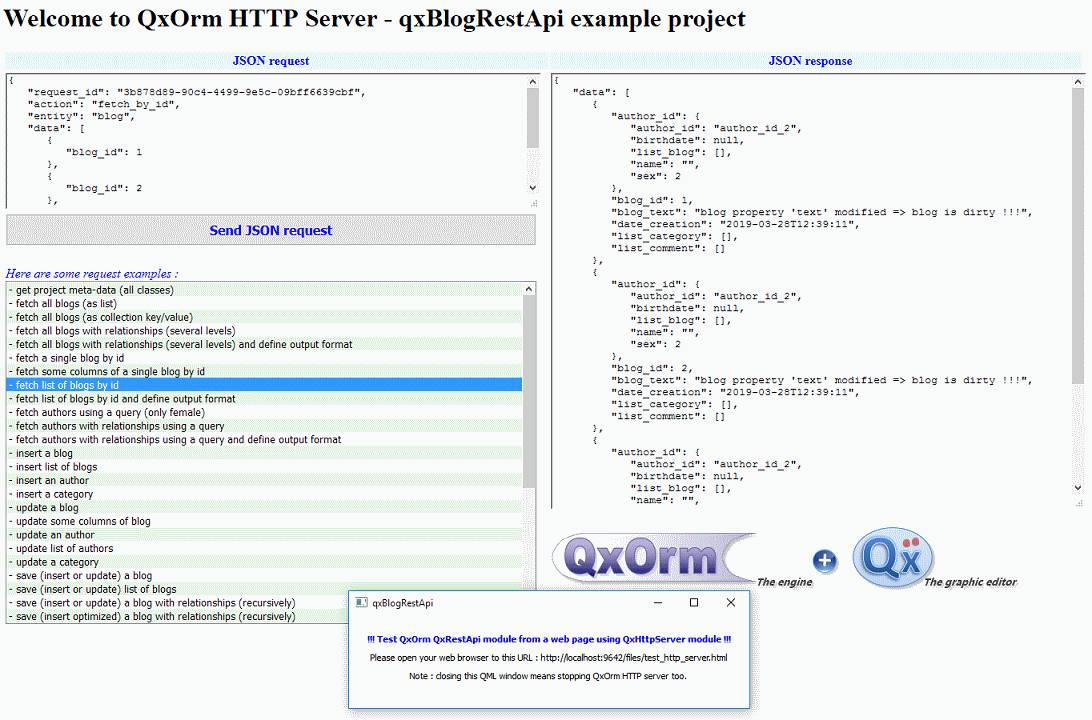
Note : when the test application is executed in debug mode, the port number is changed to '9643', so the URL becomes :
http://localhost:9643/files/test_http_server.html
Authors
QxOrm is developed by Lionel Marty, a software development engineer since 2003.
License
QxOrm is a C++ library available under a dual license :
- GNU/GPLv3 license : open-source and free (to develop an open-source project or to evaluate QxOrm library) ;
- Proprietary license to distribute an application based on QxOrm library without any restrictions of GNU/GPLv3 license.
Tag summary
Content type
Image
Digest
sha256:9069cee84…
Size
746.6 MB
Last updated
6 months ago
docker pull qxorm/ubuntu-with-qxorm-dev-qxblogrestapi