shinejh0528/openclaw
Basic openclaw image
137
shinejh0528/openclaw repository overview
Openclaw
Supported -e Environment Variables (entrypoint.sh)
-
OPENCLAW_GATEWAY_PORT : Gateway port inside the container. Default: 18789
- Example:
-e OPENCLAW_GATEWAY_PORT=18789
- Example:
-
OPENCLAW_GATEWAY_TOKEN : Gateway auth token. If provided, it is used as-is. If not provided, the entrypoint generates one via
openssl rand -hex 32, then saves it to/root/.openclaw/gateway.tokenand reuses it on later runs.- Example:
-e OPENCLAW_GATEWAY_TOKEN=xxxxxxxx
- Example:
-
LLM_PLATFORM : LLM provider selector. In the current entrypoint, only
openaiis handled explicitly (it writesOPENAI_API_KEYinternally).- Allowed (major):
openai(OpenAI API + Codex)anthropic(Claude API)openrouter(OpenRouter)litellm(LiteLLM unified gateway)bedrock(Amazon Bedrock)vercel(Vercel AI Gateway)together(Together AI)cloudflare(Cloudflare AI Gateway)moonshot(Moonshot AI / Kimi)venice(Venice AI)ollama(local models)qwen(Qwen OAuth)
- Example:
-e LLM_PLATFORM=openai
- Allowed (major):
-
LLM_MODEL : Model name.
- If you pass
gpt-5-mini, it is normalized toopenai/gpt-5-mini. - If you pass
openai/<model>, it is used as-is. - Default:
gpt-5-mini(effective:openai/gpt-5-mini) - Example:
-e LLM_MODEL=gpt-5-mini
- If you pass
-
LLM_API_KEY : API key for the selected provider. When
LLM_PLATFORM=openai, it is written toOPENAI_API_KEYin/root/.openclaw/.env.- Example:
-e LLM_API_KEY=sk-...
- Example:
-
BRAVE_SEARCH_ENABLED : Enables Brave Search key injection (env-only).
- Allowed:
true/false - Default:
false - Example:
-e BRAVE_SEARCH_ENABLED=true
- Allowed:
-
BRAVE_API_KEY : Brave Search API key. Used only when
BRAVE_SEARCH_ENABLED=true. Stored in/root/.openclaw/.env.- Example:
-e BRAVE_API_KEY=...
- Example:
-
CHAT_PLATFORM : Chat platform selector. In the current entrypoint, this is only used to decide whether to store the Telegram token (no pairing automation).
- Allowed:
telegram(others are ignored) - Example:
-e CHAT_PLATFORM=telegram
- Allowed:
-
TELEGRAM_BOT_TOKEN : Telegram bot token. Stored in
/root/.openclaw/.envonly whenCHAT_PLATFORM=telegram. (Pairing/enable steps are not automated.)- Example:
-e TELEGRAM_BOT_TOKEN=123456:ABC...
- Example:
Usage
1. Run container
You can run with -itd option. In this example, we use -it option to see log.
PowerShell ex)
# =========================
# env variables
# =========================
$sOpenai_api_key = "sk-...YOUR_OPENAI_KEY..."
$sBrave_api_key = "BSA...YOUR_BRAVE_KEY..."
$sTelegram_bot_token = "123456789:ABC...YOUR_TELEGRAM_BOT_TOKEN..."

# =========================
# command
# =========================
docker run -it --name openclaw `
  -p 18789:18789 `
  -v F:\docker_volume\openclaw\.openclaw:/root/.openclaw `
  -e OPENCLAW_GATEWAY_PORT=18789 `
  -e LLM_PLATFORM=openai `
  -e LLM_MODEL=gpt-5-mini `
  -e LLM_API_KEY=$sOpenai_api_key `
  -e BRAVE_SEARCH_ENABLED=true `
  -e BRAVE_API_KEY=$sBrave_api_key `
  -e CHAT_PLATFORM=telegram `
  -e TELEGRAM_BOT_TOKEN=$sTelegram_bot_token `
  shinejh0528/openclaw:1.0.0
Linux cmd ex)
# =========================
# env variables
# =========================
export OPENAI_API_KEY="sk-...YOUR_OPENAI_KEY..."
export BRAVE_API_KEY="BSA...YOUR_BRAVE_KEY..."
export TELEGRAM_BOT_TOKEN="123456789:ABC...YOUR_TELEGRAM_BOT_TOKEN..."

# =========================
# command
# =========================
docker run -it --name openclaw \
  -p 18789:18789 \
  -v /opt/docker_volume/openclaw/.openclaw:/root/.openclaw \
  -e OPENCLAW_GATEWAY_PORT=18789 \
  -e LLM_PLATFORM=openai \
  -e LLM_MODEL=gpt-5-mini \
  -e LLM_API_KEY="${OPENAI_API_KEY}" \
  -e BRAVE_SEARCH_ENABLED=true \
  -e BRAVE_API_KEY="${BRAVE_API_KEY}" \
  -e CHAT_PLATFORM=telegram \
  -e TELEGRAM_BOT_TOKEN="${TELEGRAM_BOT_TOKEN}" \
  shinejh0528/openclaw:1.0.0
2. Enter inside the container and onboard
docker exec -it openclaw /bin/bash
openclaw onboard
Setting for onboard
🦞 OpenClaw 2026.2.9 (<commit>) — <tagline>

▄▄▄▄▄▄▄▄▄▄▄▄▄▄▄▄▄▄▄▄▄▄▄▄▄▄▄▄▄▄▄▄▄▄▄▄▄▄▄▄▄▄▄▄▄▄▄▄▄▄▄▄
██░▄▄▄░██░▄▄░██░▄▄▄██░▀██░██░▄▄▀██░████░▄▄▀██░███░██
██░███░██░▀▀░██░▄▄▄██░█░█░██░█████░████░▀▀░██░█░█░██
██░▀▀▀░██░█████░▀▀▀██░██▄░██░▀▀▄██░▀▀░█░██░██▄▀▄▀▄██
▀▀▀▀▀▀▀▀▀▀▀▀▀▀▀▀▀▀▀▀▀▀▀▀▀▀▀▀▀▀▀▀▀▀▀▀▀▀▀▀▀▀▀▀▀▀▀▀▀▀▀▀
                  🦞 OPENCLAW 🦞

┌  OpenClaw onboarding
│
◇  Security ──────────────────────────────────────────────────────────────────────────────╮
│                                                                                         │
│  Security warning — please read.                                                        │
│                                                                                         │
│  OpenClaw is a hobby project and still in beta. Expect sharp edges.                     │
│  This bot can read files and run actions if tools are enabled.                          │
│  A bad prompt can trick it into doing unsafe things.                                    │
│                                                                                         │
│  If you’re not comfortable with basic security and access control, don’t run OpenClaw.  │
│  Ask someone experienced to help before enabling tools or exposing it to the internet.  │
│                                                                                         │
│  Recommended baseline:                                                                  │
│  - Pairing/allowlists + mention gating.                                                 │
│  - Sandbox + least-privilege tools.                                                     │
│  - Keep secrets out of the agent’s reachable filesystem.                                │
│  - Use the strongest available model for any bot with tools or untrusted inboxes.       │
│                                                                                         │
│  Run regularly:                                                                         │
│  openclaw security audit --deep                                                         │
│  openclaw security audit --fix                                                          │
│                                                                                         │
│  Must read: https://docs.openclaw.ai/gateway/security                                   │
│                                                                                         │
├─────────────────────────────────────────────────────────────────────────────────────────╯
│
◇  I understand this is powerful and inherently risky. Continue?
│  Yes
│
◇  Onboarding mode
│  QuickStart
│
◇  Existing config detected ─────────╮
│                                    │
│  workspace: ~/.openclaw/workspace  │
│  model: openai/gpt-5-mini          │
│  gateway.mode: local               │
│  gateway.port: 18789               │
│  gateway.bind: loopback            │
│  skills.nodeManager: pnpm          │
│                                    │
├────────────────────────────────────╯
│
◇  Config handling
│  Use existing values
│
◇  QuickStart ─────────────────────────────╮
│                                          │
│  Keeping your current gateway settings:  │
│  Gateway port: 18789                     │
│  Gateway bind: Loopback (127.0.0.1)      │
│  Gateway auth: Token (default)           │
│  Tailscale exposure: Off                 │
│  Direct to chat channels.                │
│                                          │
├──────────────────────────────────────────╯
│
◇  Model/auth provider
│  OpenAI
│
◇  OpenAI auth method
│  OpenAI API key
│
◇  Use existing OPENAI_API_KEY (env: OPENAI_API_KEY, sk-…<redacted>)?
│  Yes
│
◇  OpenAI API key ──────────────────────────────────────────────────────────╮
│                                                                           │
│  Saved OPENAI_API_KEY to /root/.openclaw/.env for launchd compatibility.  │
│                                                                           │
├───────────────────────────────────────────────────────────────────────────╯
│
◇  Model configured ──────────────────────────╮
│                                             │
│  Default model set to openai/<redacted>     │
│                                             │
├─────────────────────────────────────────────╯
│
◇  Default model
│  openai/gpt-5-mini
│
◇  Channel status ────────────────────────────╮
│                                             │
│  Telegram: configured                       │
│  WhatsApp: not configured                   │
│  Discord: not configured                    │
│  Google Chat: not configured                │
│  Slack: not configured                      │
│  Signal: not configured                     │
│  iMessage: work in progress                 │
│  (Other channels omitted)                   │
│                                             │
├─────────────────────────────────────────────╯
│
◇  Select channel (QuickStart)
│  Telegram (Bot API)
│
◇  Telegram already configured. What do you want to do?
│  Skip (leave as-is)
Updated ~/.openclaw/openclaw.json
Workspace OK: ~/.openclaw/workspace
Sessions OK: ~/.openclaw/agents/main/sessions
│
◇  Skills status ────────────╮
│                            │
│  Eligible: <n>             │
│  Missing requirements: <n> │
│  Blocked by allowlist: <n> │
│                            │
├────────────────────────────╯
│
◇  Configure skills now? (recommended)
│  Yes
│
◇  Homebrew recommended ──────────────────────────────────────────────────────────╮
│                                                                                 │
│  Many skill dependencies are shipped via Homebrew.                              │
│  Without brew, you'll need to build from source or download releases manually.  │
│                                                                                 │
├─────────────────────────────────────────────────────────────────────────────────╯
│
◇  Hooks ──────────────────────────────────────────────────────────╮
│                                                                  │
│  Hooks let you automate actions when agent commands are issued.  │
│  Example: Save session context to memory when you issue /new.    │
│                                                                  │
│  Learn more: https://docs.openclaw.ai/hooks                      │
│                                                                  │
├──────────────────────────────────────────────────────────────────╯
│
◇  Enable hooks?
│  📝 command-logger
│
◇  Control UI ─────────────────────────────────────────────────────────────────────╮
│                                                                                  │
│  Web UI: http://127.0.0.1:18789/                                                 │
│  Web UI (with token): http://127.0.0.1:18789/#token=<REDACTED_TOKEN>             │
│  Gateway WS: ws://127.0.0.1:18789                                                │
│  Docs: https://docs.openclaw.ai/web/control-ui                                   │
│                                                                                  │
├──────────────────────────────────────────────────────────────────────────────────╯
│
◇  Token ─────────────────────────────────────────────────────────────────────────────────╮
│                                                                                         │
│  Gateway token: shared auth for the Gateway + Control UI.                               │
│  Stored in: ~/.openclaw/openclaw.json (gateway.auth.token) or OPENCLAW_GATEWAY_TOKEN.   │
│  View token: openclaw config get gateway.auth.token                                     │
│  Generate token: openclaw doctor --generate-gateway-token                               │
│  Web UI stores a copy in this browser's localStorage (openclaw.control.settings.v1).    │
│  If prompted: paste the token into Control UI settings (or use the tokenized URL).     │
│                                                                                         │
├─────────────────────────────────────────────────────────────────────────────────────────╯
│
◇  Start TUI (best option!)
│  openclaw tui - ws://127.0.0.1:18789 - agent main - session main
│
│  Wake up, my friend!
│
│  Hey — I’m awake.
│  (Intro questions omitted)
3. Get telegram pairing token and enroll the token
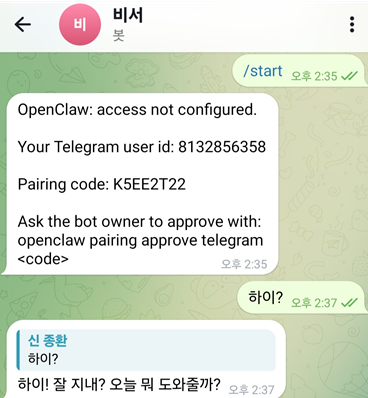
Cmd ex)
openclaw pairing approve telegram [your_token]
Run manually
docker run -itd -p 18789:18789 --name openclaw shinejh0528/openclaw:1.0.0 /bin/bash

# and enter inside the container, run openclaw manually
docker exec -it openclaw
Running with your settings
After the initial setup (mapping the .openclaw folder with the -v option), you can just run the command, and OpenClaw will start up right away.
docker run -it --name openclaw -p 18789:18789 -v F:\docker_volume\openclaw\.openclaw:/root/.openclaw shinejh0528/openclaw:1.0.0 openclaw gateway --port 18789 --verbose
Tag summary
Content type
Image
Digest
sha256:7af3d7c4d…
Size
1.8 GB
Last updated
7 months ago
docker pull shinejh0528/openclaw:1.0.0