tabilzad/sectorama
2.4K
tabilzad/sectorama repository overview

Self-hosted disk benchmark and health monitor.
Sectorama discovers your drives, runs comprehensive fio benchmarks (position curve + I/O profiles), polls SMART attributes on a schedule, and surfaces everything through a clean React dashboard — all from a single Docker container on your own hardware.
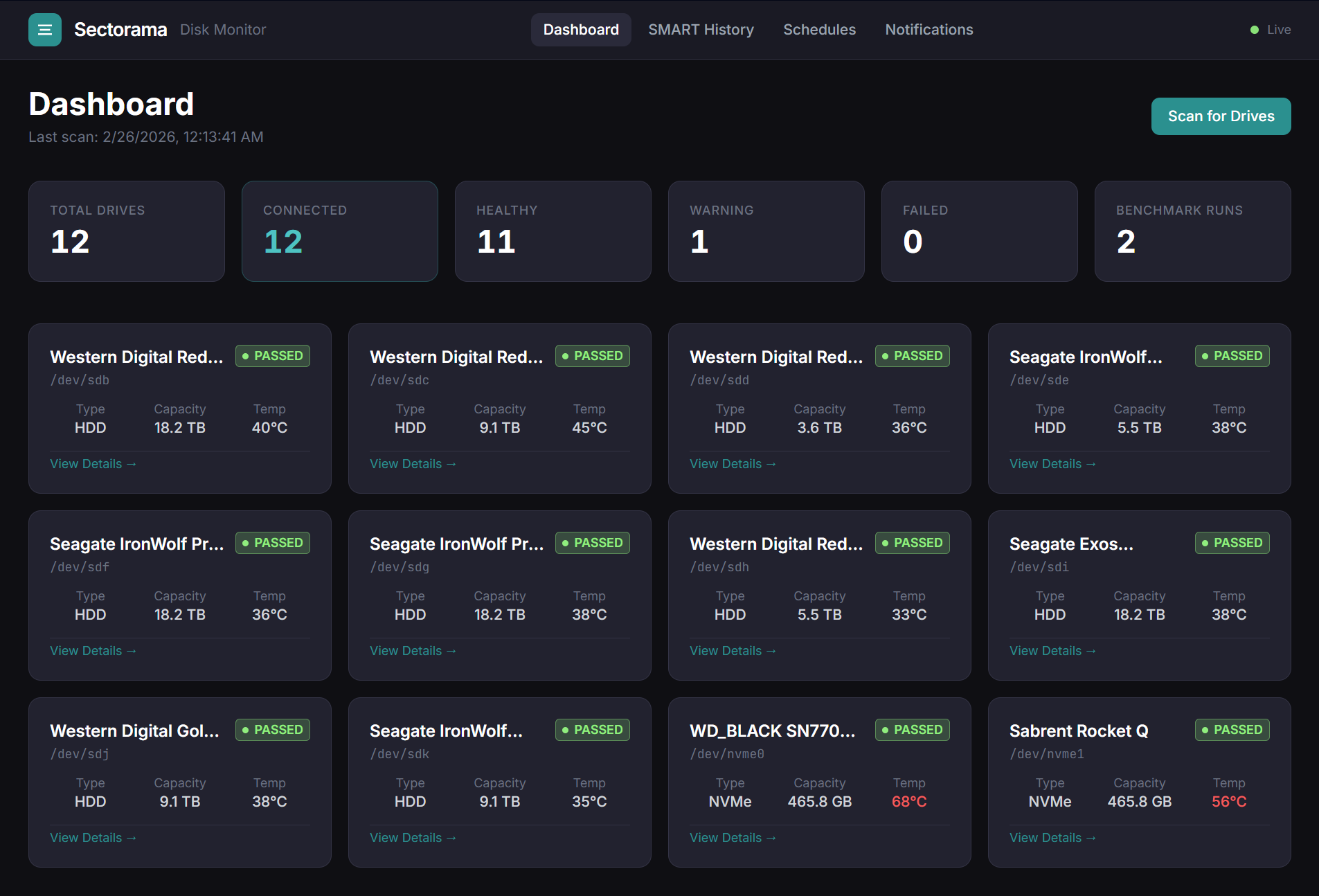
Dashboard showing 12 drives with live SMART health badges, temperatures, type, and capacity at a glance.
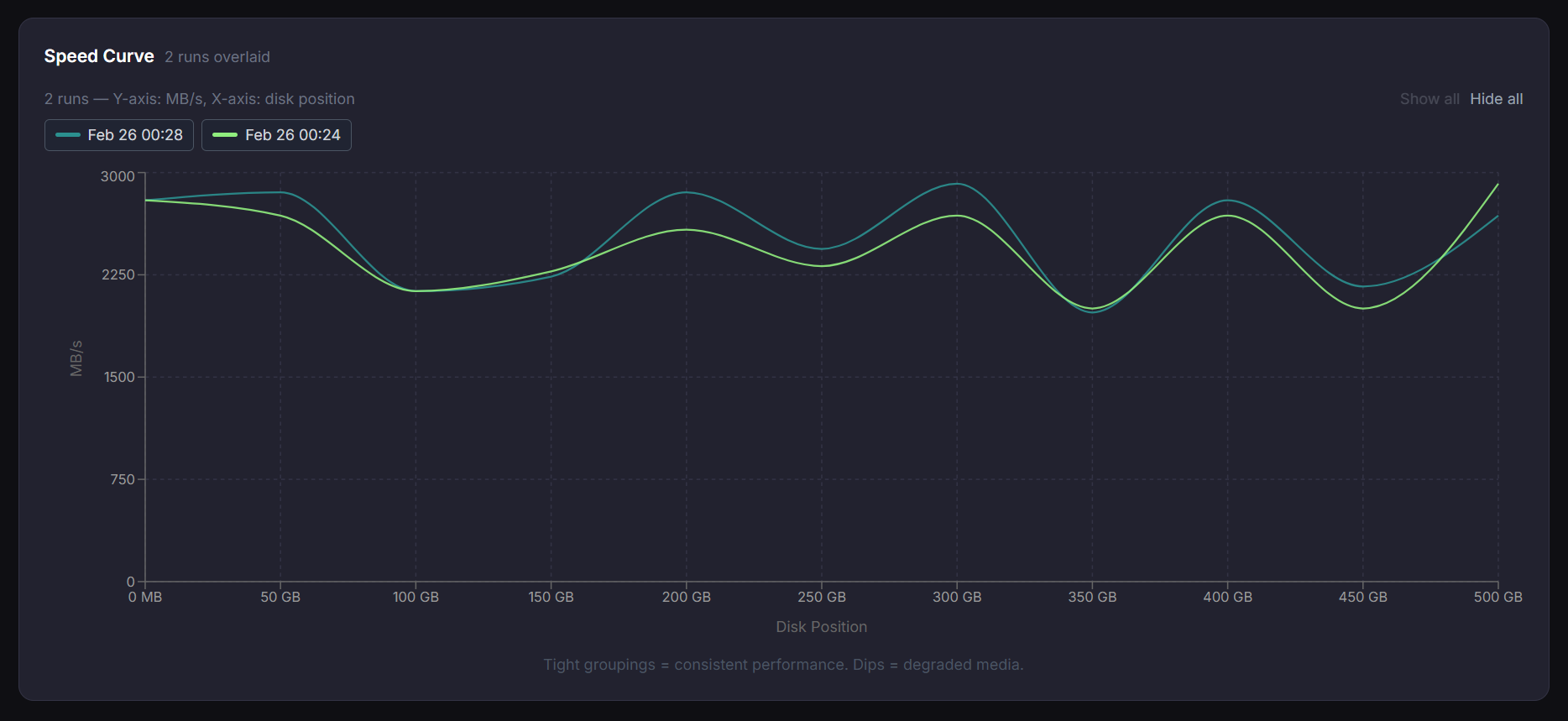
Historical speed curve to track performance overtime
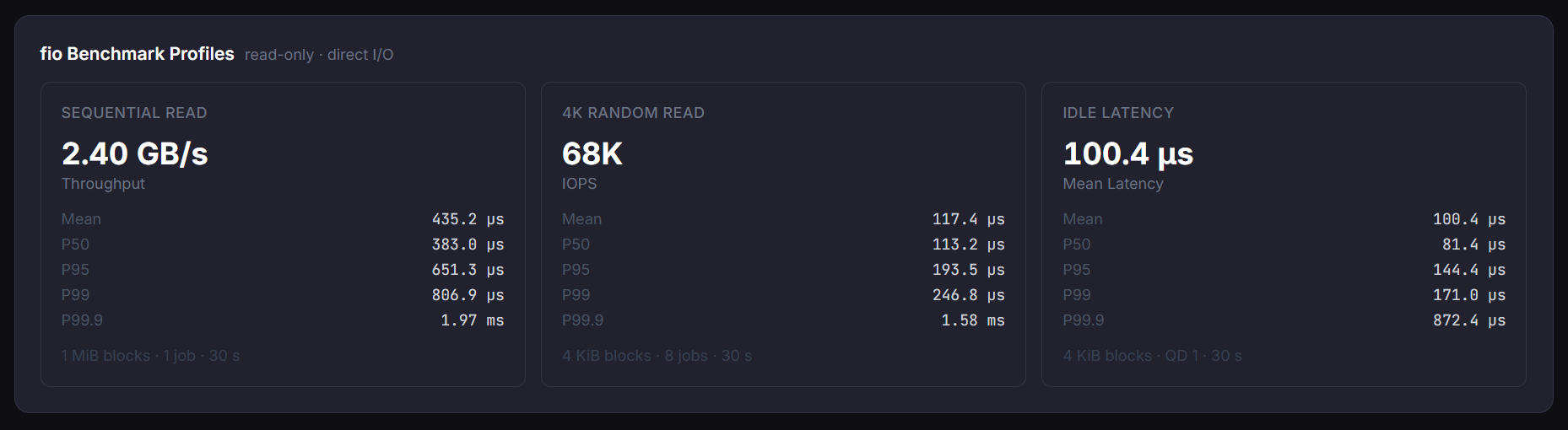
Latency, sequential and random read statistics
Features
- Drive discovery — auto-detects all block devices via
smartctl --scan - Position curve — measures sequential read speed at evenly-spaced byte offsets to visualise the speed falloff from outer to inner tracks
- fio profiles — three standard benchmark profiles per run:
- Sequential read (1 MiB blocks, 30 s)
- 4 K random read (8 parallel jobs, 30 s)
- Idle latency (P50 / P95 / P99 / P99.9 ns)
- SMART history — scheduled polling stored in InfluxDB; attribute trends charted over time
- Benchmark schedules — cron-based per-drive or global schedules
- Notifications — alert channels (Webhook, Slack) with per-alert-type subscriptions; transition-only firing (once on condition onset, silent until it clears and re-triggers); per-drive temperature threshold overrides
- Live feed — WebSocket push for real-time benchmark progress and health alerts
- Dark UI — React + Tailwind dashboard; fully responsive
Quick Start (Docker Compose)
1. Copy the compose file
curl -O https://raw.githubusercontent.com/tabilzad/sectorama/master/docker-compose.prod.yml
2. Set required secrets
export INFLUXDB_TOKEN=change-me-strong-random-secret
# optional — defaults shown
export INFLUXDB_ADMIN_PASSWORD=adminpass
export SMART_POLL_INTERVAL_MINUTES=5
export BENCHMARK_NUM_POINTS=11
3. Start
docker compose -f docker-compose.prod.yml up -d
Open http://localhost:8888, click Scan for Drives, then run a benchmark from any drive's detail page.
Note: The container runs
privilegedand mounts/devread-only so thatsmartctlandfiocan access raw block devices. Do not expose port 8888 to the public internet.
Development Setup
# 1. Clone
git clone https://github.com/tabilzad/sectorama.git
cd sectorama

# 2. Install workspace dependencies
npm install

# 3. Start just the InfluxDB
docker compose -f docker-compose.dev.yml up -d

# 4. Configure environment for node
cp .env.example .env
# On Windows/macOS: add DISK_DISCOVERY_MOCK=true to .env

# 5. Run (backend :8888, frontend :5173 with HMR)
npm run dev
Build
npm run build       # compiles shared → backend → frontend
npm run typecheck   # type-check all workspaces without emitting
Environment Variables
| Variable | Default | Description |
|---|---|---|
PORT | 8888 | HTTP port the backend listens on |
SQLITE_PATH | ./sectorama.db | Path to the SQLite database file |
INFLUXDB_URL | http://localhost:8086 | InfluxDB v2 base URL |
INFLUXDB_TOKEN | (required) | InfluxDB API token |
INFLUXDB_ORG | sectorama | InfluxDB organisation |
INFLUXDB_BUCKET | sectorama | InfluxDB bucket |
INFLUXDB_ADMIN_PASSWORD | adminpass | Admin password for the bundled InfluxDB service |
SMART_POLL_INTERVAL_MINUTES | 5 | SMART polling interval |
BENCHMARK_NUM_POINTS | 11 | Number of positions sampled in each position-curve run |
DISK_DISCOVERY_MOCK | false | Return synthetic drives/SMART/benchmark data (Windows/macOS dev) |
TEMPERATURE_ALERT_THRESHOLD_CELSIUS | 50 | Global default temperature alert threshold; overridable per drive |
Data stores
| Store | What lives there |
|---|---|
SQLite (better-sqlite3) | Drive registry, benchmark run metadata, schedules, latest SMART cache, notification channels, subscriptions, per-drive alert thresholds |
| InfluxDB v2 | SMART attribute history, benchmark speed points, benchmark profile results |
Notifications
Sectorama can push alerts to external services when a drive's health or temperature crosses a threshold.
Alert types
| Type | Fires when… |
|---|---|
smart_error | SMART self-assessment transitions from passing → failing |
temperature | Drive temperature transitions from at-or-below the threshold to above it |
Alerts are transition-only: they fire once when a condition first occurs and are silent until the condition clears and re-triggers. This prevents alert storms on every poll.
Channel types
| Type | Config fields |
|---|---|
webhook | URL + optional auth (None / Basic / Bearer token) |
slack | Slack Incoming Webhook URL (Block Kit formatting) |
Channels are managed from the Notifications page in the UI. Each channel can subscribe to any combination of alert types. A test payload can be sent from the UI at any time.
Temperature thresholds
The global default is set via TEMPERATURE_ALERT_THRESHOLD_CELSIUS (default 50°C). Individual drives can override
this from the Alert Settings section on the Drive Detail → SMART tab.
Adding a new channel type
- Create
packages/backend/src/services/notifications/channels/MyChannel.tsimplementingINotificationChannel - Add a
case 'mytype'tochannelFactory.ts - Add the new
ChannelTypeto@sectorama/shared
No other files need to change.
Contributing
Contributions are welcome. Please:
- Fork the repository and create a branch from
master - Make your changes and verify
npm run build && npm run typecheckpass - Open a pull request — CI will run automatically on the PR
For larger changes, open an issue first to discuss the approach.
License
Released under the GNU General Public License v3.0.
Tag summary
Content type
Image
Digest
sha256:856c65c8f…
Size
73.4 MB
Last updated
6 months ago
docker pull tabilzad/sectorama