unfor19/nexus-ops repository overview
nexus-ops



Provision Nexus Repository Manager (NXRM) Docker container.
All scripts are written in Bash, and the Nexus REST API calls are made with curl. Check the provision/entrypoint.sh to learn more about the provisioning process.
Goals
- Hands-on experience with Nexus Repository Manager
- Provisioning a ready-to-go Nexus Repository Manager container
- Use Nexus Repository Manager as part of a CI/CD workflow
Requirements
- Hardware
- Docker (Windows users should use WSL2 backend)
- Set Nexus's Repository as a trusted Docker repository (insecure registry) - Either edit
$HOME/.docker/config.jsonor the Docker Engine, and then restart the Docker Daemon."insecure-registries": [ "localhost:8081" ],
Quick Start
The provisioning script provision/entrypoint.sh performs the following tasks
- Changes the initial random password that is in
/nexus-data/admin.passwordtoadmin - Enables anonymous access - allows anonymous users to access
localhost:8081withREADpermissions - Adds Docker Bearer Token Realm - allows anonymous pulls from local Nexus registry
localhost:8081 - Creates two Docker repository of type proxy
docker-hub- DockerHubdocker-ecrpublic- AWS ECR Public
- Creates a Docker repository of type group
docker-group- The above Docker repositories are members of this Docker group
Docker Run
# ulimit - https://help.sonatype.com/repomanager3/installation/system-requirements#SystemRequirements-Docker
# 8081 - Nexus
# 8082 - docker-group
docker run -d \
   --ulimit nofile=65536:65536 \
   -p 8081:8081 \
   -p 8082:8082 \
   --name nexus "unfor19/nexus-ops"
How It Works
Nexus's Repository will serve as a "cache server", here's the logic -
- Each
docker pullgoes throughlocalhost:8082/repository/docker-groupand gets the and then redirected to the relevantdocker-proxy.- DockerHub -
http://localhost:8081/repository/docker-hub/v2/ - AWS ECR Public -
http://localhost:8081/repository/docker-ecrpublic/v2/
- DockerHub -
- If the Docker image exists, Docker Client pulls it from NXRM
- It is recommended to re-tag the image from
localhost:8082/nginxtonginx, so the references in your Dockerfile can remainnginx.
- It is recommended to re-tag the image from
- If the Docker image doesn't exist, NXRM pulls it from DockerHub and saves it in Nexus's Repository. Following that, the Docker Client pulls the image from NXRM.
Run Nexus Locally (UI)
This is the exact same process that was done in the Quick Start section, only now we're going to do it manually in the UI. The purpose of this section is to help Nexus newbies (like me) to get familiar with the UI.
Expand/Collapse
For the sake of simplicity, I won't be using Docker volumes for Persistent Data. The nexus-data is generated at the top layer of Nexus's container, so if the container is removed (not stopped), all the data in nexus-data is lost, including the Docker images.
- Run Nexus locally
NEXUS_VERSION="3.30.1" && \ # ulimit - https://help.sonatype.com/repomanager3/installation/system-requirements#SystemRequirements-Docker # 8081 - Nexus # 8082 - docker-group docker run -d \ --ulimit nofile=65536:65536 \ -p 8081:8081 \ -p 8082:8082 \ --name nexus "sonatype/nexus3:${NEXUS_VERSION}" - Get the initial admin password - exec into the Docker container
nexusand executecat /nexus-data/admin.password; echo # the extra echo makes it easier to copy-paste # Example: # e9d3c296-c89a-41b3-bc44-1484c59c9f05 - Login for the first time - http://localhost:8081
- Username:
admin - Password:
from-previous-step - Set the new password to
adminandEnable anonymous access
- Username:
Setup Docker Repository With Nexus
-
Server Administration (Cogwheel) > Repositories > Create DockerHub repository
- Recipe Type: docker (proxy)
- Name:
docker-hub - Remote storage URL (DockerHub):
https://registry-1.docker.io - Docker Index: Use Docker Hub
-
(Optional) Server Administration (Cogwheel) > Repositories > Create AWS ECR Public repository
- Recipe Type: docker (proxy)
- Name:
docker-ecr - Remote storage URL (ECR):
https://public.ecr.aws- Docker login to AWS ECR:
aws ecr-public get-login-password --region us-east-1 | docker login --username AWS --password-stdin public.ecr.aws
- Docker login to AWS ECR:
- Docker Index: Use proxy registry
-
Server Administration (Cogwheel) > Repositories > Create repository
- Recipe Type: docker (group)
- Name:
docker-group - HTTP:
8082- Images are pulled fromhttp://localhost:8082 - Allow Anonymous docker pull: check
- Member repositories > Members > Add
docker-hub - Member repositories > Members > Add
docker-ecr
-
Realms > Add Docker Bearer Token Realm - Enables Anonymous Pulls
Test Locally
- Pull relevant Docker images via
localhost:8082docker pull localhost:8082/unfor19/alpine-ci:latest && \ docker pull localhost:8082/ubuntu:20.04 - Tag relevant images with
docker.ioor omit the prefix (like I did), that will mitigate the need to rename images tolocalhost:8082docker tag localhost:8082/unfor19/alpine-ci:latest unfor19/alpine-ci:latest && \ docker tag localhost:8082/ubuntu:20.04 ubuntu:20.04 docker build- build the application; the Docker Daemon already pulled the required images to build the app.git clone https://github.com/unfor19/nexus-ops.git cd nexus-ops docker build -f Dockerfile.example -t unfor19/nexus-ops:example .test imagedocker run --rm unfor19/nexus-ops:example # Miacis, the primitive ancestor of cats, was a small, tree-living creature of the late Eocene period, some 45 to 50 million years ago. # ^^ A random cat fact for each build
Workflow (CI/CD)
I've added the GitHub Action - docker-release.yml. If you check it out, you'll see the following code snippet
jobs:
  docker:
    name: docker
    runs-on: linux-self-hosted # <-- A label that I chose
As implied from the label self-hosted, I intend to run this workflow on my local machine. Adding your local machine as a self-hosted runner is quite simple.
- GitHub Repository > Settings > Actions > Runners
- Add Runner > Operating System: Linux (or any OS), Architecture: X64
- Follow the steps in Download
- Follow the steps in Configure > Follow the prompts and add a custom label when prompted
A successful configuration should look like this.
Enter any additional labels (ex. label-1,label-2): linux-self-hosted~/actions-runner $ ./config.sh --url https://github.com/unfor19/nexus-ops --token YOUR_TOKEN ... √ Settings Saved. ~/actions-runner $ ./run.sh √ Connected to GitHub 2021-06-01 21:18:04Z: Listening for Jobs
Go on and initiate a workflow; add a file, commit and push.
touch some-file                   && \
git add some-file                 && \
git commit -m "added some file"   && \
git push
Pull From Different Repositories
So far, the examples showed how to use DockerHub, though the process is the same for AWS ECR or any other container registry.
-
Pull from DockerHub - nginx:1.19-alpine
docker pull localhost:8082/nginx:1.19-alpine -
Pull from ECR - nginx/nginx:1.19-alpine
docker pull localhost:8082/nginx/nginx:1.19-alpine
Same Tag Precedence
But what happens if both repositories hold images with the same tags? owner/repository:tag
We'll use bitnami/kubectl:latest which is named the same both in DockerHub and AWS ECR Public
docker pull localhost:8082/bitnami/kubectl:latest
Navigate to http://localhost:8081/service/rest/repository/browse/docker-hub/v2/bitnami/kubectl/tags/, as the link implies, the image was pulled from DockerHub.
To change this behavior, go to the docker-group's settings and change the order of Members
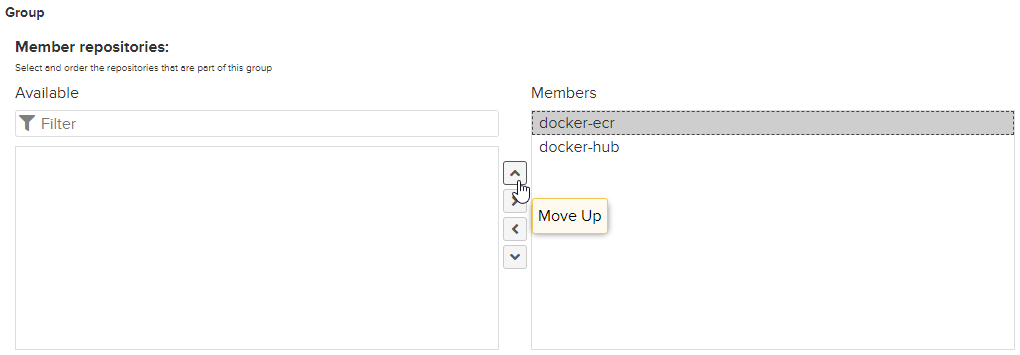
After changing the order of Members -
-
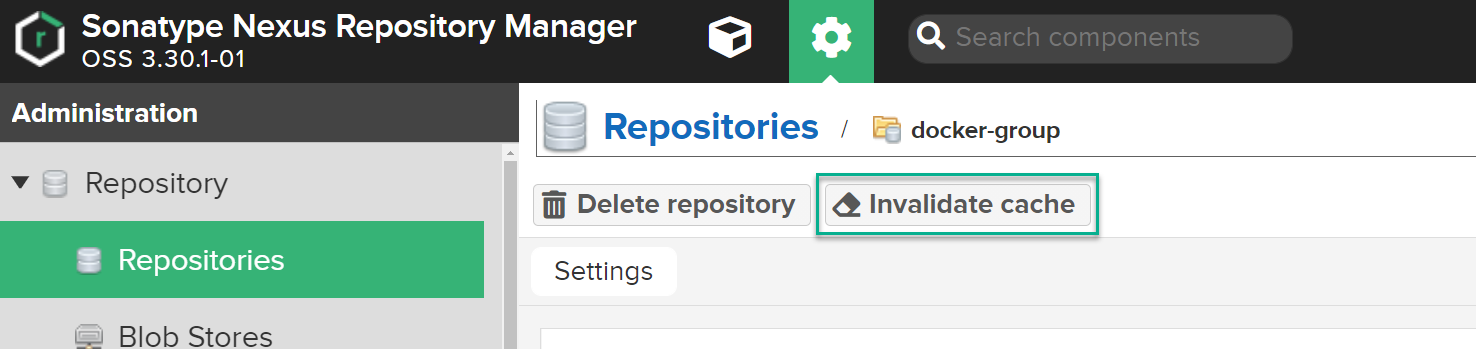
-
Remove the existing image from the local Docker Daemon cache
docker rmi localhost:8082/bitnami/kubectl -
Pull the image again; this time, it will be from ECR
docker pull localhost:8082/bitnami/kubectl -
Check results at http://localhost:8081/service/rest/repository/browse/docker-ecr/v2/bitnami/kubectl/tags/
Development
Flow Of Work
- Build the image
docker build -t unfor19/nexus-ops . - Run the image and mount the code
docker run -d -it --name nexus -p 8081:8081 -p 8082:8082 -v "$PWD"/:/code/ unfor19/nexus-ops - Exec to container
docker exec -it nexus --workdir="/code/provision" bash - Change the code of
entrypoint.shin local IDE (VSCode, PyCharm, etc.), and then execute the code in the container# Exploring current dir /code/provision bash-4.4$ ls entrypoint.sh repositories wait_for_endpoints.sh # After changing the code # Execute entrypoint.sh bash-4.4$ ./entrypoint.sh [LOG] Sun Jun 6 22:58:46 UTC 2021 :: Healthy endpoint - http://localhost:8081/service/rest/v1/status/writable [LOG] Sun Jun 6 22:58:46 UTC 2021 :: Nexus API is ready to receive requests [LOG] Sun Jun 6 22:58:46 UTC 2021 :: Password was set [LOG] Sun Jun 6 22:58:46 UTC 2021 :: Repository exists - proxy docker-hub [LOG] Sun Jun 6 22:58:46 UTC 2021 :: Repository exists - proxy docker-ecrpublic [LOG] Sun Jun 6 22:58:46 UTC 2021 :: Repository exists - group docker-group [LOG] Sun Jun 6 22:58:46 UTC 2021 :: Finished executing - /nexus-data/nexus-ops/entrypoint.sh
Exploring Nexus API
The easiest way to get familiar with Nexus's REST API, is to run Nexus locally and check the API page http://localhost:8081/#admin/system/api.
From there, you can execute commands with Swagger UI, and get the relevant curl commands. The following example demonstrates how I learned about the [GET] repositories/docker/proxy/{repositoryName} API.
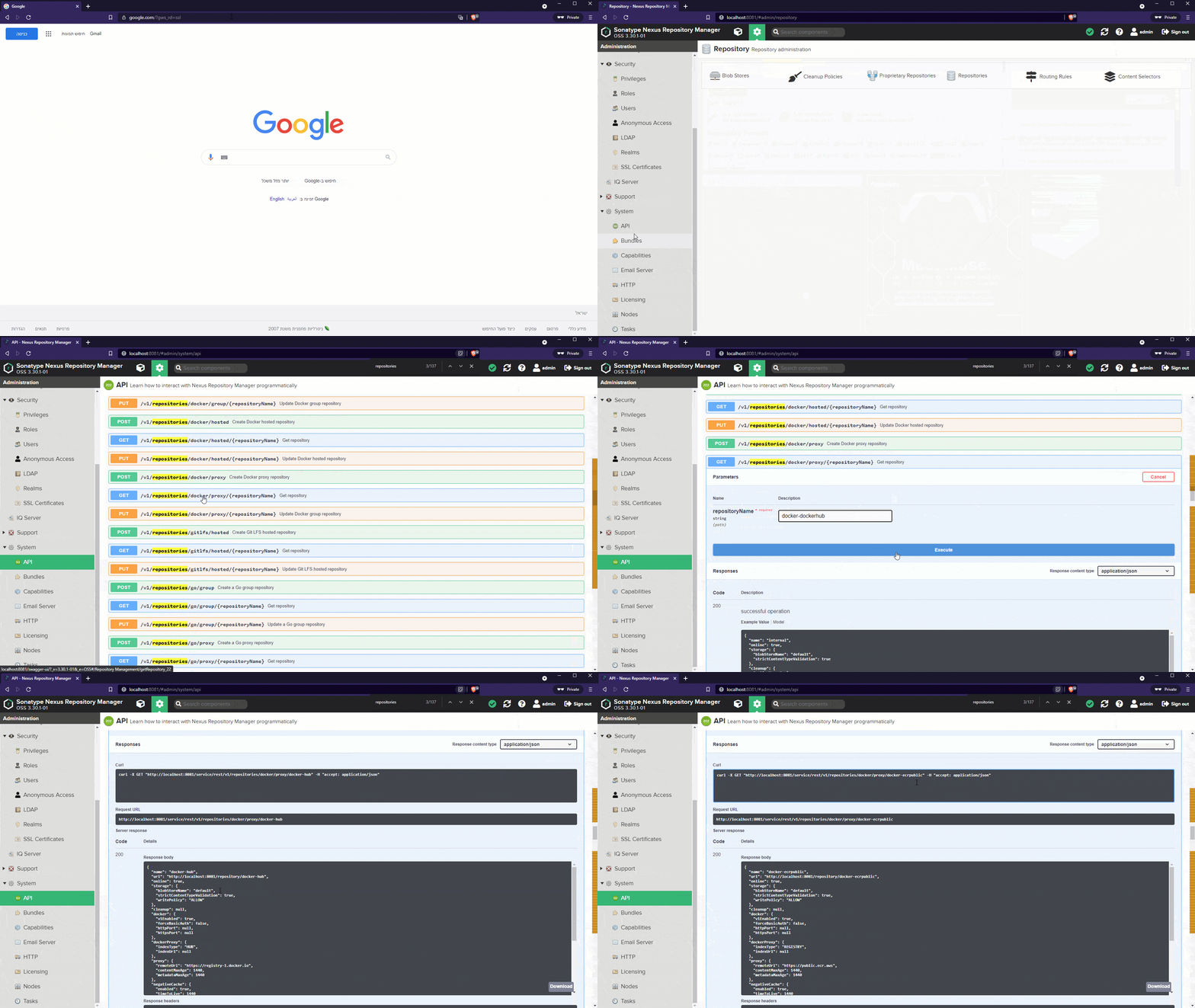
The provided curl commands do not include -u admin:admin, so make sure you add this argument when you use curl. Here's an example of a curl command
curl -u admin:admin -X GET "http://localhost:8081/service/rest/v1/repositories/docker/proxy/docker-ecrpublic" -H "accept: application/json"
Tip: It's best to invoke the
curlcommands within the runningnexuscontainer (docker exec), and not from your local machine. That is becauseentrypoint.shis running as part of the container's startup, so it's best to test this file as if the container is running it, and not some other machine (like your local machine).
Known Caveats
- It is required to pull all relevant images before the build step. Re-tagging the images tricks the Docker Daemon to use existing images (
--pull missing). This helps to avoid hitting DockerHub for eachpull, though it means you need to prepare a list of images that should be pulled.
References
- Cover image - Hackerboy Emoticon
- Cover image - Nexus Logo
- Cover image - Docker Logo - https://draw.io
Authors
Created and maintained by Meir Gabay
License
This project is licensed under the MIT License - see the LICENSE file for details
Tag summary
Content type
Image
Digest
Size
327.5 MB
Last updated
over 5 years ago
docker pull unfor19/nexus-ops