wagoautomation/anyviz
Connecting Wago Controller with OPC-UA, Modbus, BACnet and M-Bus devices to AnyViz Cloud
10K+
wagoautomation/anyviz repository overview
What is AnyViz
The AnyViz cloud solution allows you to remotely monitor, control and analyse industrial PLCs, sensors and meters.
AnyViz is maintained by Mirasoft GmbH & Co. KG
- Support via mail: [email protected]
- Support via telephone: +49 9351 9793320
What are the features of anyviz/cloudadapter
The cloud adapter is able to connect local devices via Modbus, OPC-UA, Siemens, M-Bus and BACnet. The data is collected locally and transmitted to the AnyViz portal via an encrypted connection. If the internet connection is interrupted, the data is buffered locally.
Prerequirements
To run this Docker container directly on a WAGO-PFC controller, the Docker runtime must be installed (see docker.ipk)
Running AnyViz cloud adapter
docker run -d -p 8888:8888 -p 9999:9999 wagoautomation/anyviz
Open your browser and start configuring via web interface via http://hostname:8888.
Running AnyViz cloud adapter including full VPN support
docker run -d --net=host --cap-add=NET_ADMIN --device /dev/net/tun:/dev/net/tun wagoautomation/anyviz
The AnyViz Cloud Adapter requires some privileges to enable VPN connections.
Running AnyViz cloud adapter incl. recommended options
docker run -d -it \
  --net=host \
  --cap-add=NET_ADMIN \
  --device /dev/net/tun:/dev/net/tun \
  --restart=always \
  --name=anyviz \
  -v /etc/anyviz:/etc/anyviz \
  wagoautomation/anyviz
Starts AnyViz Cloud adapter as a deamon with automatic execution at boot time, VPN support and separate storage of the configuration
Complete setup
- Join the AnViz portal or create a new project
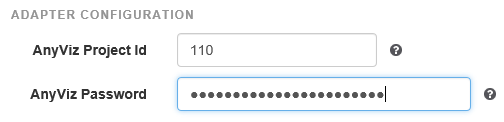
- Enter the project ID given by AnyViz portal and enter a unique password for your cloud adapter
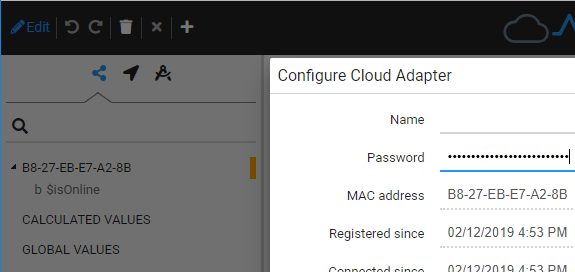
- The cloud adapter should now appear in the AnyViz portal. In the configuration dialog of the Cloud Adapter the password from step 2 has to be confirmed.
Access to Controller IOs
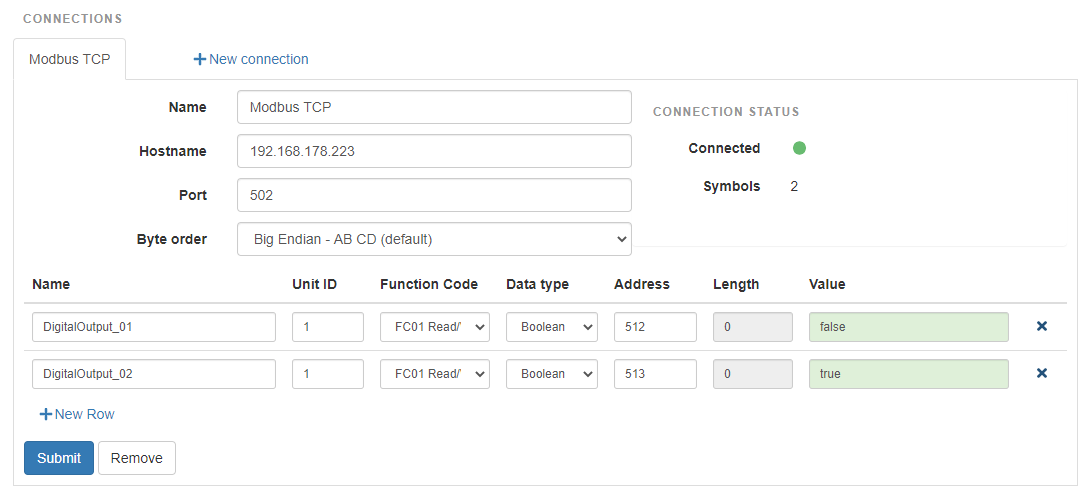
With the pfc-modbusslave, the AnyViz Cloud Adapter is able to directly access the IOs of the controller. In this case, no PLC program is required. After the installation only a Modbus-TCP connection with the IP address of the controller must be created.
Additional links and documentation
Tag summary
Content type
Image
Digest
sha256:2ffab0433…
Size
4.5 MB
Last updated
over 1 year ago
docker pull wagoautomation/anyviz