woozymasta/archimate-ci
Archimate container image for CI
3.2K
woozymasta/archimate-ci repository overview
Archimate container image for CI
Archi container image for use in continuous integration pipelines. With this container, you can implement automatic report generation and model export in your pipeline.
The Archi modelling toolkit is targeted toward all levels of Enterprise Architects and Modellers.
For collaboration with models in the git repository, the coArchi plugin is installed in the container.
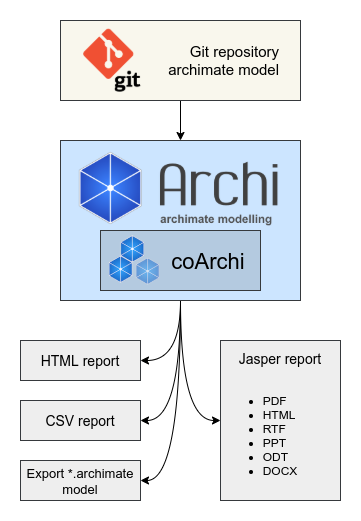
For ease of use, the entrypoint.sh script is run in the container, which processes the environment variables, and the native git client is used for cloning.
Table of Contents
- Examples and Demo
- Container image
- Run Container
- Configuration
- GitHub Actions Example
- GitLab CI Example
- Build Container
- Solving Potential Problems
Examples and Demo
View GitHub Pages demo | Example GitHub repository
View GitLab Pages demo | Example GitLab repository
Container image
You can pull image from registries:
ghcr.io/woozymasta/archimate-ci:4.9.1-1.0quay.io/woozymasta/archimate-ci:4.9.1-1.0docker.io/woozymasta/archimate-ci:4.9.1-1.0
Run Container
Example with cloning a remote repository and render HTML report:
mkdir -p ./report
chmod o+rw ./report

docker run --rm -ti \
  -v $(pwd)/report:/archi/report \
  -e GIT_REPOSITORY=https://github.com/WoozyMasta/archimate-ci-image-example.git \
  -e ARCHI_HTML_REPORT_ENABLED=true \
  -e ARCHI_JASPER_REPORT_ENABLED=false \
  -e ARCHI_CSV_REPORT_ENABLED=true \
  -e ARCHI_EXPORT_MODEL_ENABLED=true \
  ghcr.io/woozymasta/archimate-ci:4.9.1-1.0
An example with handling a local repository:
cd /path/to/exist/repository
mkdir -p ./report
chmod o+rw ./report

docker run --rm -ti \
  -v $(pwd):/archi/project \
  -v $(pwd)/report:/archi/report \
  ghcr.io/woozymasta/archimate-ci:4.9.1-1.0
Working with the CLI directly:
docker run --rm -ti ghcr.io/woozymasta/archimate-ci:4.9.1-1.0 --help
Configuration
Configuration for connecting to the git repository:
GIT_REPOSITORY- Git repository address;GIT_TOKEN- Token for accessing the git repository. Preferred for private repositories, or use a key mounted in an ssh container;GIT_USERNAME- Username (it is better to use token or ssh key);GIT_PASSWORD- Password (it is better to use token or ssh key).
Options for managing model export:
ARCHI_PROJECT_PATH=/archi/project- The path where the git repository with the architectural model will be cloned or connected;ARCHI_REPORT_PATH=/archi/report- Path where reports will be saved;ARCHI_HTML_REPORT_ENABLED=true- Generate HTML report;ARCHI_HTML_REPORT_PATH=$ARCHI_REPORT_PATH/html- Path for save HTML report;ARCHI_JASPER_REPORT_ENABLED=false- Generate Jasper reports;ARCHI_JASPER_REPORT_PATH=$ARCHI_REPORT_PATH/jasper- Path for save Jasper report;ARCHI_JASPER_REPORT_FORMATS=PDF,DOCX- Formats for Jasper reports should be separated by commas. Valid values:PDF,HTML,RTF,PPT,ODT,DOCX;ARCHI_JASPER_REPORT_TITLE- The title for the Jasper report, the default is the model/project name;ARCHI_CSV_REPORT_ENABLED=false- Generate CSV report;ARCHI_CSV_REPORT_PATH=$ARCHI_REPORT_PATH/csv- Path for save CSV report;ARCHI_EXPORT_MODEL_ENABLED=true- Export model in*.archimateformat.ARCHI_EXPORT_MODEL_PATH=$ARCHI_REPORT_PATH- Path for save model;ARCHI_APP=com.archimatetool.commandline.appapplication name.
GitHub Actions Configuration
Variables
GITHUB_TOKEN- Use default token, or you can set some token from secrret${{ secrets.ACCESS_TOKEN }}GITHUB_SERVER_URL=https://github.com- GitHub server URL;GITHUB_PAGES_DOMAIN- Custom domain CNAME for pages;GITHUB_PAGES_BRANCH=gh-pages- Branch for store reports used in pages;GIT_SUBTREE_PREFIX=.archi_report- Directory for store reports in model branch.
Inputs
All inputs equivalent to environment variables:
githubTokenrequiredarchiHtmlReportEnabledarchiJasperReportEnabledarchiJasperReportFormatsarchiJasperReportTitlearchiCsvReportEnabledarchiExportModelEnabledgithubServerURLgithubPagesDomaingithubPagesBranchgitSubtreePrefix
GitHub Actions Example
Add a configuration like this to your actions .github/workflows/main.yml file:
jobs:
  archi_report:
    permissions:
      contents: write
      pages: write
    runs-on: ubuntu-latest
    name: Deploy Archi report HTML to GitHub Pages
    steps:
      - name: Check out the repo
        uses: actions/checkout@v2

      - name: Deploy Archi report
        id: archi
        uses: WoozyMasta/[email protected]
        with:
          archiHtmlReportEnabled: true
          archiJasperReportEnabled: true
          archiJasperReportFormats: PDF,DOCX
          archiCsvReportEnabled: false
          archiExportModelEnabled: true
          githubToken: ${{ secrets.GITHUB_TOKEN }}
In the repository settings, set the branch for publishing pages that you
specified in githubPagesBranch or the GITHUB_PAGES_BRANCH variable
(gh-pages by default).

GitLab CI Example
Add a configuration like this to your ./.gitlab-ci.yml file:
pages:
  stage: build
  image:
    name: woozymasta/archimate-ci-image:4.9.1-1.0
    entrypoint: [""]

  script:
    - /opt/Archi/entrypoint.sh

  variables:
    ARCHI_PROJECT_PATH: "$CI_PROJECT_DIR"
    ARCHI_REPORT_PATH: "$CI_PROJECT_DIR/public"
    ARCHI_HTML_REPORT_ENABLED: "true"
    ARCHI_HTML_REPORT_PATH: "$CI_PROJECT_DIR/public"
    ARCHI_JASPER_REPORT_ENABLED: "false"
    ARCHI_JASPER_REPORT_FORMATS: "PDF,DOCX"
    ARCHI_JASPER_REPORT_TITLE: "false"
    ARCHI_CSV_REPORT_ENABLED: "false"
    ARCHI_EXPORT_MODEL_ENABLED: "true"

  rules:
    # Run only if roles exist or changed
    - if: $CI_COMMIT_BRANCH != null || $CI_PIPELINE_SOURCE == "merge_request_event"
      exists:
        - model/folder.xml

  artifacts:
    name: "$CI_JOB_NAME from $CI_PROJECT_NAME on $CI_COMMIT_REF_SLUG"
    expire_in: never
    paths:
      - public
Build Container
docker build \
  --tag archimate-ci:4.9.1-1.0 \
  --build-arg="ARCHI_VERSION=4.9.1-1.0" \
  --build-arg="COARCHI_VERSION=0.8.1.202112061132" \
  ./
Solving Potential Problems
If you are trying to build an image using podman or buildah and get a warning
"SHELL is not supported for OCI image format", use the --format docker
flag
If you use podman, unshare mounted volumes to user with id 1000.
mkdir -p ./report

podman unshare chown 1000 -R $(pwd)/model
podman run --rm -ti \
  -v $(pwd)/report:/archi/report \
  -e GIT_REPOSITORY=https://github.com/WoozyMasta/archimate-ci-image-example.git \
  -e ARCHI_JASPER_REPORT_ENABLED=false \
  ghcr.io/woozymasta/archimate-ci:4.9.1-1.0
If you are using a private git repository hosted behind a VPN, the tunnel interface or name resolution might not be available in the container, use the host network in the container and force the DNS record forward.
docker run --rm -ti \
  -v $(pwd)/archi:/archi \
  -e GIT_REPOSITORY=https://github.com/WoozyMasta/archimate-ci-image-example.git
  --network=host
  --add-host="$(getent hosts gitlab.internal.tld | awk '{print $2 ":" $1}')"
  ghcr.io/woozymasta/archimate-ci:4.9.1-1.0
Tag summary
Content type
Image
Digest
Size
327.7 MB
Last updated
over 5 years ago
docker pull woozymasta/archimate-ci